



Angular Update Guide

Prerequisites
Before you started make sure you have completed all the required installations such as:
- npm (Node Package Manager) and NodeJS compatible version which is required by the angular i.e:
- NodeJS v14.x.x or Later from https://nodejs.org/en/download and choose your compatible version.
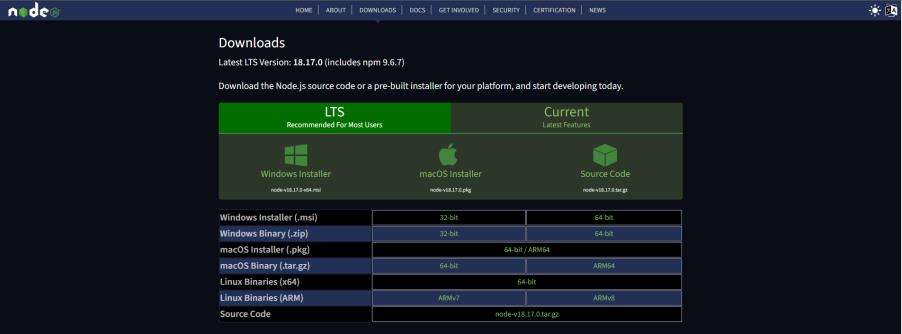
- npm v7.x.x or Later.
By installing NodeJS npm will be also installed by itself so no need to worry about that follow the official document for further help.
Link: https://docs.npmjs.com/downloading-and-installing-node-js-and-npmAngular CLI Update
After performing the above installation your system is ready for the Angular Update. Assuming Angular’s older version 10.x.x or 11.x.x is already installed in your system. Now you need to update to version 14.2.11.
We use npm to Install Angular CLI by running this command on the shell.
- “npm install -g @angular/cli@14.2.11”

This command will install Angular CLI v14.2.11 globally.
Update Your App
You can find many online contents to update the Angular App but no guarantee that it will easily work for you. Here’s the best and tested approach to updating the app with fewer hurdles on an initial basis.
- Create a new angular 14 test app in your local directory by using this command.
- “ng new angular14TestApp”

This command will create Angular App v14.2.11
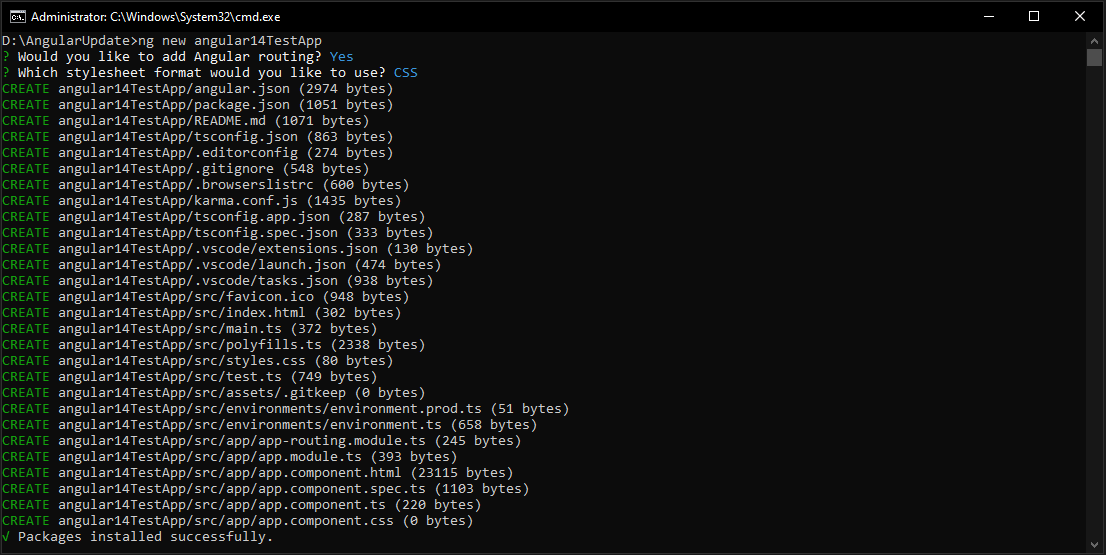
Once Packages installed successfully now replace the version of dependencies and devDependencies in package.json of the old app with the new app as shown below.
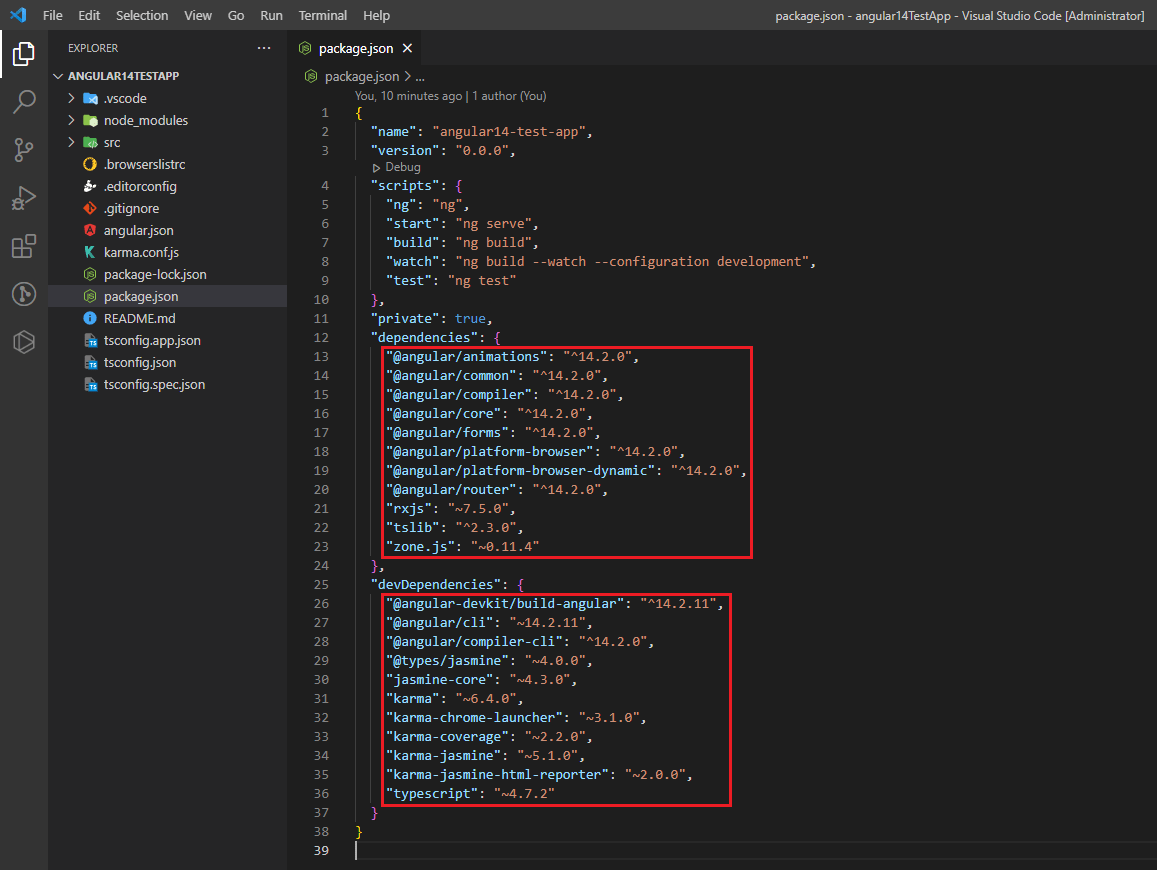
Angular 14 Test App
- After replacing versions delete node_modules of the old angular app and run “npm install” to reinstall the compatible versions in the old app.
Update Third-Party Packages
In order to be compatible with Angular 14 it might be necessary to update a lot of Third-Party libraries and packages. Make sure you have documentation and release notes on the libraries used in your project. To update them to the most recently supported version, please do so.
Review Deprecated APIs and resolve them
Some deprecated APIs that you used in Angular 11.2.14 may be introduced in Angular 14. To update your code, you need to check the Angular Update Guide and Documentation for deprecated APIs.
Check your Codebase
Review your codebase to find out if there are breaking changes or discontinued APIs that you may need to change, after updating Angular CLI, Core Packages, and Third-Party Dependencies. Attention shall be given to the following:
- The syntax for the Angular template.
- Angular lifecycle hooks.
- Changes in Angular Material component (if used)
Run and Test
After performing the above checks run your new Angular 14 app and test each of the components and functionalities to ensure that all features function as expected and that there are no regressions or problems. You may also face issues related to the styling and functionalities if any feature encountered an issue fixed them for example ng-select. You need to check the version and its newly added feature and apply them to your codebase. Depending on the specific features and dependencies that your application is using, it can have a different update process.
AWS Migration Checklist: A Practical Roadmap for Modern Businesses
Migrating businesses to AWS offers many benefits, including cost optimization, improved security, and greater scalability. However, a successful migration requires careful planning and execution. Otherwise, organizations may experience...
Read More
Agentic AI for QA & Software Testing with MCP Servers
For years, QA engineers have relied heavily on manual testing, repetitive validation, documentation, and traditional automation scripts But now, a new era of testing...
Read More
Our Proven Web Development Process That Delivers Real Results
In software development, success does not come from coding alone. Real results come from understanding business needs, planning the right workflow, building user-friendly designs...
Read More_16_11zon.webp&w=3840&q=100)
Secure AWS Connectivity Using AWS Systems Manager (SSM)
In traditional cloud architectures, secure access to private resources such as databases and internal servers often relies on...
Read More
Building a Secure Multi-Account AWS Architecture for Enterprise Environments (Dev, STG, UAT, Prod)
In today’s cloud-first world, scalability and speed are no longer enough security, governance, and cost control are equally critical...
Read More
Why You Should Use AI Agents Over Single Prompts: Unlocking the Power of Adaptive AI for Complex Workflows
In the world of artificial intelligence (AI), one of the biggest advancements has been the rise of AI agents that adapt dynamically to real-time data and complex workflows...
Read More_13_11zon.webp&w=3840&q=100)
Production Ready ( Quality, performance, and the lessons learned shipping to 150 stores )
We chose dbt over custom scripts, built observability, optimized performance, and shipped to production...
Read More_12_11zon.webp&w=3840&q=100)
Scaling from 15 to 150 Stores ( When copy-paste becomes technical debt, macros become salvation )
We built a pipeline with observability, incremental models for performance, and snapshots for history. Our 15-store deployment ran smoothly...
Read More_11_11zon.webp&w=3840&q=100)
Keeping Your Data Fresh: ( The wake-up call at 3am that taught us about observability )
That morning taught us a crucial lesson: a successful dbt run doesn't mean your data is fresh, accurate, or complete. You need observability.
Read MoreReady to Work With Us?
Most engagements start with a 20-minute conversation. No pitch, no pressure - just an honest discussion about what you're building and whether we're the right fit.