



Why You Should Use AI Agents Over Single Prompts: Unlocking the Power of Adaptive AI for Complex Workflows

Introduction
In the world of artificial intelligence (AI), one of the biggest advancements has been the rise of AI agents that adapt dynamically to real-time data and complex workflows. These agents are far more advanced than traditional single prompts and can handle multi-step, dependent tasks with ease. In this blog post, we’ll explore why AI agents are essential for modern businesses and projects that require adaptability, scalability, and precise execution.
1. Context and Flexibility: The Core of AI Agents
How AI Agents Excel in Dynamic Workflows
Unlike traditional single prompts, AI agents are designed to handle dynamic, multi-step workflows. Their ability to adapt, learn, and track context over time allows them to perform complex tasks efficiently. AI agents excel in workflows that involve multiple steps, dependencies, and continuous data processing. This makes them ideal for tasks where flexibility and precision are crucial.
Benefits of AI Agents:
🞄 Contextual Awareness: Agents maintain context over time, ensuring that each decision is informed by the most recent data and observations.
🞄 Multi-Step Capability: Agents can execute a series of actions that span multiple systems and dependencies, tracking each step to ensure everything works cohesively.
🞄 Real-Time Adaptation: Unlike single prompts, agents can change their approach based on real-time results, minimizing risks and optimizing workflows.
For example, when managing a complex database or an API interaction, an AI agent can dynamically adjust its actions as new data comes in, ensuring smooth and error-free execution.
Why Single Prompts Fall Short
A single prompt is static and works within a one-step context, meaning it lacks the flexibility and adaptability of agents. While single prompts can handle basic, self-contained tasks, they are not equipped for complex processes that involve multiple variables, dependencies, or long-running workflows.
2. What Exactly Is an AI Agent?
Unpacking the Structure of AI Agents
An AI agent is more than just an intelligent prompt - it’s a full-fledged execution system capable of:
🞄 Perceiving Inputs: Agents understand and analyze data, schemas, and other key variables.
🞄 Taking Action: They interact with various tools such as databases, APIs, or external systems.
🞄 Observing Results: Agents assess the impact of their actions, refining their approach based on feedback.
🞄 Looping and Iterating: If the task requires multiple steps, agents will continue to loop through actions until completion.
This dynamic process makes agents incredibly effective at handling real-world tasks that require constant adaptation and decision-making.
3. Simplifying Agent Creation: No-Code AI Solutions
Easy Creation with Platforms Like Cursor
The barrier to entry for AI agents has dropped significantly, thanks to modern tools like Cursor. These platforms allow users to create AI agents without needing to write complex code.
Here’s how you can create an agent with Cursor in just a few steps:
1. Type / in the chat interface to bring up the command palette.
2. Select /create-subagent from the options.
3. Enter the details: name the agent, describe its purpose, and define its system prompt.
4. Click “Create” to instantly generate the agent.
The agent will be ready to use, and you can adjust it later if needed. No coding required.
Benefits of No-Code Agents:
🞄 Ease of Use: Creating AI agents is as simple as typing a command, enabling non-technical users to automate workflows.
🞄 Scalability: As your project grows, you can easily modify and scale your agents to meet new challenges.
🞄 Integration: Once created, agents integrate seamlessly with your existing systems and tools.
4. Agents vs. Single Prompts: A Real-World Case Study
The Complex Task: Migrating Team Membership Logic
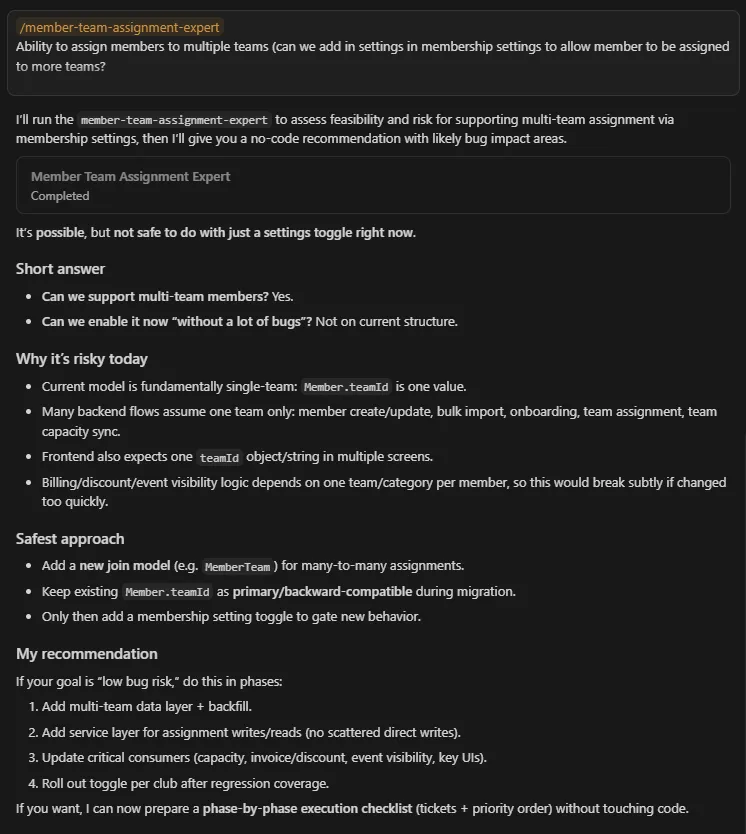
Let’s consider the case of migrating a team membership logic from a single teamId field to a multi-team system. This task involves updating databases, modifying the UI, and ensuring compatibility across systems.
Without an Agent:
A single prompt would only offer a generalized solution, potentially overlooking dependencies in the database, UI, or backend processes. This could result in errors and inconsistencies

With an Agent:
An AI agent would:
🞄 Automatically trace dependencies across the system (databases, billing, UI components).
🞄 Check the actual schema to ensure backward compatibility.
🞄 Create an evidence-backed plan that minimizes risks by prioritizing safety and accuracy.
5. Why Agents Deliver Near-Zero Bugs: Precision in Action
Evidence-Based Decision Making
Unlike single prompts, agents make decisions based on real-time data. They don’t rely on assumptions but instead read the actual system to form solutions. This significantly reduces the chances of errors.
Tracking Dependencies
AI agents are inherently dependency-aware. In the case of migrating team membership logic, the agent would automatically identify all the components that rely on the teamId field, ensuring that no part of the system breaks during the migration process.
Risk-First Planning
Risk-first sequencing ensures that the agent prioritizes backward compatibility and error reduction before making changes. This proactive approach is key to minimizing production bugs.
6. Token Efficiency: Optimizing Resources with Agents
How Agents Save Tokens and Resources
Token efficiency is a crucial consideration when working with AI systems. Since agents retain context between interactions, you don’t need to resend the same data with every new action.
With Agents: Once an agent is created, it retains context, reducing the need to resend data repeatedly. This makes the system more efficient and reduces token usage.
With Single prompts: Each prompt requires the full context, which increases token usage and can lead to higher processing costs.
7. When to Use an Agent vs. a Single Prompt
Knowing when to choose an AI agents over a single prompt is essential for maximizing efficiency. Here's a quick guide:
| Use an Agent | Use a Single Prompt |
|---|---|
| Complex, multi-step tasks | Simple, self-contained tasks |
| Tasks that require real-time data | Tasks based on general knowledge |
| Workflows with dependencies | Clear, well-defined paths |
| High accuracy needed | Approximate or less critical results |
| Involving multiple systems | Single-system tasks |
Key Takeaways:
🞄 Agents are ideal for handling complex workflows with multiple dependencies and dynamic inputs.
🞄 Single prompts are better suited for simple tasks that don’t require real-time feedback or extensive context.
8. Conclusion: Why You Should Embrace AI Agents for Your Next Project
In today’s fast-paced world, businesses and developers need tools that can handle complexity and adapt to changing conditions. AI agents offer a level of intelligence, flexibility, and efficiency that single prompts can’t match. Whether you're managing complex migrations, dealing with real-time data, or ensuring precise execution across multiple systems, AI agents are the future of automated workflows.
With platforms like Cursor making agent creation simple and intuitive, it’s easier than ever to leverage the power of adaptive AI. So, if you’re ready to improve your workflow, reduce risks, and optimize your processes, AI agents are the way to go.

AWS Security Best Practices Every Business Should Follow
As more organizations migrate their applications and critical workloads to AWS, securing cloud environments has become a business priority rather than just an IT responsibility...
Read More
AWS Migration Checklist: A Practical Roadmap for Modern Businesses
Migrating businesses to AWS offers many benefits, including cost optimization, improved security, and greater scalability. However, a successful migration requires careful planning and execution. Otherwise, organizations may experience...
Read More
Agentic AI for QA & Software Testing with MCP Servers
For years, QA engineers have relied heavily on manual testing, repetitive validation, documentation, and traditional automation scripts But now, a new era of testing...
Read More
Our Proven Web Development Process That Delivers Real Results
In software development, success does not come from coding alone. Real results come from understanding business needs, planning the right workflow, building user-friendly designs...
Read More_16_11zon.webp&w=3840&q=100)
Secure AWS Connectivity Using AWS Systems Manager (SSM)
In traditional cloud architectures, secure access to private resources such as databases and internal servers often relies on...
Read More
Building a Secure Multi-Account AWS Architecture for Enterprise Environments (Dev, STG, UAT, Prod)
In today’s cloud-first world, scalability and speed are no longer enough security, governance, and cost control are equally critical...
Read MoreWhy You Should Use AI Agents Over Single Prompts: Unlocking the Power of Adaptive AI for Complex Workflows
In the world of artificial intelligence (AI), one of the biggest advancements has been the rise of AI agents that adapt dynamically to real-time data and complex workflows...
Read More_13_11zon.webp&w=3840&q=100)
Production Ready ( Quality, performance, and the lessons learned shipping to 150 stores )
We chose dbt over custom scripts, built observability, optimized performance, and shipped to production...
Read More_12_11zon.webp&w=3840&q=100)
Scaling from 15 to 150 Stores ( When copy-paste becomes technical debt, macros become salvation )
We built a pipeline with observability, incremental models for performance, and snapshots for history. Our 15-store deployment ran smoothly...
Read MoreReady to Work With Us?
Most engagements start with a 20-minute conversation. No pitch, no pressure - just an honest discussion about what you're building and whether we're the right fit.