


Boost Your Website’s Security: A Full Guide to Install TLS Certification

Introduction
In today’s online world, securing your website with a TLS (Transport Layer Security) certificate is essential. TLS encrypts data exchanged between your server and users, helping protect sensitive information such as passwords, credit card numbers, and personal data. Additionally, websites secured with HTTPS are favored by search engines and appear more trustworthy to users. In this guide, we will walk you through the steps of applying for a TLS certificate using Let’s Encrypt and Certbot, which is compatible with many web servers, including Nginx, Apache, and more.
What is TLS?
TLS (Transport Layer Security) is a cryptographic protocol that ensures secure communication between a server and a client (such as a web browser). TLS is widely used to protect the confidentiality and integrity of data transmitted over the internet, particularly in applications like web browsing, email, and instant messaging. When you see a website with HTTPS in the URL (as opposed to HTTP), it means that TLS is protecting the communication between your browser and the website.
Why is TLS Important?
- Encryption: TLS ensures that any sensitive data exchanged between users and your site (such as passwords, credit card information, or personal details) is encrypted, making it unreadable to attackers.
- Authentication: It helps verify that the website you’re communicating with is the legitimate one and not a fraudulent site.
- Data Integrity: TLS ensures that the data sent and received has not been altered during transmission, preventing tampering by malicious actors.
What is Let’s Encrypt?
Let’s Encrypt is a free, automated, and open certificate authority (CA) that provides digital certificates to enable HTTPS encryption on websites. Established in 2016, Let’s Encrypt aims to make internet security more accessible and widespread by offering free SSL/TLS certificates and automating the entire process.
What is Certbot?
Certbot is an open-source tool developed by the Electronic Frontier Foundation (EFF) that automates the process of obtaining and renewing TLS certificates from Let’s Encrypt. It is designed to work with various web servers, including Nginx, Apache, and others, making it easy to implement HTTPS on your website.
Why Should You Use TLS?
TLS (Transport Layer Security) ensures that the data transferred between your server and the user’s browser is encrypted, keeping sensitive information safe. Here’s why applying TLS to your site is crucial:
- Security: TLS protects your users’ data from hackers and malicious actors.
- SEO Benefits: Search engines like Google favor HTTPS-enabled sites, potentially improving your search rankings.
- Trust: Users are more likely to trust your website when they see the HTTPS padlock icon next to the URL
What You’ll Need Before You Begin
- A web server: This guide works with Nginx, Apache, and others.
- Root or sudo access to your server: You need administrative privileges to install and configure the necessary software.
- A registered domain name: Your domain should be pointing to your server’s IP address.
- A basic understanding of using the terminal or SSH: Some familiarity with command-line tools is required.
Steps to Install a TLS Certificate with Let’s Encrypt and Certbot
1. SSH to our Server
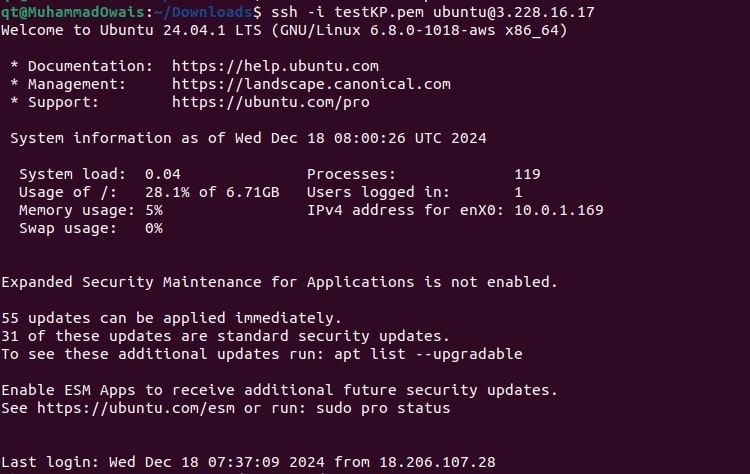
2. Install Snap Package Manager If Snap is not already installed on our server, we need to install it first.

3. Install Certbot Using Snap Now, we will install Certbot using the Snap package manager. This method ensures we get the latest version of Certbot.

4. Create a Symlink for Easy Access to Certbot After installing Certbot via Snap, create a symbolic link so that we can run the certbot command easily from anywhere without any issues.

5. Obtain the TLS Certificate Once Certbot is installed and the symlink is created, it’s time to request our TLS certificate. This process will also automatically configure the web server (in our case Nginx) to serve our site over HTTPS.

It will then ask some questions:
a. Your Email for certificate for notices:
We used a dummy email (test@test.com) as the intent was to create a tutorial.

b. Terms of Service:


c. Domain Name:
Finally, it will ask for our domain names (tlstutorial.ip-ddns.com) in our case. The domains can be more than one of
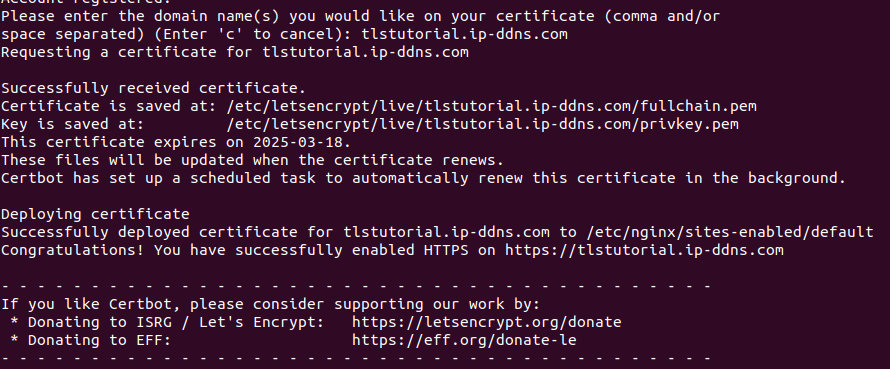
Here, we have successfully installed a TLS certificate for our website. But there’s one more step.
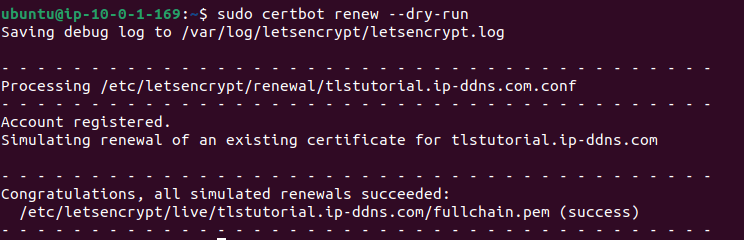
6. Test Automatic Renewal with Certbot Let’s Encrypt certificates are valid for 90 days, so it’s essential to automate the renewal process. Certbot allows for automatic renewals, and we can test this feature by running a dry-run to simulate the renewal process. This ensures that the renewal process will work correctly when our certificate is about to expire.
Website:
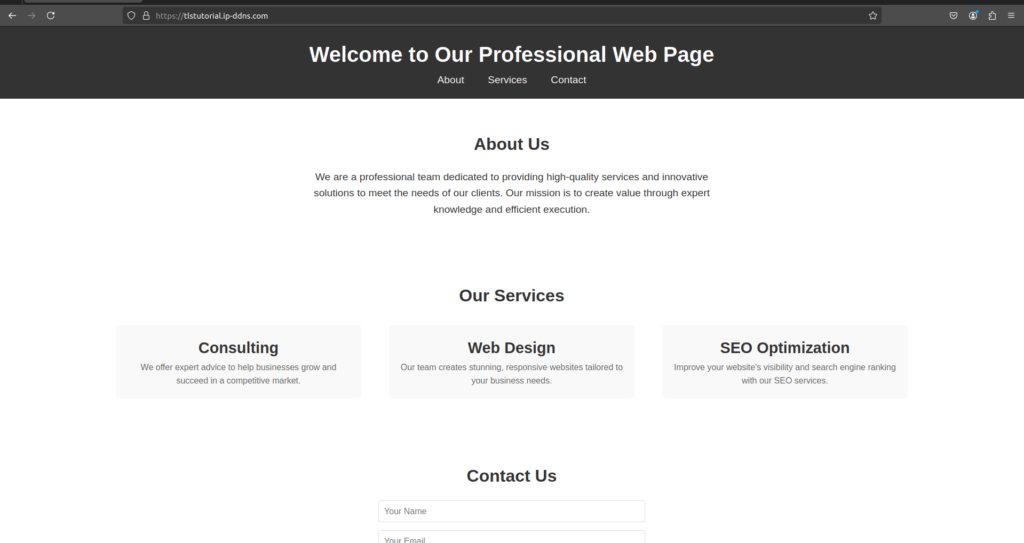
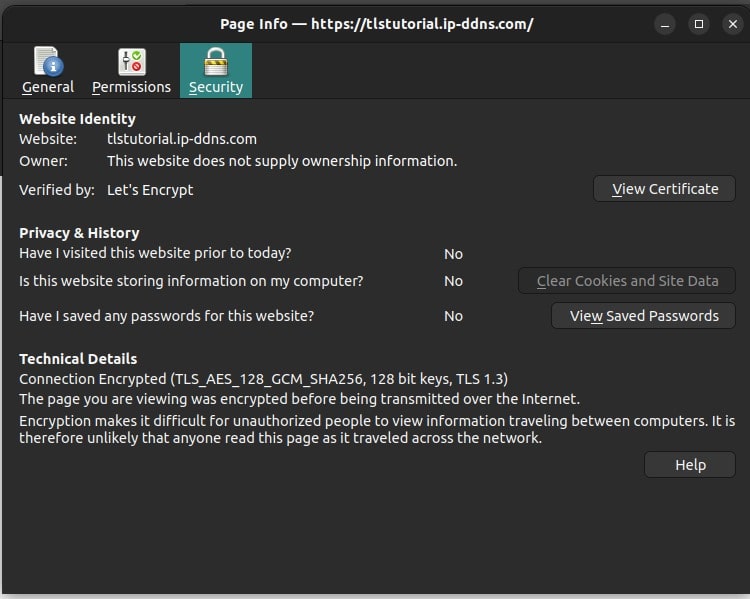
As we can see on the browser, we have been using HTTPS instead of HTTP. Below is further detail share about the certificate:
Conclusion
By following these custom steps, we’ve successfully secured our website using a TLS certificate from Let’s Encrypt with Certbot. The installation and renewal process is automated, ensuring that our website remains secure with minimal effort. With Nginx handling the web traffic, we now have a fully functioning HTTPS site, which improves both security and user trust.
AWS Security Best Practices Every Business Should Follow
As more organizations migrate their applications and critical workloads to AWS, securing cloud environments has become a business priority rather than just an IT responsibility...
Read More
AWS Migration Checklist: A Practical Roadmap for Modern Businesses
Migrating businesses to AWS offers many benefits, including cost optimization, improved security, and greater scalability. However, a successful migration requires careful planning and execution. Otherwise, organizations may experience...
Read More
Agentic AI for QA & Software Testing with MCP Servers
For years, QA engineers have relied heavily on manual testing, repetitive validation, documentation, and traditional automation scripts But now, a new era of testing...
Read More
Our Proven Web Development Process That Delivers Real Results
In software development, success does not come from coding alone. Real results come from understanding business needs, planning the right workflow, building user-friendly designs...
Read More_16_11zon.webp&w=3840&q=100)
Secure AWS Connectivity Using AWS Systems Manager (SSM)
In traditional cloud architectures, secure access to private resources such as databases and internal servers often relies on...
Read More
Building a Secure Multi-Account AWS Architecture for Enterprise Environments (Dev, STG, UAT, Prod)
In today’s cloud-first world, scalability and speed are no longer enough security, governance, and cost control are equally critical...
Read More
Why You Should Use AI Agents Over Single Prompts: Unlocking the Power of Adaptive AI for Complex Workflows
In the world of artificial intelligence (AI), one of the biggest advancements has been the rise of AI agents that adapt dynamically to real-time data and complex workflows...
Read More_13_11zon.webp&w=3840&q=100)
Production Ready ( Quality, performance, and the lessons learned shipping to 150 stores )
We chose dbt over custom scripts, built observability, optimized performance, and shipped to production...
Read More_12_11zon.webp&w=3840&q=100)
Scaling from 15 to 150 Stores ( When copy-paste becomes technical debt, macros become salvation )
We built a pipeline with observability, incremental models for performance, and snapshots for history. Our 15-store deployment ran smoothly...
Read MoreReady to Work With Us?
Most engagements start with a 20-minute conversation. No pitch, no pressure - just an honest discussion about what you're building and whether we're the right fit.