



Leveraging WordPress as a Headless CMS with Vue.js and GraphQL

Introduction
In recent years, traditional Content Management Systems (CMS) like WordPress have evolved into more versatile solutions with the concept of a “headless CMS.” In this blog, we’ll explore how to use WordPress as a headless CMS, leveraging Vue.js as the front-end framework and GraphQL for fetching data.
Key takeaways:
- What is a headless CMS and why it’s important.
- How to set up WordPress as a headless CMS.
- Integrating WordPress with Vue.js and GraphQL to create a modern web application.
What is a Headless CMS?
A headless CMS decouples the front-end and back-end of a web application. Traditionally, WordPress renders both the back-end (admin panel) and the front-end (the website itself). In a headless CMS setup, WordPress handles only the content management (back-end), while the front-end is handled separately, using a framework like Vue.js.
Advantages of a Headless CMS:
- Performance: Load times are faster because the front-end is optimized independently.
- Flexibility: You can use any front-end technology, making the system more adaptable.
- Scalability: Easier to scale and optimize front-end performance without affecting the CMS.
Why Use Vue.js and GraphQL with WordPress?
Vue.js: A popular, lightweight JavaScript framework for building fast, responsive user interfaces. Vue’s ease of integration, component-based architecture, and flexibility make it a great choice for front-end development.
GraphQL: Unlike traditional REST APIs, GraphQL allows clients to specify exactly what data they need, reducing over-fetching and improving performance. WordPress supports GraphQL through plugins like WPGraphQL, making it easy to fetch and manipulate content.
Setting Up WordPress as a Headless CMS
1. Install WordPress and WPGraphQL Plugin
Start by installing WordPress on your server and setting up the WPGraphQL plugin. This plugin provides a GraphQL API for WordPress, allowing you to query posts, pages, and custom content types.
Steps:
- Install WordPress.
- Navigate to the plugins section and search for “WPGraphQL.”
- Install and activate the plugin.
Once WPGraphQL is set up, you can use the /graphql endpoint to access your WordPress data.
2. Define Custom Post Types (Optional)
If you need to manage more than just blog posts or pages, define custom post types in WordPress to structure your content. This flexibility is one of the major advantages of using WordPress as a CMS.
Integrating Vue.js with WordPress and GraphQL
1. Setting Up the Vue.js Application
Create a Vue.js project using the Vue CLI:

Install Apollo Client and the GraphQL package for making GraphQL requests:

2. Configure Apollo Client for GraphQL
Apollo Client is a popular GraphQL client that will handle requests from Vue.js to your WordPress GraphQL API.
Create an Apollo Client configuration in a new file (e.g., apollo.js):
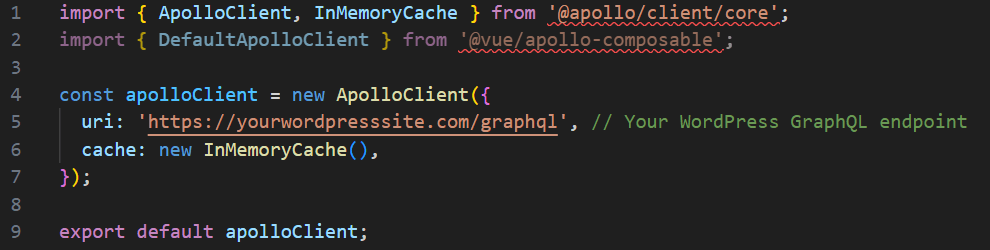
3. Integrating Apollo Client into Vue.js
In your main.js file, configure Apollo Client for your Vue.js application:
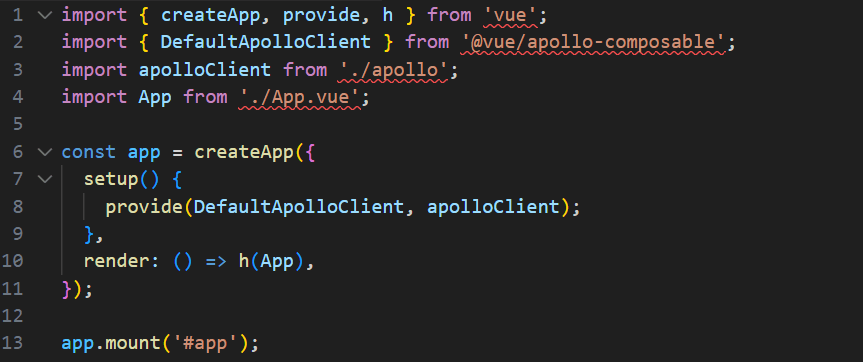
Fetching Data in Vue.js with GraphQL
Here’s an example of how to fetch posts from WordPress using GraphQL in Vue.js. Create a Posts.vue component to display WordPress posts:
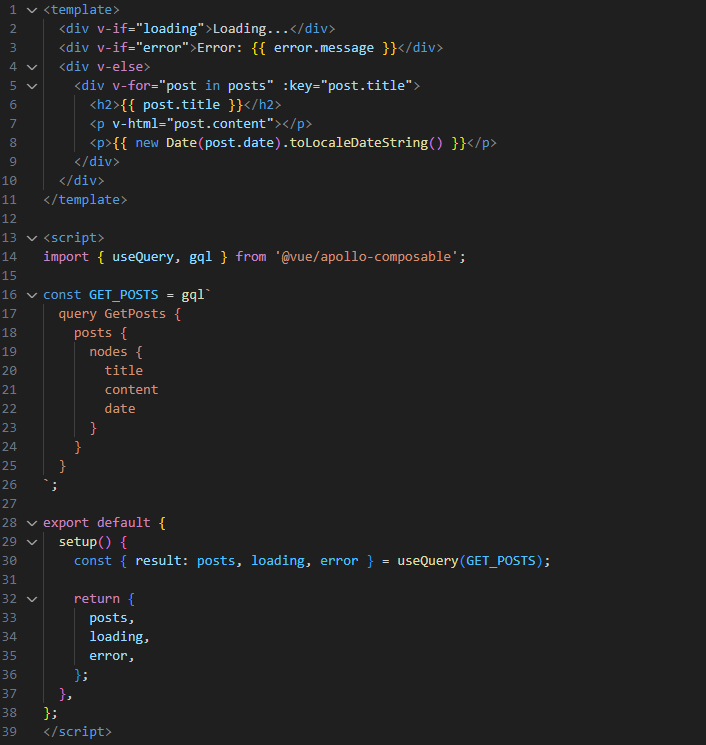
This component queries WordPress for the latest posts using GraphQL and renders them in a simple list.
Handling Routing in Vue.js
Vue.js uses vue-router for handling routing. You can set up routes to display various WordPress content types like posts and pages.
Install the Vue Router:

Set up routing in your main.js:
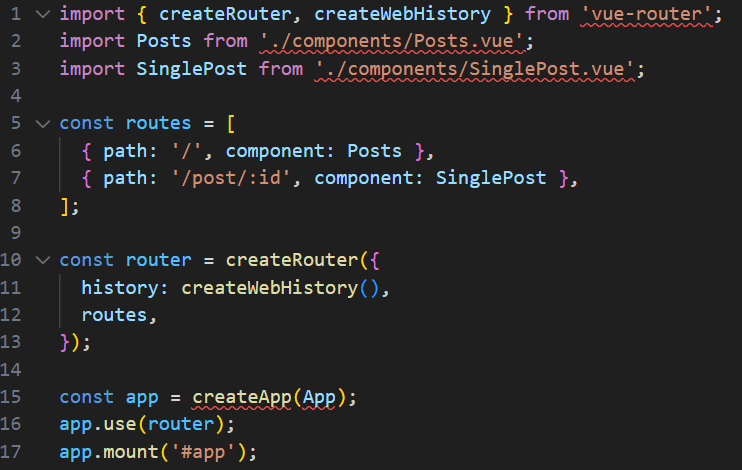
Each route would dynamically load the respective WordPress content using GraphQL.
Conclusion
Using WordPress as a headless CMS with Vue.js and GraphQL is a powerful way to build modern, scalable web applications. This approach gives you the best of both worlds: the simplicity of WordPress for managing content and the flexibility of Vue.js for building dynamic, fast, and interactive front-end applications.
Final Thoughts:
- With this setup, you can take advantage of WordPress’s extensive CMS features while having full control over your front-end design and functionality.
- GraphQL’s efficiency in fetching only the required data ensures optimal performance.
If you’re building a complex, content-heavy application and want the freedom to use cutting-edge front-end technologies, this headless approach is the way forward.

AWS Migration Checklist: A Practical Roadmap for Modern Businesses
Migrating businesses to AWS offers many benefits, including cost optimization, improved security, and greater scalability. However, a successful migration requires careful planning and execution. Otherwise, organizations may experience...
Read More
Agentic AI for QA & Software Testing with MCP Servers
For years, QA engineers have relied heavily on manual testing, repetitive validation, documentation, and traditional automation scripts But now, a new era of testing...
Read More
Our Proven Web Development Process That Delivers Real Results
In software development, success does not come from coding alone. Real results come from understanding business needs, planning the right workflow, building user-friendly designs...
Read More_16_11zon.webp&w=3840&q=100)
Secure AWS Connectivity Using AWS Systems Manager (SSM)
In traditional cloud architectures, secure access to private resources such as databases and internal servers often relies on...
Read More
Building a Secure Multi-Account AWS Architecture for Enterprise Environments (Dev, STG, UAT, Prod)
In today’s cloud-first world, scalability and speed are no longer enough security, governance, and cost control are equally critical...
Read More
Why You Should Use AI Agents Over Single Prompts: Unlocking the Power of Adaptive AI for Complex Workflows
In the world of artificial intelligence (AI), one of the biggest advancements has been the rise of AI agents that adapt dynamically to real-time data and complex workflows...
Read More_13_11zon.webp&w=3840&q=100)
Production Ready ( Quality, performance, and the lessons learned shipping to 150 stores )
We chose dbt over custom scripts, built observability, optimized performance, and shipped to production...
Read More_12_11zon.webp&w=3840&q=100)
Scaling from 15 to 150 Stores ( When copy-paste becomes technical debt, macros become salvation )
We built a pipeline with observability, incremental models for performance, and snapshots for history. Our 15-store deployment ran smoothly...
Read More_11_11zon.webp&w=3840&q=100)
Keeping Your Data Fresh: ( The wake-up call at 3am that taught us about observability )
That morning taught us a crucial lesson: a successful dbt run doesn't mean your data is fresh, accurate, or complete. You need observability.
Read MoreReady to Work With Us?
Most engagements start with a 20-minute conversation. No pitch, no pressure - just an honest discussion about what you're building and whether we're the right fit.