


Setting Up Jenkins Build Notifications in Google Chat: A Practical Guide

Introduction
In this guide, we’ll walk through the process of setting up Jenkins build notifications in a Google Workspace chat. By integrating Jenkins with Google Chat, you can receive real-time updates on the status of your builds (success, failure, etc.) directly in your workspace. This is a great way to keep your team informed and streamline communication for better productivity.
Prerequisites
- A running Jenkins server with administrator access.
- A Google Workspace account with access to Google Chat.
- Basic knowledge of Jenkins pipelines/jobs.
Steps to Set Up Jenkins Build Notifications in Google Workspace
Step 1: Install the Google Hangouts Chat Bot in Google Workspace
1. Open your Google Workspace and navigate to the desired space/channel where you want to receive Jenkins build notifications.
2. Go to the Settings of the space, and under the Integrations tab, click on Apps.
3. In the search bar, type “Jenkins” and you should see a Jenkins bot listed for Google Chat.
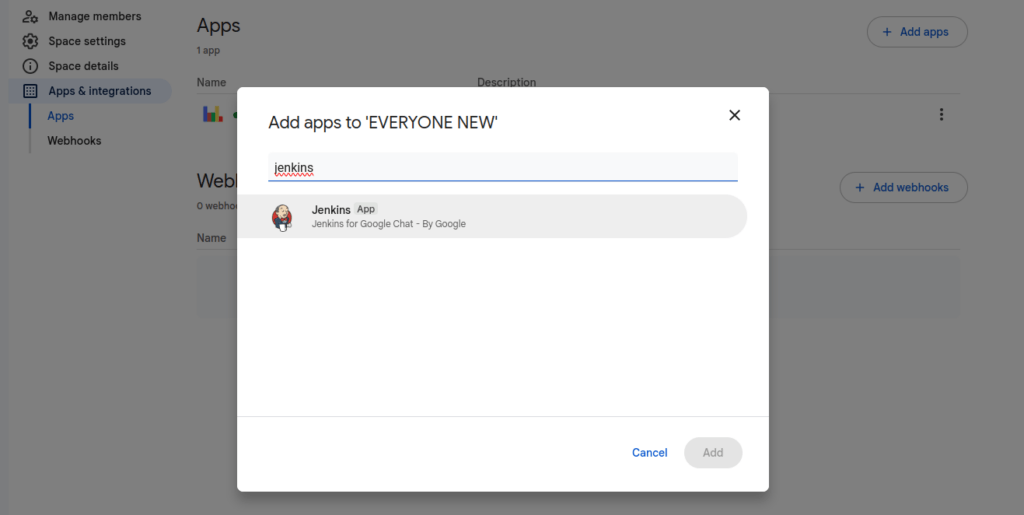
4. Click Add to add the bot to the space.
5. Once the bot is added, it will automatically send a message to the workspace containing a token and a link to download the Jenkins plugin google-hangouts-chat-notifier.hpi.
Keep this token handy as you’ll need it later.

Step 2: Install the Jenkins Plugin
1. Log in to your Jenkins server with administrator privileges.
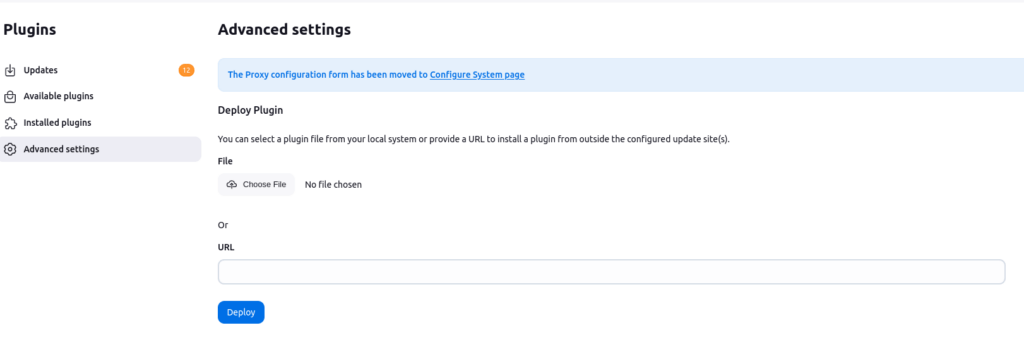
2. Go to Manage Jenkins > Manage Plugins.
3. Under the Advanced tab, click Upload Plugin and choose the google-hangouts-chat-notifier.hpi plugin file you downloaded earlier.
4. After uploading, Jenkins will install the plugin. Once installed, restart Jenkins to apply the changes.
Step 3: Configure the Jenkins Job for Notifications
1. Go to the Pipelines or Jobs section in Jenkins, and select the pipeline you want to configure for notifications (for example, “Dev”).
2. Click on Configure in the left-hand menu for the selected pipeline.
3. Scroll down to the Post-build Actions section.
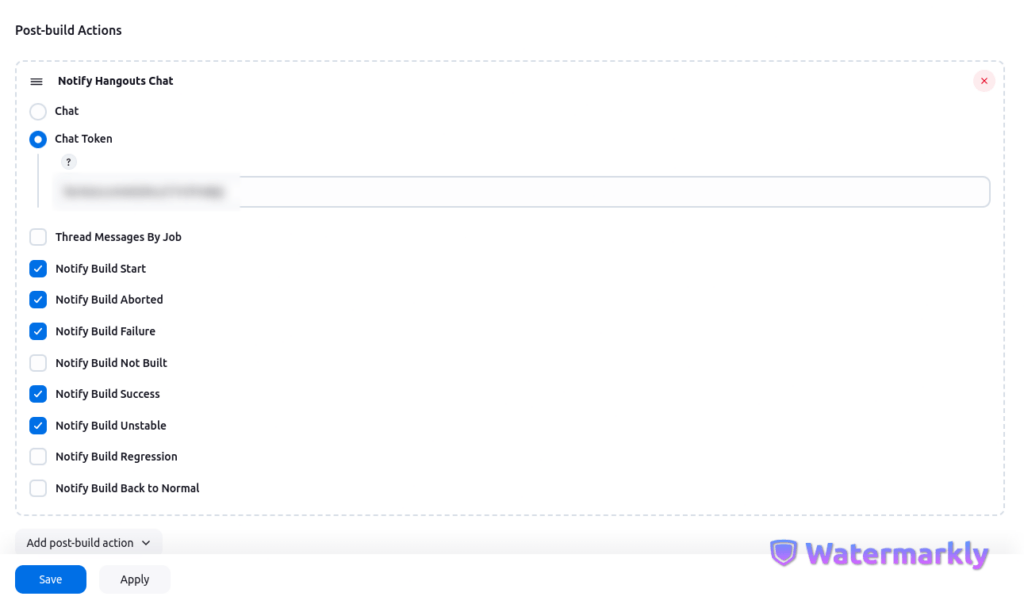
4. Click on Add Post-build Action and select Notify Hangouts Chat (the option provided by the plugin).
5. In the Chat Token field, paste the token you received from the Google Chat bot during installation.
6. Select the notification triggers you wish to use (for example, “Notify build start”, “Notify build failure”, etc.).
Step 4: Test the Configuration
1. After configuring the notification settings, save your changes and run the Jenkins build.
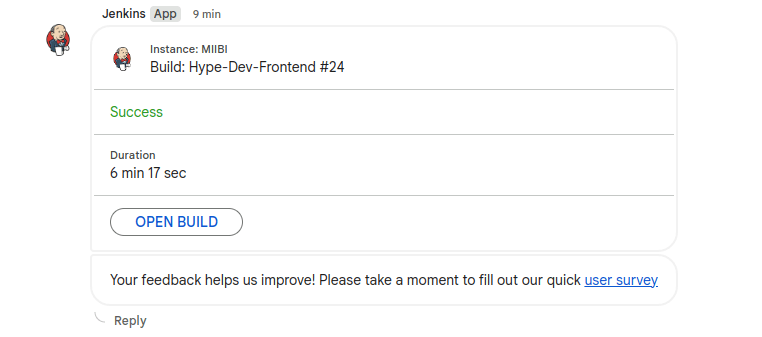
2. Once the build starts, you should see a notification in your Google Workspace chat, indicating the status of the build (e.g., “Build Started”, “Build Failed”, etc.).
Conclusion
Now your Jenkins builds are successfully integrated with Google Workspace! By following these steps, you can keep your team updated in real-time about build statuses, helping you improve collaboration and streamline communication.
This integration can be customized to notify your team on various build events, ensuring you’re always in the loop regarding your CI/CD pipeline’s progress.
AWS Security Best Practices Every Business Should Follow
As more organizations migrate their applications and critical workloads to AWS, securing cloud environments has become a business priority rather than just an IT responsibility...
Read More
AWS Migration Checklist: A Practical Roadmap for Modern Businesses
Migrating businesses to AWS offers many benefits, including cost optimization, improved security, and greater scalability. However, a successful migration requires careful planning and execution. Otherwise, organizations may experience...
Read More
Agentic AI for QA & Software Testing with MCP Servers
For years, QA engineers have relied heavily on manual testing, repetitive validation, documentation, and traditional automation scripts But now, a new era of testing...
Read More
Our Proven Web Development Process That Delivers Real Results
In software development, success does not come from coding alone. Real results come from understanding business needs, planning the right workflow, building user-friendly designs...
Read More_16_11zon.webp&w=3840&q=100)
Secure AWS Connectivity Using AWS Systems Manager (SSM)
In traditional cloud architectures, secure access to private resources such as databases and internal servers often relies on...
Read More
Building a Secure Multi-Account AWS Architecture for Enterprise Environments (Dev, STG, UAT, Prod)
In today’s cloud-first world, scalability and speed are no longer enough security, governance, and cost control are equally critical...
Read More
Why You Should Use AI Agents Over Single Prompts: Unlocking the Power of Adaptive AI for Complex Workflows
In the world of artificial intelligence (AI), one of the biggest advancements has been the rise of AI agents that adapt dynamically to real-time data and complex workflows...
Read More_13_11zon.webp&w=3840&q=100)
Production Ready ( Quality, performance, and the lessons learned shipping to 150 stores )
We chose dbt over custom scripts, built observability, optimized performance, and shipped to production...
Read More_12_11zon.webp&w=3840&q=100)
Scaling from 15 to 150 Stores ( When copy-paste becomes technical debt, macros become salvation )
We built a pipeline with observability, incremental models for performance, and snapshots for history. Our 15-store deployment ran smoothly...
Read MoreReady to Work With Us?
Most engagements start with a 20-minute conversation. No pitch, no pressure - just an honest discussion about what you're building and whether we're the right fit.