


Dagster For Data Orchestration

Introduction to ETLs and Orchestration
In today’s data-driven world, businesses need a structured approach to managing and processing vast amounts of data. This is where ETL (Extract, Transform, Load) processes come into play. ETL helps organizations systematically collect, refine, and store data for further analysis and decision-making.
- Data is retrieved from various sources, including relational databases, APIs, flat files, and cloud storage systems like AWS S3 or Google Cloud Storage.
- The extracted raw data undergoes cleansing, validation, and formatting to meet the required standards. This step may include filtering unwanted data, aggregating information, or applying business rules.
- The transformed data is then loaded into a target data warehouse, data lake, or database for further analytics, reporting, or machine learning applications.
It’s important to understand that ETL is the process, while orchestration refers to the coordination and automation of that process. Orchestration tools like Dagster help ensure that the steps of an ETL workflow are:
- Executed in the correct order with dependencies handled properly.
- Automatically retried or flagged when failures occur.
- Observable, testable, and easy to debug.
So while ETL defines what needs to happen with the data, orchestration defines how and when it happens, particularly at scale and across many interconnected steps. That’s why we chose Dagster for our ETL workflows it provides robust orchestration capabilities tailored to data engineering.
Why Use Dagster?
Dagster is an open-source data orchestrator designed to simplify and automate ETL workflows. It provides a structured approach to defining data pipelines and managing dependencies between tasks. Here are some key reasons why Dagster stands out:
- No more running scripts manually. Dagster automates the execution of each step in the workflow.
- Built-in tools allow you to track the execution status of every step, visualize logs, and debug failures effectively.
- Dagster seamlessly integrates with cloud services like AWS, Google Cloud, and Snowflake, making it ideal for processing large datasets.
- Define assets as independent units that can be reused in multiple workflows. For example, the same transformation logic can be applied to multiple datasets without redundant coding.
Setting Up Dagster
1. Setup a virtual environment
- python -m venv dagster-env
- source dagster-env/bin/activate # On Windows, use `dagster-env\Scripts\activate`
2. Install Dagster
- pip install dagster dagster-webserver pandas
3. Run dagster
- Run dagster ui by “dagster dev”
The Example Pipeline
Our pipeline covers:
- 1Fetching a CSV file from AWS S3.
- 2Processing raw data and generating summary.
- 3Loading the data into Snowflake.
1. Setting Up Resources
Resources in Dagster represent external dependencies like databases or cloud storage. Below is the resource setup for AWS S3 and Snowflake.
1from dagster import resource2import os34@resource5def s3_resource(_):6 import boto37 return boto3.client(8 "s3",9 aws_access_key_id=os.getenv("YOUR_AWS_ACCESS_KEY"),10 aws_secret_access_key=os.getenv("YOUR_AWS_SECRET_KEY"),11 region_name="ap-south-1",12 )1314@resource15def snowflake_resource():16 from dagster_snowflake import snowflake_resource17 return snowflake_resource.configured({18 "account": os.getenv("SNOWFLAKE_ACCOUNT"),19 "user": os.getenv("SNOWFLAKE_USER"),20 "password": os.getenv("SNOWFLAKE_PASSWORD"),21 "database": "FitnessApp",22 "warehouse": "COMPUTE_WH",23 "schema": "PUBLIC",24 })
2. Fetching Data from S3
This step involves downloading a CSV file from an S3 bucket and loading it into a Pandas DataFrame for further processing. Metadata logging ensures visibility into the process.
1from dagster import resource2import os34@asset(required_resource_keys={"s3"})56def fetch_csv_from_s3(context):7 import pandas as pd8 import io910 bucket = "s3-snow-lambda"11 key = "prices.csv"1213 response = context.resources.s3.get_object(Bucket=bucket, Key=key)14 csv_content = response["Body"].read().decode("utf-8")1516 data_frame = pd.read_csv(io.StringIO(csv_content))17 context.log.info(f"Fetched {len(data_frame)} rows from S3")18 context.add_output_metadata({19 "DataFrame Preview": MetadataValue.md(data_frame.head().to_markdown(index=False))20 })21 return data_frame
3. Processing the Data
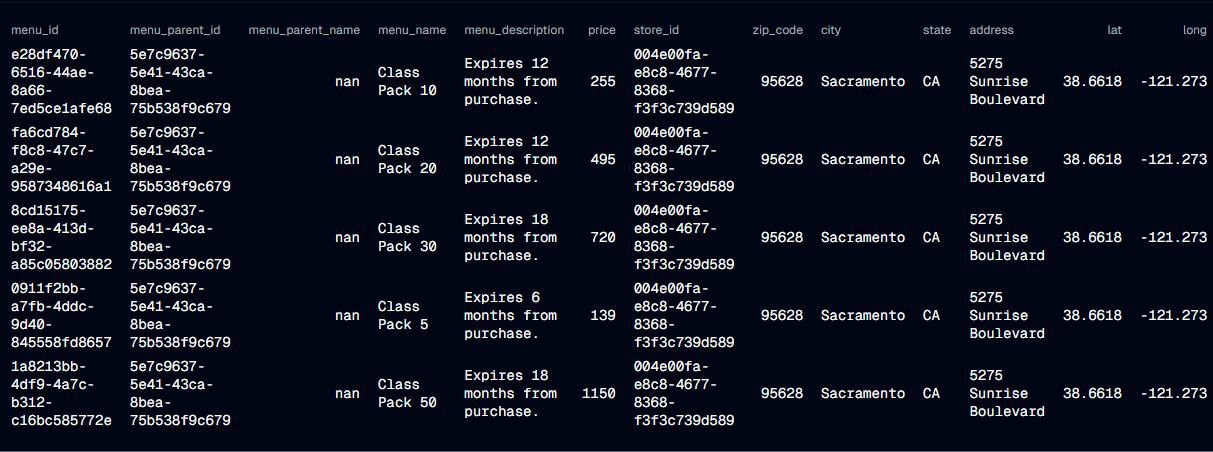
After fetching the data, we add a new column called discounted_price by applying a 10% discount to an existing price column. This demonstrates simple data transformation.
1from dagster import resource2import os34@asset(required_resource_keys={"s3"})56def fetch_csv_from_s3(context):7 import pandas as pd8 import io910 bucket = "s3-snow-lambda"11 key = "prices.csv"1213 response = context.resources.s3.get_object(Bucket=bucket, Key=key)14 csv_content = response["Body"].read().decode("utf-8")1516 data_frame = pd.read_csv(io.StringIO(csv_content))17 context.log.info(f"Fetched {len(data_frame)} rows from S3")18 context.add_output_metadata({19 "DataFrame Preview": MetadataValue.md(data_frame.head().to_markdown(index=False))20 })21 return data_frame
4. Loading Data into Snowflake
The processed data is loaded into a Snowflake table. Temporary stages are used to manage file uploads efficiently.
1from dagster import resource2import os34@asset(required_resource_keys={"snowflake"})56def save_to_snowflake(context, process_data):7 import pandas as pd8 df = process_data910 temp_file_path = "temp_data.csv"11 df.to_csv(temp_file_path, index=False, header=False)1213 snowflake_stage = "TEMP_STAGE"14 snowflake_table = "PRICES"1516 try:17 with context.resources.snowflake.get_connection() as conn:18 cursor = conn.cursor()19 cursor.execute(f"CREATE OR REPLACE STAGE {snowflake_stage}")20 cursor.execute(f"PUT file://{temp_file_path} @{snowflake_stage}")21 cursor.execute(f"COPY INTO {snowflake_table} FROM @{snowflake_stage} FILE_FORMAT = (TYPE = 'CSV' FIELD_OPTIONALLY_ENCLOSED_BY='"');")22 cursor.execute(f"REMOVE @{snowflake_stage}")2324 context.log.info("Data successfully loaded into Snowflake.")25 except Exception as e:26 context.log.error(f"Failed to load data into Snowflake: {e}")27 raise28 finally:29 if os.path.exists(temp_file_path):30 os.remove(temp_file_path)
5. Definitions
Finally, we register resources and assets in Dagster.
1from dagster import Definitions23defs = Definitions(4 resources={"s3": s3_resource, "snowflake": snowflake_resource},5 assets=[fetch_csv_from_s3, process_data, save_to_snowflake],6)
Running Dagster Pipeline
Now, we can see the Global asset lineage in dagster ui running locally on port 3000
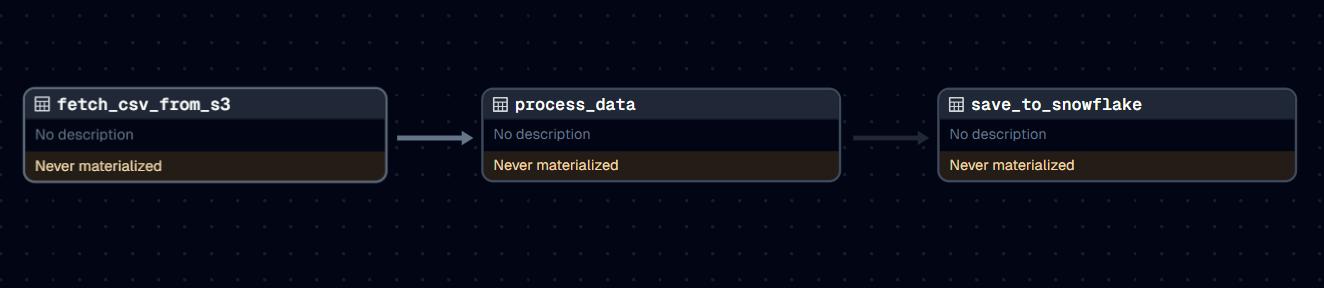
We can materialize an asset by running its job
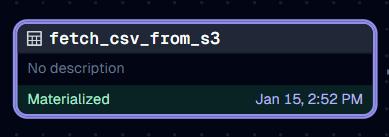
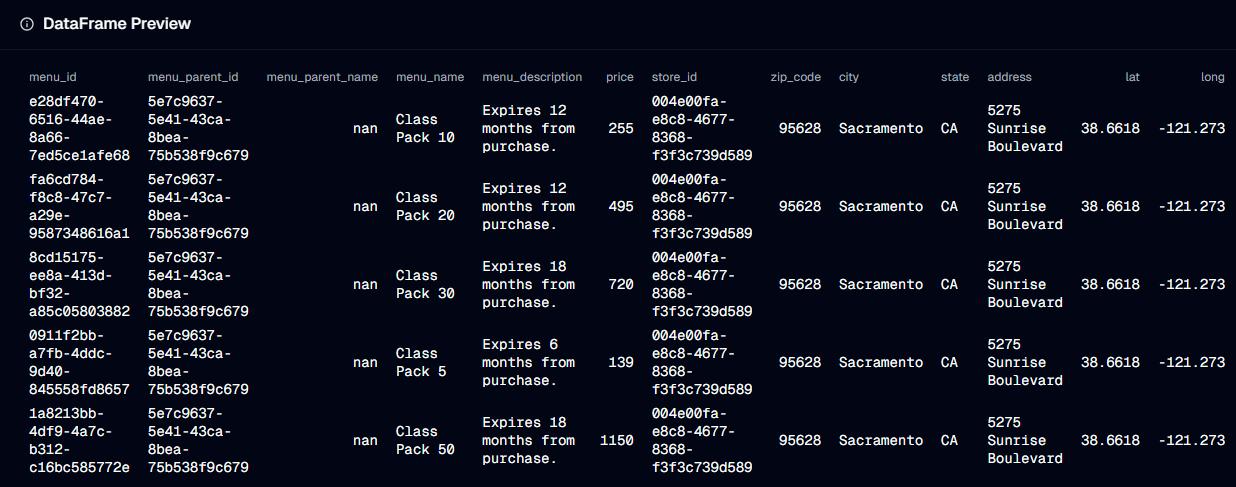
Our Asset is now materialized and now we can preview the data it has produced
Now lets materialize the Process Data asset
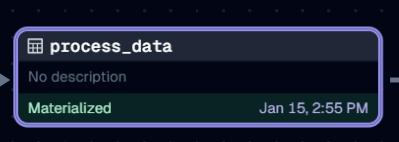
We can now view its meta data too to see the data it has produced
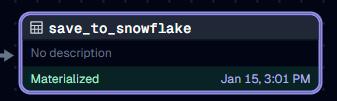
Now, lets move to our final step, which is inputting this transformed data into Snowflake database, lets run our snowflake asset
Now, we can verify our data in snowflake cloud
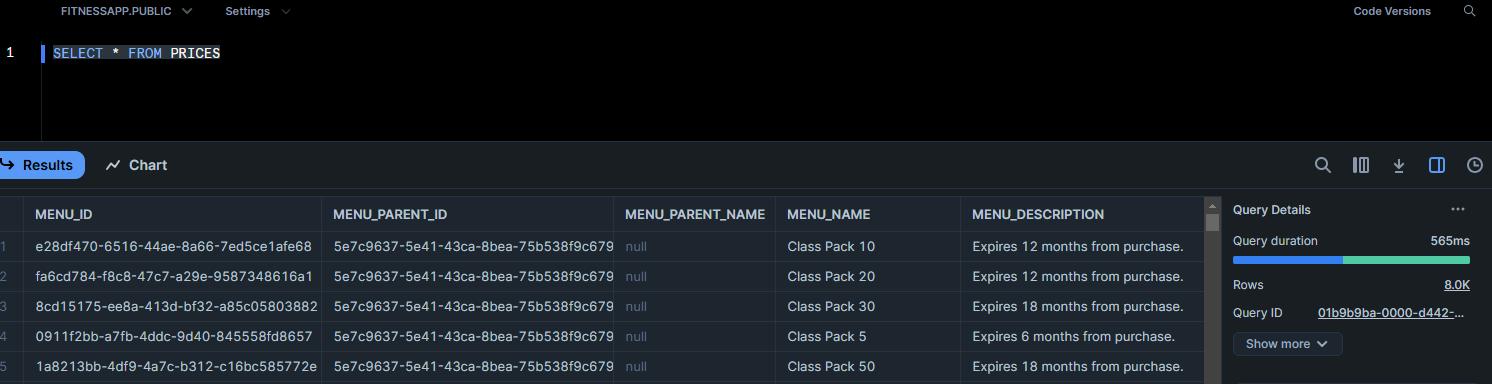
As we can see, our transformation and saving of data has been executed successfully.
Benefits of Using Dagster
- 1Each step in the pipeline is defined independently, making it reusable and testable.
- 2Dagster’s rich logging and metadata capabilities provide clear insights into pipeline execution.
- 3Seamlessly integrates with tools like AWS, Snowflake, and Pandas.
- 4Allows customization and configuration to meet specific pipeline requirements.
Conclusion
Dagster makes managing complex data pipelines intuitive and efficient. Whether you are working with cloud storage, databases, or data transformations, Dagster provides the tools and flexibility needed for modern data orchestration. Start building your pipelines today and experience the power of Dagster!
AWS Security Best Practices Every Business Should Follow
As more organizations migrate their applications and critical workloads to AWS, securing cloud environments has become a business priority rather than just an IT responsibility...
Read More
AWS Migration Checklist: A Practical Roadmap for Modern Businesses
Migrating businesses to AWS offers many benefits, including cost optimization, improved security, and greater scalability. However, a successful migration requires careful planning and execution. Otherwise, organizations may experience...
Read More
Agentic AI for QA & Software Testing with MCP Servers
For years, QA engineers have relied heavily on manual testing, repetitive validation, documentation, and traditional automation scripts But now, a new era of testing...
Read More
Our Proven Web Development Process That Delivers Real Results
In software development, success does not come from coding alone. Real results come from understanding business needs, planning the right workflow, building user-friendly designs...
Read More_16_11zon.webp&w=3840&q=100)
Secure AWS Connectivity Using AWS Systems Manager (SSM)
In traditional cloud architectures, secure access to private resources such as databases and internal servers often relies on...
Read More
Building a Secure Multi-Account AWS Architecture for Enterprise Environments (Dev, STG, UAT, Prod)
In today’s cloud-first world, scalability and speed are no longer enough security, governance, and cost control are equally critical...
Read More
Why You Should Use AI Agents Over Single Prompts: Unlocking the Power of Adaptive AI for Complex Workflows
In the world of artificial intelligence (AI), one of the biggest advancements has been the rise of AI agents that adapt dynamically to real-time data and complex workflows...
Read More_13_11zon.webp&w=3840&q=100)
Production Ready ( Quality, performance, and the lessons learned shipping to 150 stores )
We chose dbt over custom scripts, built observability, optimized performance, and shipped to production...
Read More_12_11zon.webp&w=3840&q=100)
Scaling from 15 to 150 Stores ( When copy-paste becomes technical debt, macros become salvation )
We built a pipeline with observability, incremental models for performance, and snapshots for history. Our 15-store deployment ran smoothly...
Read MoreReady to Work With Us?
Most engagements start with a 20-minute conversation. No pitch, no pressure - just an honest discussion about what you're building and whether we're the right fit.