



React Performance Optimization Techniques

Introduction
Performance optimization is crucial in React applications, especially when dealing with API requests. Inefficient data fetching can lead to unnecessary network requests, sluggish UI updates, and poor user experience.
This blog explores how Axios and React Query impact performance and how combining them can maximize efficiency.
1. Performance Bottlenecks in API Handling
Fetching data efficiently in React involves challenges such as:
- Excessive API calls: Every component re-render may trigger redundant network requests.
- Lack of caching: Fetching the same data multiple times slows performance.
- Blocking UI updates: Poor request handling can lead to delays and unresponsive interfaces.
- Stale data issues: Data retrieved once may become outdated without a refresh mechanism.
To address these, we need tools that optimize API requests and manage state efficiently.
2. Enhancing Performance with React Query
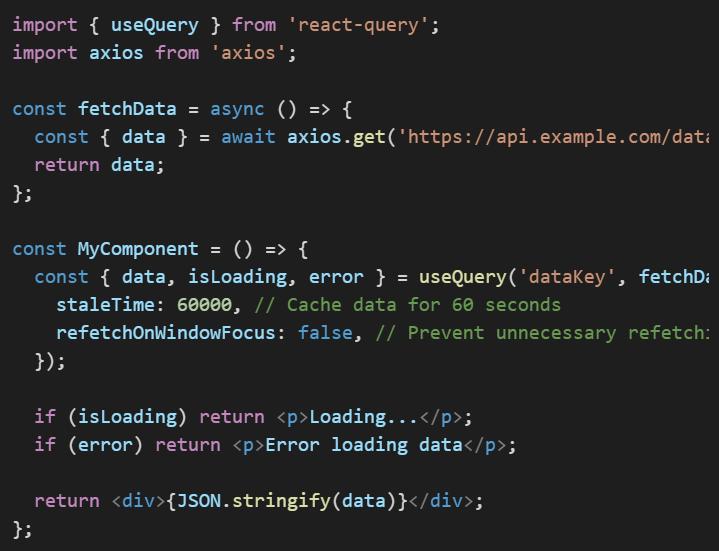
React Query is a powerful tool for managing server state efficiently. Here’s how it optimizes performance:
Automatic Caching & Background Updates
- Prevents redundant network calls by caching responses.
- Automatically fetches stale data in the background.
- Ensures UI remains in sync with the latest data.
Optimized Data Fetching
- Fetches data only when necessary using conditional fetching.
- Reduces re-renders by storing query results outside of React’s state.
Retries & Error Handling
- Automatically retries failed requests, improving reliability.
- Displays proper UI states (loading, success, error) without unnecessary logic.
Example: Using React Query for Optimized Fetching
3. Optimizing Axios for Better Performance
While Axios simplifies HTTP requests, optimizing it can further improve performance:
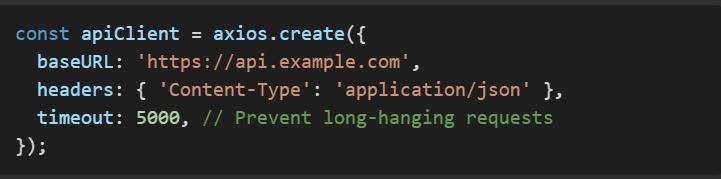
Use Global Configurations
- Set base URLs and headers globally to reduce redundancy.
Enable Request Interceptors
- Modify requests before sending (e.g., adding auth tokens).

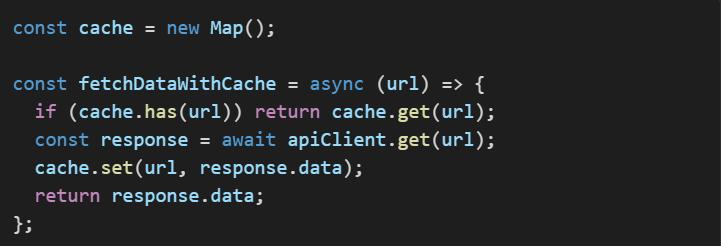
Reduce Redundant Requests with Memoization
- Store API responses and reuse them when applicable.
4. Combining Axios and React Query for Peak Performance
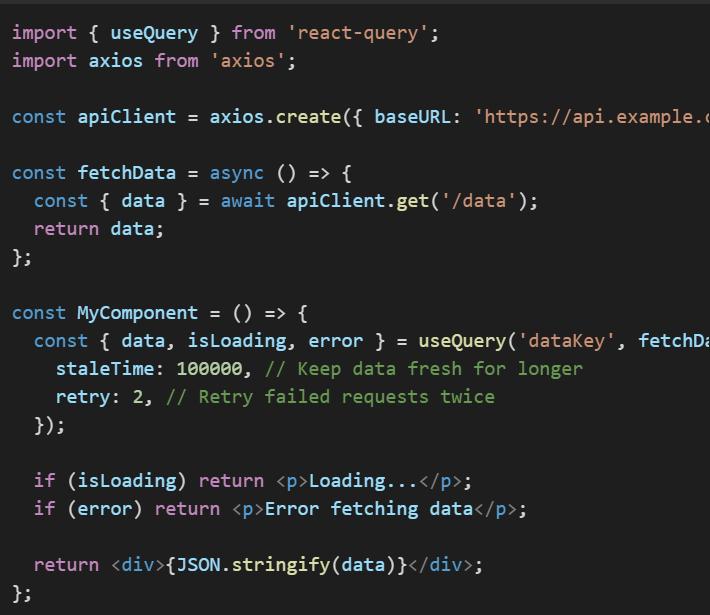
Axios alone doesn’t manage state efficiently, and React Query alone doesn’t send requests. Combining them provides the best of both worlds:
Axios for making API calls
- Handles request/response logic, authentication, and error processing.
React Query for caching and background fetching
- Reduces redundant network calls and ensures data freshness.
Example: Using Axios with React Query
5. Best Practices for Performance Optimization
Set Proper Cache Times
- Avoid refetching frequently used data by setting an appropriate staleTime.
Reduce Re-Renders
- Store fetched data outside of component state.
Batch API Requests
- Combine multiple API calls into a single request.
Use Lazy Loading
- Fetch data only when needed instead of all at once.
Conclusion
To optimize React performance when dealing with APIs:
- Use React Query for caching, background fetching, and efficient state management.
- Use Axios for structured request handling, interceptors, and authentication.
- Combine both for the best performance, ensuring fewer network requests and better state management.
By applying these strategies, you’ll create React applications that are fast, scalable, and maintainable!

AWS Security Best Practices Every Business Should Follow
As more organizations migrate their applications and critical workloads to AWS, securing cloud environments has become a business priority rather than just an IT responsibility...
Read More
AWS Migration Checklist: A Practical Roadmap for Modern Businesses
Migrating businesses to AWS offers many benefits, including cost optimization, improved security, and greater scalability. However, a successful migration requires careful planning and execution. Otherwise, organizations may experience...
Read More
Agentic AI for QA & Software Testing with MCP Servers
For years, QA engineers have relied heavily on manual testing, repetitive validation, documentation, and traditional automation scripts But now, a new era of testing...
Read More
Our Proven Web Development Process That Delivers Real Results
In software development, success does not come from coding alone. Real results come from understanding business needs, planning the right workflow, building user-friendly designs...
Read More_16_11zon.webp&w=3840&q=100)
Secure AWS Connectivity Using AWS Systems Manager (SSM)
In traditional cloud architectures, secure access to private resources such as databases and internal servers often relies on...
Read More
Building a Secure Multi-Account AWS Architecture for Enterprise Environments (Dev, STG, UAT, Prod)
In today’s cloud-first world, scalability and speed are no longer enough security, governance, and cost control are equally critical...
Read More
Why You Should Use AI Agents Over Single Prompts: Unlocking the Power of Adaptive AI for Complex Workflows
In the world of artificial intelligence (AI), one of the biggest advancements has been the rise of AI agents that adapt dynamically to real-time data and complex workflows...
Read More_13_11zon.webp&w=3840&q=100)
Production Ready ( Quality, performance, and the lessons learned shipping to 150 stores )
We chose dbt over custom scripts, built observability, optimized performance, and shipped to production...
Read More_12_11zon.webp&w=3840&q=100)
Scaling from 15 to 150 Stores ( When copy-paste becomes technical debt, macros become salvation )
We built a pipeline with observability, incremental models for performance, and snapshots for history. Our 15-store deployment ran smoothly...
Read MoreReady to Work With Us?
Most engagements start with a 20-minute conversation. No pitch, no pressure - just an honest discussion about what you're building and whether we're the right fit.