
Leveraging WordPress as a Headless CMS with Vue.js and GraphQL

Got a project?
Let's discuss your project
Introduction
In recent years, traditional Content Management Systems (CMS) like WordPress have evolved into more versatile solutions with the concept of a “web application development.” In this blog, we’ll explore how to use WordPress as a headless CMS, leveraging Vue.js as the front-end framework and GraphQL for fetching data.
Key takeaways:
- What is a headless CMS and why it’s important.
- How to set up WordPress as a headless CMS.
- Integrating WordPress with Vue.js and GraphQL to create a modern web application.
What is a Headless CMS?
A headless CMS decouples the front-end and back-end of a web application. Traditionally, WordPress renders both the back-end (admin panel) and the front-end (the website itself). In a headless CMS setup, WordPress handles only the content management (back-end), while the front-end is handled separately, using a framework like Vue.js.
Advantages of a Headless CMS:
- Performance: Load times are faster because the front-end is optimized independently.
- Flexibility: You can use any front-end technology, making the system more adaptable.
- Scalability: Easier to scale and optimize front-end performance without affecting the CMS.
Why Use Vue.js and GraphQL with WordPress?
Vue.js: A popular, lightweight JavaScript framework for building fast, responsive user interfaces. Vue’s ease of integration, component-based architecture, and flexibility make it a great choice for front-end development.
GraphQL: Unlike traditional REST APIs, GraphQL allows clients to specify exactly what data they need, reducing over-fetching and improving performance. WordPress supports GraphQL through plugins like WPGraphQL, making it easy to fetch and manipulate content.
Setting Up WordPress as a Headless CMS
1. Install WordPress and WPGraphQL Plugin
Start by installing WordPress on your server and setting up the WPGraphQL plugin. This plugin provides a GraphQL API for WordPress, allowing you to query posts, pages, and custom content types.
Steps:
- Install WordPress.
- Navigate to the plugins section and search for “WPGraphQL.”
- Install and activate the plugin.
Once WPGraphQL is set up, you can use the /graphql endpoint to access your WordPress data.
2. Define Custom Post Types (Optional)
If you need to manage more than just blog posts or pages, define custom post types in WordPress to structure your content. This flexibility is one of the major advantages of using WordPress as a CMS.
Integrating Vue.js with WordPress and GraphQL
1. Setting Up the Vue.js Application
Create a Vue.js project using the Vue CLI:

Install Apollo Client and the GraphQL package for making GraphQL requests:

2. Configure Apollo Client for GraphQL
Apollo Client is a popular GraphQL client that will handle requests from Vue.js to your WordPress GraphQL API.
Let's Build Something Great Together
Ready to transform your idea into a powerful software solution? Talk to our experts and get a free consultation.
Contact Us
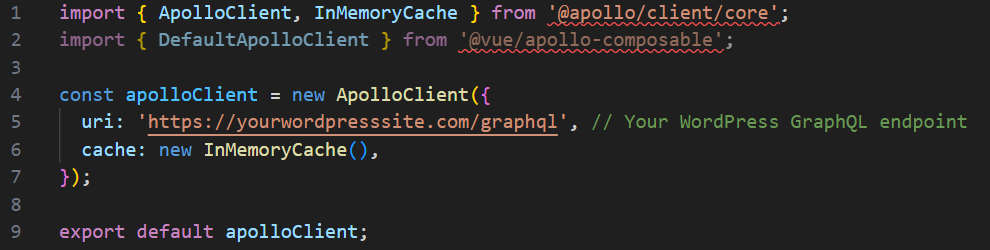
Create an Apollo Client configuration in a new file (e.g., apollo.js):
3. Integrating Apollo Client into Vue.js
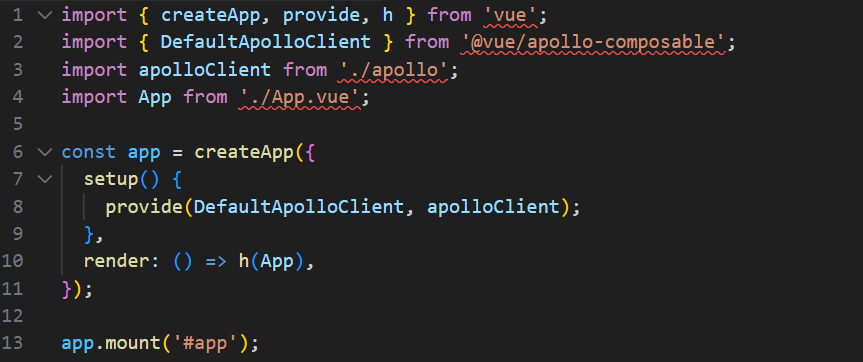
In your main.js file, configure Apollo Client for your Vue.js application:
Fetching Data in Vue.js with GraphQL
Here’s an example of how to fetch posts from WordPress using GraphQL in Vue.js. Create a Posts.vue component to display WordPress posts:
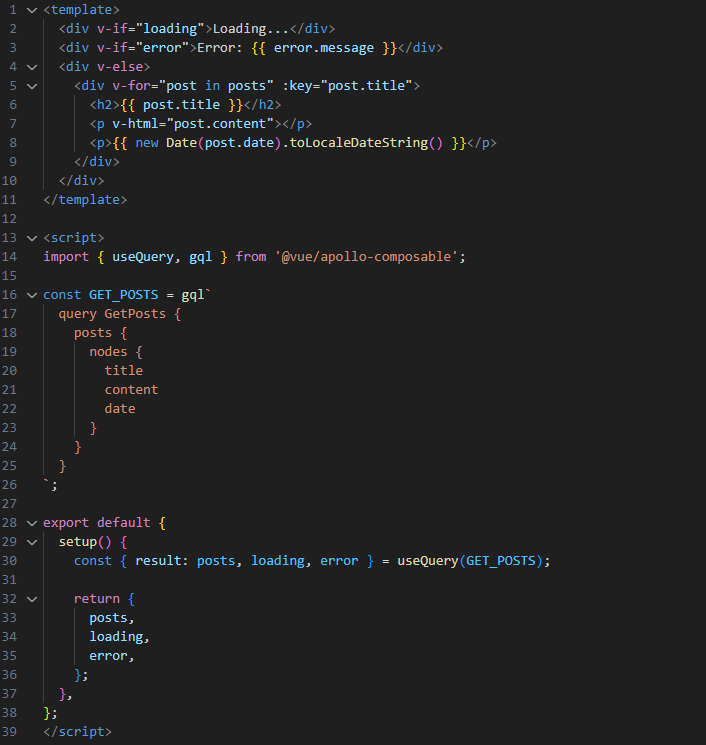
This component queries WordPress for the latest posts using GraphQL and renders them in a simple list.
Handling Routing in Vue.js
Vue.js uses vue-router for handling routing. You can set up routes to display various WordPress content types like posts and pages.
Install the Vue Router:

Set up routing in your main.js:
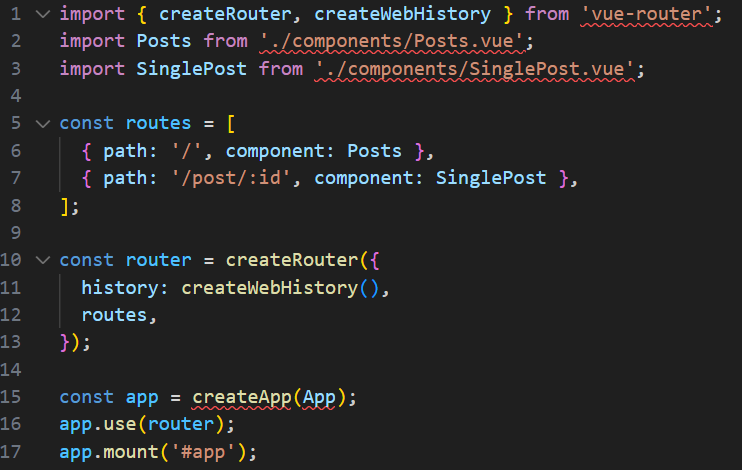
Each route would dynamically load the respective WordPress content using GraphQL.
Conclusion
Using WordPress as a headless CMS with Vue.js and GraphQL is a powerful way to build modern, scalable web applications. This approach gives you the best of both worlds: the simplicity of WordPress for managing content and the flexibility of Vue.js for building dynamic, fast, and interactive front-end applications.
Final Thoughts:
- With this setup, you can take advantage of WordPress’s extensive CMS features while having full control over your front-end design and functionality.
- GraphQL’s efficiency in fetching only the required data ensures optimal performance.
If you’re building a complex, content-heavy application and want the freedom to use cutting-edge front-end technologies, this headless approach is the way forward.

From ETL to ELT: The Evolution of Data Pipelines in Modern Analytics
How and why data pipeline architecture evolved from ETL to ELT.
Read More
Bridge View Hybrid: A Smarter Path to Bringing Web Apps to Mobile
Learn how the Bridge View Hybrid architecture uses a React Native shell and WebView to launch iOS and Android apps faster, cheaper, and with less risk.
Read More
10 AI Prompts Every Manual Tester Should Have in Their QA Toolkit
Discover 10 practical AI prompts manual testers can use to improve test coverage, find edge cases, analyze bugs, strengthen regression testing, and become more effective QA engineers.
Read More
The Website Accessibility Revolution: Why You Can't Afford to Ignore WCAG 2.2
Website accessibility starts with WCAG 2.2. Learn how accessible design, development, QA, and testing can help create websites that work for everyone.
Read More
Race Conditions in Web Applications: Why Correct Code Produces Wrong Results
Race conditions silently corrupt data when concurrent requests touch shared state at the wrong time. Learn how atomic updates, transactions, idempotency, and locking keep your application correct under real concurrency.
Read More
AI Writes the Code • Stop Blindly Shipping It Without Reviewing the Engineering
A practical perspective on AI-generated code, scalability, maintainability, and engineering judgment and why engineering review still owns the final decision.
Read More
Migrating Databases with AWS DMS With Nearly Zero Downtime
Learn how to migrate databases using AWS DMS with nearly zero downtime using Full Load, CDC, validation, monitoring, and controlled cutover.
Read More
How to Add LiveKit Video Calling to a Next.js App
Add embedded video & audio calling to Next.js with LiveKit Cloud. Compared vs Twilio, Daily, Agora, Zoom — plus token auth, guests & recording.
Read More
We chose ECS over EKS: what we gained and what we gave up
An honest comparison of ECS vs EKS the costs, tradeoffs, and real-world reasoning behind choosing ECS for a production platform on AWS.
Read More