
Migrating Databases with AWS DMS With Nearly Zero Downtime

Got a project?
Let's discuss your project
Introduction
Migrating a database is one of the riskiest infrastructure changes an engineering team can perform. Whether you're moving from an on-premises database to AWS, migrating from one Amazon RDS instance to another, moving from MySQL to PostgreSQL, upgrading to a different database platform, or transitioning to a managed database service, the fundamental challenge remains the same:
For large and business-critical applications, a traditional backup-and-restore approach can require significant downtime. The larger the database and the higher the transaction volume, the more difficult it becomes to find an acceptable maintenance window. This is where AWS Database Migration Service (AWS DMS) can help.
AWS Database Migration Service (AWS DMS) makes this process significantly easier by allowing teams to migrate existing database data while simultaneously capturing ongoing changes from the source and applying them to the target, while the source remains online. AWS DMS supports both homogeneous and heterogeneous migrations, although exact capabilities depend on the source, target, engine versions, and migration mode.
Why I Chose AWS DMS
Before choosing AWS DMS, there were several possible approaches to consider. A traditional backup-and-restore migration is straightforward, but it requires the source application to remain stopped while the database is copied and restored, making the downtime dependent on the database size and restore time. Native database replication can provide a low-downtime path, but it is generally tied to specific database engines and is not always practical when moving between different platforms. Another option is application-level dual writes, but this introduces significant application complexity and additional consistency and failure scenarios. AWS DMS provided a better fit because it could perform the initial migration while the source remained online and then continuously replicate changes through CDC, allowing the final cutover to be limited to a controlled maintenance window.
What Does “Nearly Zero Downtime” Mean?
A migration cannot honestly guarantee zero downtime in every environment. An application cutover normally requires a short period in which writes are paused or controlled. The goal is to move the large majority of data while the application remains online, then make the final cutover during a small maintenance window.
The key AWS DMS pattern is Full Load + Change Data Capture (CDC): copy the existing data first, capture changes occurring during the migration, apply those changes to the target, and cut over once the target is caught up.
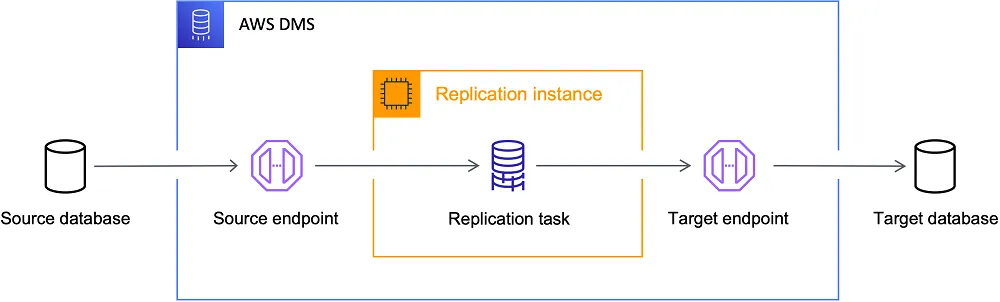
How AWS DMS Reduces Downtime
1. Full Load
AWS DMS copies the existing data from the source database to the target. The application can generally continue operating during this phase.
2. Change Data Capture
While the full load is taking place and after it completes, users continue modifying the source database. DMS captures those changes made on the source and applies them to the target.
3. Cutover
Eventually, the initial full load finishes and DMS continues applying ongoing changes. Once the target is synchronized, writes are briefly stopped, the remaining changes are allowed to reach the target, validation is performed, and the application is pointed to the new database.
Understanding CDC
Change Data Capture (CDC) is the key technology that makes low-downtime migration possible. Instead of repeatedly copying the entire database, CDC captures only changes made after the initial data migration. This dramatically reduces the amount of data that must be transferred during the final synchronization.
The underlying CDC mechanism depends on the database engine for example, MySQL can use binary logs, PostgreSQL can use logical replication/WAL, SQL Server can use transaction-log/CDC mechanisms, and Oracle can use redo-log based mechanisms.
Supported Migration Scenarios
AWS DMS supports many database engines and data stores as sources and targets, including engines such as MySQL, PostgreSQL, Oracle, SQL Server, MariaDB, MongoDB, Db2, Amazon Aurora, and several AWS data services. The exact source-target combination and CDC support should always be checked against the current AWS DMS documentation.
DMS can be used for both homogeneous and heterogeneous migrations:
- Homogeneous: for example, MySQL to MySQL.
- Heterogeneous: for example, Oracle to PostgreSQL.
For heterogeneous migrations, moving the data is only part of the job. Schema objects, data types, procedures, functions, indexes, constraints, and other engine-specific features may require additional conversion or manual work.
Migration Process
A successful DMS migration is not simply a matter of creating a replication task and waiting for it to finish. The source database, target database, network, replication instance, table mappings, CDC configuration, and validation strategy all need to be prepared before the final cutover.
1. Assess the Source and Target
Check engine/version compatibility, database size, transaction volume, large tables, LOBs, foreign keys, and other database-specific features. For heterogeneous migrations, identify schema and data-type differences that may require conversion. AWS maintains separate documentation for supported DMS sources and targets.
2. Prepare the Source
Configure the source database for DMS, including the required user privileges and CDC/logging configuration. For example, MySQL CDC requires binary logging with sufficient retention to ensure DMS does not lose required changes.
3. Prepare the Target
Provision the target database with the required capacity, users, schemas, and configuration. Review and adjust incompatible data types or schema objects before migration, particularly for heterogeneous migrations.
4. Configure Network Connectivity
Ensure DMS can reach both databases. Verify routing, security groups/firewalls, database ports, DNS, TLS requirements, and credentials.
5. Create DMS Endpoints
Create the source and target endpoints and test connectivity from the DMS replication infrastructure before starting the migration.
6. Provision the Replication Infrastructure
Choose sufficient CPU, memory, storage, and network capacity for the expected full-load and CDC workload. DMS Serverless can also be used where supported.
7. Configure Table Mappings
Define which databases, schemas, and tables should be migrated. Review the mappings carefully to ensure all required tables are included and unwanted tables are excluded.
8. Choose Full Load + CDC
Use Full Load + CDC when minimizing application downtime. DMS copies the existing data first and then continuously captures changes made on the source.
9. Monitor the Migration
Monitor task status, table-level progress, CDC latency, replication resources, storage, and DMS logs. Pay particular attention to tables in error or suspended states rather than relying only on the overall task status. If you'd rather hand this over to professionals, our AWS cloud monitoring services track replication health around the clock.
10. Validate the Target
Compare row counts, critical records, data types, relationships, and other important data. Use DMS data validation where supported, but supplement it with application-level checks.
11. Test the Application
Test critical application functionality against the target, including reads, writes, transactions, reports, background jobs, and other database-dependent operations.
12. Perform the Cutover
- 1Stop application writes or place the application in maintenance/read-only mode.
- 2Confirm no new writes are reaching the source.
- 3Allow DMS to apply the remaining CDC changes.
- 4Confirm the target is synchronized and perform final validation.
- 5Change the application's database connection to the target.
- 6Resume application traffic and monitor closely.
The application downtime should be limited to this final cutover rather than the full migration period.
Rollback Planning
A rollback plan should be designed before the migration begins. Keeping the source database available provides a recovery option, but simply switching the application back is not always safe after new writes have reached the target.
Let's Build Something Great Together
Ready to transform your idea into a powerful software solution? Talk to our experts and get a free consultation.
Contact Us
If rollback is required after cutover, determine how target changes will be preserved or replicated back to the source. Reverse replication can be useful for supported scenarios, but it must be designed and tested rather than assumed.
Common Problems to Watch For
A DMS migration can appear healthy while individual tables are still failing, lagging, or becoming inconsistent. During a real migration, several issues can occur that are not obvious from the overall task status.
1. Insufficient Source Log/Binlog Retention
AWS DMS depends on source database logs for CDC. If those logs are rotated or deleted before DMS consumes them, CDC can fail and replication may stop.
Configure sufficient log retention on the source and monitor CDC latency. This is especially important during long-running migrations where the source continues generating changes.
2. High CDC Latency
CDC latency can increase when DMS processes many tables and rows in parallel. The bottleneck may be the source database handling read/load operations, the DMS replication instance processing and buffering changes, or the target database handling incoming writes.
Monitor the CPU, memory, storage, and I/O of the replication instance along with the source and target resources. If parallel processing is pushing any component to its limit, reduce parallelism or increase the capacity of the bottleneck before the final cutover.
3. Foreign-Key Failures
One common issue encountered during the migration is foreign-key failures caused by tables being loaded in parallel. For example, DMS can load multiple tables in parallel during full load, so a child table may be loaded before its parent table has finished. This can cause foreign-key errors when the referenced parent rows do not yet exist on the target.
This is particularly important when multiple full-load subtasks are running concurrently. DMS does not automatically guarantee parent-before-child loading based on foreign-key dependencies. Control full-load parallelism or reload affected child tables after the parent data is available, and manage foreign-key constraints carefully when appropriate.
4. Validation Status Can Become Misleading After Pausing and Resuming
Another important issue usually occurs after a DMS task is paused, some tables have already completed validation. When the task resumed, source data changed, but those tables could still show a successful validation status instead of indicating that they needed validation again. This can create a dangerous false sense of confidence: a table may show validation as successful even though the underlying data has changed since that validation was performed.
The lesson is that validation status should not be treated as proof that the data is currently synchronized. After pausing/resuming or making further source changes, perform fresh validation and verify current CDC status before cutover.
5. Schema or Data-Type Incompatibilities
Schema differences are common, especially during heterogeneous migrations. Data types or database-specific features may not have a direct equivalent on the target for example, a JSON column may need to be represented as LONGTEXT.
Review the target schema before starting the migration and adjust incompatible types or objects where necessary. Do not assume that a successful connection between the endpoints means every schema element is compatible.
6. Tables Can Fail While the Overall Task Continues
A DMS task can remain running or appear healthy while individual tables enter error or suspended states. Relying only on the overall task status can therefore hide table-level migration problems.
For this reason, monitor table-level statistics and DMS logs instead of relying only on the overall task status. After the full load, review individual tables and identify any that require reload, correction, or additional validation.
7. Large-Object (LOB) Performance
LOB columns can significantly increase migration time, network usage, and resource consumption. Migrating unnecessary LOB data can therefore slow down the overall process.
Review the DMS LOB configuration and migrate only the LOB data that the application actually requires. Make sure the replication resources are sized for the expected LOB workload.
8. Network, Firewall, TLS, or Credential Problems
DMS must be able to connect reliably to both the source and target. Incorrect routing, security rules, ports, TLS settings, DNS, or database privileges can prevent tasks from starting or cause replication failures.
Test both endpoints before starting the migration and verify connectivity from the DMS replication infrastructure. Check CloudWatch/DMS logs when connection or authentication errors occur.
9. Incomplete Target Validation
A DMS task showing a successful status does not necessarily mean that every table and record is correct. Individual tables can still be in error or suspended states, and validation results may not always reflect the latest source changes.
Use DMS data validation where supported, but also compare row counts and critical records manually. After events such as pausing and resuming a task, perform fresh validation rather than relying only on an earlier validation result.
How Much Downtime Should You Expect?
There is no universal downtime number. A small database with low write activity may have a very short cutover, while a large, highly active database may require more preparation and tuning.
The important distinction is that DMS moves the bulk of the data before the application is taken offline. The final downtime is therefore primarily determined by the remaining CDC backlog, validation steps, application restart, and the complexity of changing over to the target.
Final Takeaway
AWS DMS can turn a high-risk, long-downtime database migration into a controlled application change. The key is not simply starting a DMS task it is designing the migration around Full Load + CDC, preparing both databases correctly, monitoring replication latency, validating the target, and executing a disciplined cutover and rollback plan.
When these steps are followed carefully, organizations can migrate between supported database platforms while keeping applications available for most of the migration and limiting downtime to a controlled final cutover.
From ETL to ELT: The Evolution of Data Pipelines in Modern Analytics
How and why data pipeline architecture evolved from ETL to ELT.
Read More
Bridge View Hybrid: A Smarter Path to Bringing Web Apps to Mobile
Learn how the Bridge View Hybrid architecture uses a React Native shell and WebView to launch iOS and Android apps faster, cheaper, and with less risk.
Read More
10 AI Prompts Every Manual Tester Should Have in Their QA Toolkit
Discover 10 practical AI prompts manual testers can use to improve test coverage, find edge cases, analyze bugs, strengthen regression testing, and become more effective QA engineers.
Read More
The Website Accessibility Revolution: Why You Can't Afford to Ignore WCAG 2.2
Website accessibility starts with WCAG 2.2. Learn how accessible design, development, QA, and testing can help create websites that work for everyone.
Read More
Race Conditions in Web Applications: Why Correct Code Produces Wrong Results
Race conditions silently corrupt data when concurrent requests touch shared state at the wrong time. Learn how atomic updates, transactions, idempotency, and locking keep your application correct under real concurrency.
Read More
AI Writes the Code • Stop Blindly Shipping It Without Reviewing the Engineering
A practical perspective on AI-generated code, scalability, maintainability, and engineering judgment and why engineering review still owns the final decision.
Read More
How to Add LiveKit Video Calling to a Next.js App
Add embedded video & audio calling to Next.js with LiveKit Cloud. Compared vs Twilio, Daily, Agora, Zoom — plus token auth, guests & recording.
Read More
We chose ECS over EKS: what we gained and what we gave up
An honest comparison of ECS vs EKS the costs, tradeoffs, and real-world reasoning behind choosing ECS for a production platform on AWS.
Read More
Upgrading Legacy Systems: From Outdated Technology to Competitive Advantage
Learn how to upgrade legacy systems through application modernization, API integration, cloud migration, security improvements, and incremental system upgrades without disrupting business operations.
Read More