Beyond Prompting: Managing Context and Tokens in AI Coding Tools

Got a project?
Let's discuss your project
Introduction
Ever wondered why your AI coding agent starts losing context or hits a hard limit mid-task? The answer lies in tokens and the context window, much like how AI agents manage context differently from single prompts. Good AI coding is not about giving the model the most information. It is about giving it the right information at the right time.
Why Token and Context Management Matters
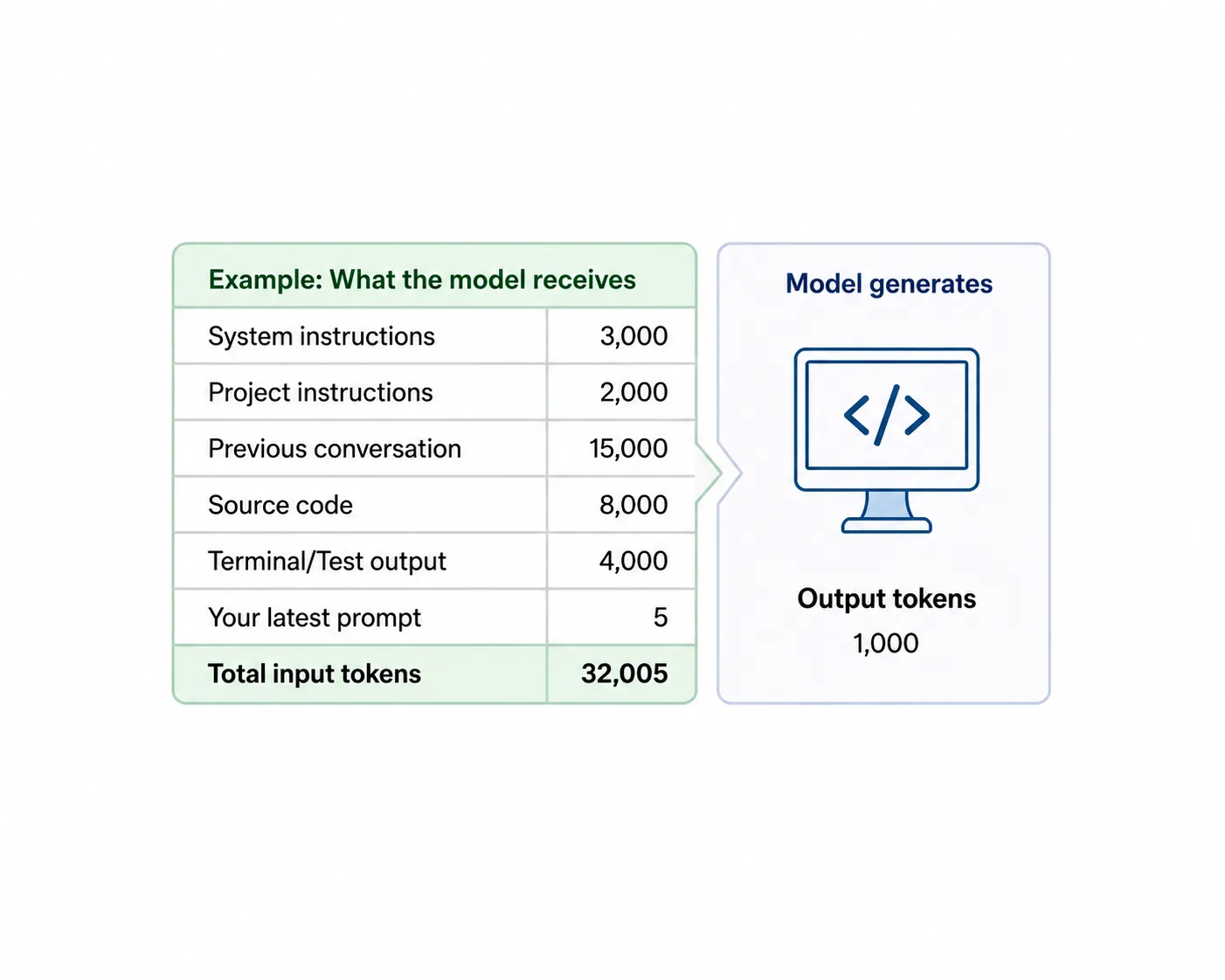
AI coding tools can read source files, run commands, inspect tests, and call external tools. As a result, the real input to a model is often much larger than the latest prompt you typed. This matters for both cost and efficiency.
| Component | Tokens |
|---|---|
| Latest prompt | 5 |
| System + project instructions | 5,000 |
| Previous conversation | 15,000 |
| Relevant source code | 8,000 |
| Terminal / test output | 4,000 |
| Approx. input context | 32,005 tokens |
| Model output | 1,000 tokens |
A five-token prompt can therefore trigger tens of thousands of input tokens. Reused context may sometimes be cached and priced differently, but it still occupies the model's working context. Large, noisy context can also reduce answer quality by mixing relevant information with stale assumptions, unrelated files, and old tool output.
What Is a Token?
LLMs process text as tokens rather than human-defined words. A tokenizer may split a word such as:
"understanding -> under | stand | ing"
Code is tokenized too. Keywords, identifiers, operators, strings, and punctuation all consume tokens. Rare or machine-like text often uses more tokens: UUIDs, hashes, JWTs, base64, minified JavaScript, large JSON, and stack traces are common examples.
Less common natural-language spellings can also tokenize less efficiently. An informal Roman Urdu prompt such as:
"auth ka bug fix krdo and ui theek krdo"
may use more tokens than a comparable plain-English sentence because forms such as “krdo” or “theek” may be split into more pieces. Exact counts vary by tokenizer. Still, clarity matters more than saving a few prompt tokens: a slightly longer, precise prompt can prevent thousands of tokens of unnecessary exploration.
What Is Context?
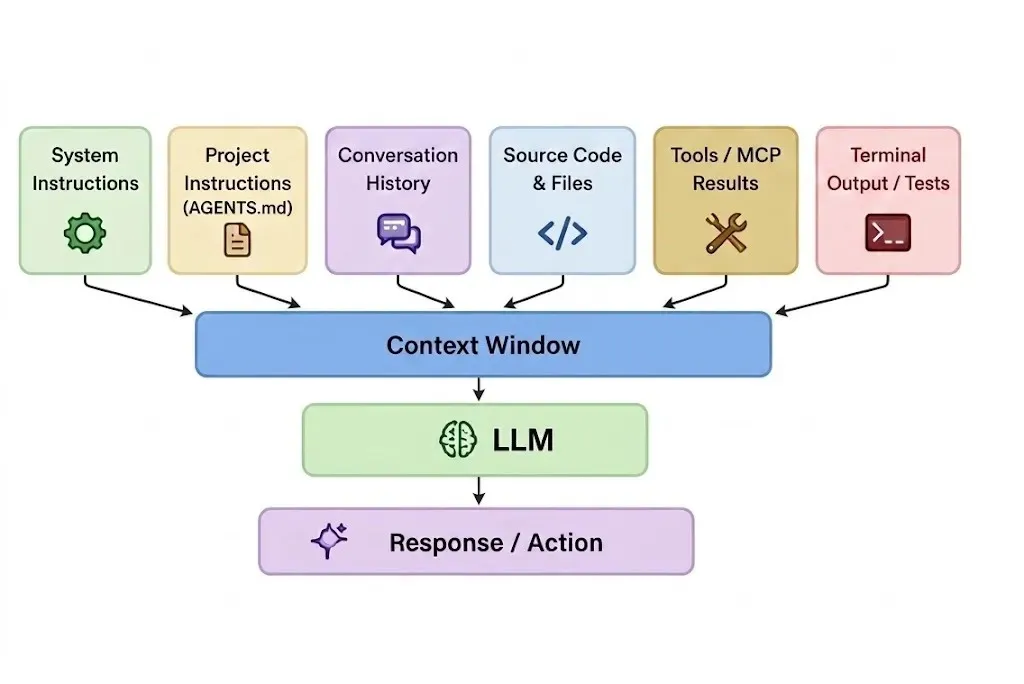
Context is everything available to the model when it makes its next decision. In a coding agent, it commonly includes:
- System and project instructions
- Current prompt and previous conversation
- Relevant source files and documentation
- Terminal output, tests, and Git diffs
- Tool definitions and MCP results
Previous output can become future input. If the assistant gives an 800-token explanation and your next instruction is only “add tests,” that earlier explanation may still be part of the next request. This is why long coding sessions naturally grow.
More Context Is Not Always Better
A large context window is capacity, not a target. If you are debugging an authentication endpoint, the useful context may be a controller, service, model, failing test, and error message. Unrelated UI components, deployment docs, and thousands of log lines add noise rather than value.
In very long contexts, important details buried in the middle can be harder to use reliably.
Let's Build Something Great Together
Ready to transform your idea into a powerful software solution? Talk to our experts and get a free consultation.
Contact Us
Optimize signal-to-noise: keep important requirements explicit, retrieve information close to when it is needed, and avoid carrying unnecessary history.
Practical Strategies for Managing Context
1. Give Landmarks, Not the Entire Repository
Point the agent toward the problem, expected behavior, relevant module, and constraints. Let it search for the exact implementation.
"Login returns 500 when the email does not exist. Expected: return the existing invalid-credentials response. Relevant area: src/modules/auth/. Reproduce the issue first. Do not change the API response format."
"Bad prompt: Read the whole repository and fix the bug."
"Better prompt: Login returns 500 for an invalid email. Expected: return the existing invalid-credentials response. Relevant area: src/modules/auth/. Reproduce it first and preserve the API response format."
2. Retrieval Beats Stuffing
Do not try to place an entire large repository in context. Search first, then read only the files that matter.
rg "resetPassword" src/
A strong flow is: Task -> Search -> Read relevant code -> Understand -> Modify -> Test.
"Bad prompt: Load everything under src/ so you understand the project."
"Better prompt: Search for resetPassword and read only the files involved in that flow."
3. Control Tool and Terminal Output
Tool output can consume context extremely quickly. Filter it before returning it to the model.
"Bad: cat production.log"
"Better: grep "ERROR" production.log | tail -50"
"Bad: npm test"
"Better: npm test -- auth.service.test.ts"
4. Keep Project Instructions Focused
Use AGENTS.md or CLAUDE.md for stable architecture rules, test commands, and important constraints. Keep detailed database, deployment, or feature documentation separate and load it only when relevant.
"Bad instruction: Read every project document before making any change."
"Better instruction: Follow the core rules in AGENTS.md. Read database.md, deployment.md, or other specialized docs only when the task requires them."
5. Keep One Logical Task Per Session
Mixing unrelated bugs, UI changes, DevOps work, and database investigations creates context pollution. Starting a fresh session for a new logical task can be an optimization.
"Bad prompt: Fix the login bug, then update the dashboard, debug Docker, and optimize the database query."
"Better approach: Keep each logical task in its own focused session."
6. Investigate Before Implementing
For complex problems, first ask the agent to locate the source of the issue, trace the relevant functions, identify the root cause, and propose the smallest safe fix. Then implement and test. This is usually cleaner than Guess -> Edit -> Fail -> Undo -> Search.
"Bad prompt: Fix it."
"Better prompt: Investigate the root cause first. Do not modify files yet. Identify the relevant flow and propose the smallest safe fix; then implement it and add a regression test."
7. Summarize Long Sessions
When a long investigation stabilizes, create a checkpoint with the objective, root cause, relevant files, decisions, completed changes, tests, remaining work, and risks. A short summary can replace thousands of tokens of obsolete debugging history.
"Useful checkpoint prompt: “Summarize the objective, root cause, relevant files, changes made, tests run, remaining work, and known risks before we continue.”"
8. Write AI-Friendly, High-Quality Code
Code quality affects context quality. Clear names, small functions, predictable architecture, and useful tests help an AI agent understand intent with fewer searches and fewer file reads.
Poor-quality code:function p(a, b, c) {if (c === 1) return a * b;if (c === 2) return a + b;return 0;}
The agent must first infer what p, a, b, and c mean and may need to inspect multiple callers.
AI-friendly code:function calculateOrderTotal(price, quantity) {return price * quantity;}function applyDiscount(total, discountRate) {return total - total * discountRate;}
Meaningful names and separated responsibilities give the model semantic clues immediately. If the task is about discounts, it can focus on applyDiscount() and its tests instead of tracing unrelated code.
"Poor code path: Read large file -> trace callers -> infer intent -> locate logic -> edit"
"Clean code path: Search meaningful symbol -> read focused function + test -> understand -> edit"
"Bad prompt: “The calculation is wrong. Fix it.”"
"Better prompt: “The discount calculation is incorrect for percentage discounts. Inspect applyDiscount() and its tests, reproduce the failure, and make the smallest safe fix without changing the public API.”"
Clean code is not only easier for developers to maintain; it is also easier and often cheaper for AI agents to reason about because less context is required to understand the system.
Common Token Traps in Software Repositories
Some repository content is particularly poor AI context unless the task specifically requires it:
| Category | Examples |
|---|---|
| Dependency lock files | package-lock.json, yarn.lock, pnpm-lock.yaml |
| Generated code | dist/, build/, .next/, coverage/ |
| Minified files | bundle.min.js, vendor.min.js |
| Database dumps | production.sql, data-export.json |
| Encoded data | base64, JWTs, binary representations |
A useful project instruction might be:
"Do not inspect generated directories, dependency lock files, database dumps, or minified bundles unless they are specifically required for the task."
This prevents unnecessary exploration.
Be Selective With MCP and External Tools
MCP can connect AI agents and autonomous systems to GitHub, Jira, Slack, databases, cloud platforms, and internal APIs. Tool descriptions can add context, and tool results can add much more. Query only what is needed.
"Bad: SELECT * FROM users;"
"Better: SELECT id, email, status FROM users WHERE id = 125;"
Modern tools may dynamically discover or load tool definitions, so connecting an MCP server does not necessarily place every tool in every request. The principle remains: broad access, narrow retrieval.
Five Layers of Context
A useful way to reason about coding-agent context is to divide it into five layers:
- Stable context: Architecture, coding standards, testing rules, and directory conventions. Usually stored in AGENTS.md, CLAUDE.md, or README.
- Task context: Bug description, expected behavior, acceptance criteria, and constraints.
- Retrieved context: Relevant files, tests, functions, and database schema discovered during investigation.
- Working context: Terminal output, test failures, hypotheses, Git diff, and debugging results.
- External context: Jira, GitHub, Slack, databases, MCP servers, and documentation.
Think in Terms of Context ROI
A useful mental model is:
"Context ROI = Decision-making value / Token cost"
High-value context includes the actual error message, expected behavior, relevant module, failing test, acceptance criteria, and constraints. Low-value context includes entire repositories, huge logs, generated files, unrelated code, old debugging history, and massive database responses.
Conclusion
Prompt engineering asks, “How should I ask the model?” Context engineering asks, “What should the model know when making its next decision?”
Retrieve instead of stuffing. Filter instead of dumping. Summarize instead of accumulating. Keep tasks focused. Make constraints explicit. Load information when it becomes relevant.
The goal is not to minimize every prompt or fill the model's entire context window. It is to provide the minimum sufficient, highest-value context needed for the next correct decision. Done well, this reduces unnecessary token usage and cost while making AI coding tools faster, more focused, and more reliable. Clean code, focused prompts, targeted retrieval, and filtered tool output all contribute to that goal.

From ETL to ELT: The Evolution of Data Pipelines in Modern Analytics
How and why data pipeline architecture evolved from ETL to ELT.
Read More
Bridge View Hybrid: A Smarter Path to Bringing Web Apps to Mobile
Learn how the Bridge View Hybrid architecture uses a React Native shell and WebView to launch iOS and Android apps faster, cheaper, and with less risk.
Read More
10 AI Prompts Every Manual Tester Should Have in Their QA Toolkit
Discover 10 practical AI prompts manual testers can use to improve test coverage, find edge cases, analyze bugs, strengthen regression testing, and become more effective QA engineers.
Read More
The Website Accessibility Revolution: Why You Can't Afford to Ignore WCAG 2.2
Website accessibility starts with WCAG 2.2. Learn how accessible design, development, QA, and testing can help create websites that work for everyone.
Read More
Race Conditions in Web Applications: Why Correct Code Produces Wrong Results
Race conditions silently corrupt data when concurrent requests touch shared state at the wrong time. Learn how atomic updates, transactions, idempotency, and locking keep your application correct under real concurrency.
Read More
AI Writes the Code • Stop Blindly Shipping It Without Reviewing the Engineering
A practical perspective on AI-generated code, scalability, maintainability, and engineering judgment and why engineering review still owns the final decision.
Read More
Migrating Databases with AWS DMS With Nearly Zero Downtime
Learn how to migrate databases using AWS DMS with nearly zero downtime using Full Load, CDC, validation, monitoring, and controlled cutover.
Read More
How to Add LiveKit Video Calling to a Next.js App
Add embedded video & audio calling to Next.js with LiveKit Cloud. Compared vs Twilio, Daily, Agora, Zoom — plus token auth, guests & recording.
Read More
We chose ECS over EKS: what we gained and what we gave up
An honest comparison of ECS vs EKS the costs, tradeoffs, and real-world reasoning behind choosing ECS for a production platform on AWS.
Read More