
AI Integrations for QA Engineers

Got a project?
Let's discuss your project
Introduction
A QA engineer usually does not work in one tool.
Requirements may be in Jira or Notion. Developers are working in GitHub. Team discussions are happening in Slack. Test evidence is stored somewhere else. Release updates may come through email.
During testing, we keep moving between all these tools.
- Open Jira.
- Check the requirements.
- Go to Slack to find a discussion.
- Open GitHub to understand a change.
- Come back to Jira.
- Then prepare a testing update.
It works, but it takes time.
This is where AI integrations for QA engineers become useful.
Instead of using AI as a separate chatbot where we manually copy and paste everything, we can connect the AI assistant with the tools our QA team already uses.
Once connected, AI can work with real project context and help us search information, understand requirements, review changes, summarize discussions, prepare test scenarios and even perform supported actions without constantly switching between applications.
This does not mean AI replaces the QA engineer.
It means the QA engineer gets a much more powerful workspace.
What Are AI Integrations in QA?
An AI integration connects an AI assistant with another application such as:
- Jira
- GitHub
- Slack
- Notion
- Google Drive
- Gmail
- Confluence
- GitLab
- Other development and project management tools
Instead of explaining your project to AI from zero every time, the connected tool can provide relevant project information when you ask for it.
Think about the difference.
Without an integration, you might write:
"Here is the Jira requirement. Here are some Slack messages. Here is the developer comment. Please create test scenarios."
You first have to collect everything manually.
With integrations, you can ask something closer to:
"Review this Jira ticket, check the related discussion and help me identify the important test scenarios."
The AI can retrieve the available context from connected sources, subject to the permissions you have granted.
That is a much more practical way to use AI in software testing.
Why Are AI Integrations Important for QA Engineers?
AI itself is useful, but AI becomes much more useful when it understands the actual project.
A generic AI can suggest generic test cases.
An AI connected with your project tools can work with your actual:
- requirements
- bug reports
- developer discussions
- code changes
- previous defects
- release information
- documentation
- testing history
That context makes a big difference.
For organizations already investing in a strong software quality assurance process, AI integrations can help QA teams reduce repetitive work while keeping human testers responsible for validation and final quality decisions.
Here are some of the biggest benefits.
1. Less Context Switching
Context switching is one of the hidden productivity problems in QA.
Imagine you are testing a feature and need to understand why a field behaves differently from the original requirement.
You may need to:
- 1open the Jira issue
- 2read comments
- 3search Slack
- 4check the design discussion
- 5ask a developer
- 6return to testing
When the relevant tools are connected with your AI assistant, you can bring more of this information into one conversation.
You spend less time finding information and more time actually testing the product.
2. Faster Requirement Understanding
Requirements are not always perfect.
Sometimes the Jira description says one thing while an important clarification exists somewhere deep inside a comment or Slack thread.
A QA engineer can use AI integrations to collect this information and ask:
"Based on the Jira ticket and related discussion, what is the final expected behavior?"
Or:
"Find any conflicting requirements for this feature."
This can be especially useful before writing test cases.
The QA engineer still needs to verify the result, but AI can significantly reduce the time spent searching through information.
3. Better Test Scenario Generation
AI can already generate test cases.
But there is a major difference between generating test cases from a one-line prompt and generating them using actual project context.
Suppose the requirement says:
"Users can cancel bookings."
A generic AI may create scenarios such as:
- cancel valid booking
- cancel already cancelled booking
- cancel without permission
Useful, but still generic.
If AI also has access to the project requirement, role permissions, previous bugs and related discussions, it may help uncover much more specific scenarios.
For example:
- Customer can cancel before the configured cancellation window.
- Provider receives the correct notification.
- Billing rules are applied.
- Admin history records the cancellation.
- Restricted roles cannot cancel the booking.
- Deep links show the correct updated status.
This is where AI-powered QA becomes much more relevant to real-world testing.
4. Faster Bug Investigation
Finding a bug is only the first step.
QA then needs to understand:
- Is this a new issue?
- Has something similar already been reported?
- Which requirement is affected?
- Was there a recent code change?
- Which module may also be impacted?
With Jira, GitHub and team communication tools connected, AI can help gather this information faster.
You could ask:
"Search for similar bugs related to this payment issue."
Or:
"Check whether any recent code changes could be related to this behavior."
Or:
"Summarize the history of this Jira issue before I retest it."
This does not replace root-cause analysis by developers, but it gives QA a better starting point.
Which Tools Should QA Engineers Integrate with AI?
You do not need to connect every tool your company uses.
Start with the tools that contain the most useful QA context.
Jira
For many QA teams, Jira should be one of the first integrations.
It contains:
- requirements
- bugs
- acceptance criteria
- comments
- priorities
- statuses
- sprint information
- testing feedback
A connected AI assistant can help with tasks such as:
"Summarize this ticket for testing."
"Identify missing acceptance criteria."
"Create test scenarios based on this Jira issue."
"Find open high-priority bugs for this release."
"Summarize the comments added since my last review."
Current ChatGPT integrations can bring Jira and Confluence information into conversations through Atlassian's integration, and supported configurations can also expose certain actions. (OpenAI Help Center)
GitHub
GitHub integration is especially useful when QA needs more technical context.
QA engineers do not necessarily need to become developers to benefit from repository access.
You can ask questions such as:
"What areas of the application were changed in this feature?"
"Explain this pull request in simple QA language."
"Which modules may need regression testing based on these changes?"
"Are there changes related to validation or permissions?"
"Help me identify edge cases based on this implementation."
ChatGPT's GitHub app can access authorized repositories and use repository content such as code and documentation as context. (OpenAI Help Center)
This can be particularly helpful for senior QA engineers, automation engineers and technical QA leads.
Slack
A surprising amount of project knowledge lives inside Slack.
- Developers clarify requirements.
- Product owners change decisions.
- QA asks questions.
- Someone mentions a production issue.
- And sometimes that information never reaches the original Jira ticket.
Connecting Slack with AI can help QA search and summarize those discussions.
For example:
"Find the latest discussion about the registration flow."
"Summarize today's QA-related messages from this project channel."
"Was any decision made about this bug?"
"Find discussions related to the upcoming release."
This makes Slack more than just a communication tool. It becomes another searchable source of project knowledge.
Notion or Confluence
Documentation platforms are valuable because they usually contain longer-term product knowledge.
This may include:
- business rules
- feature documentation
- onboarding material
- API information
- workflow descriptions
- release processes
When this documentation is available to AI, you can ask questions such as:
"Compare this Jira requirement with our documented business rules."
"Create regression scenarios using the existing product documentation."
"Explain the complete workflow before I start testing."
This is especially useful when a QA engineer joins an existing project and needs to learn the product quickly.
Google Drive
Many teams still keep important information inside Docs, Sheets and other Drive files.
These may contain:
- test data
- release plans
- requirements
- test reports
- user feedback
- spreadsheets
- meeting notes
Connecting these sources with AI can make them easier to search and use during QA activities.
ChatGPT currently supports Google Drive integrations in supported configurations, including the ability to work with connected Drive content where the user has permission. (OpenAI Help Center)
How to Connect AI Tools with Your QA Applications
The exact setup depends on the AI platform and your company's permissions.
Below is a practical example using ChatGPT.
Note: Interface names and available integrations may differ depending on your ChatGPT plan, organization settings and admin permissions. (OpenAI Help Center)
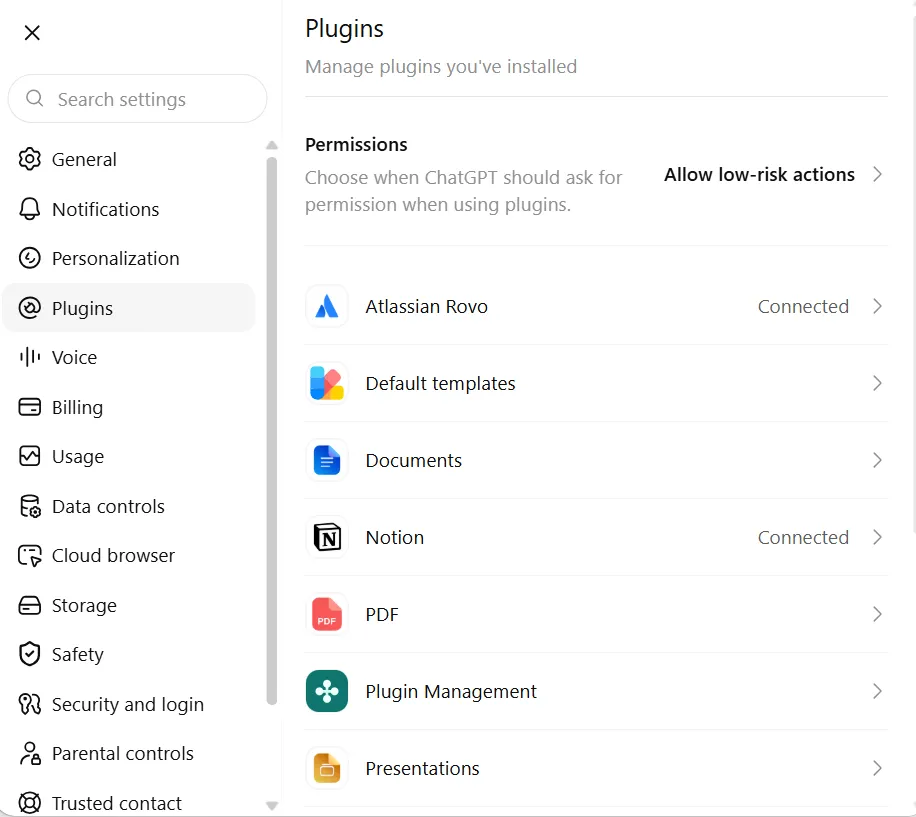
Step 1: Open ChatGPT Settings
Log in to ChatGPT.
Open your profile/settings menu and go to the section where available Apps or Plugins are listed.
Let's Build Something Great Together
Ready to transform your idea into a powerful software solution? Talk to our experts and get a free consultation.
Contact Us
Depending on your workspace, your administrator may control which applications you are allowed to connect.
Step 2: Find the Tool You Want to Connect
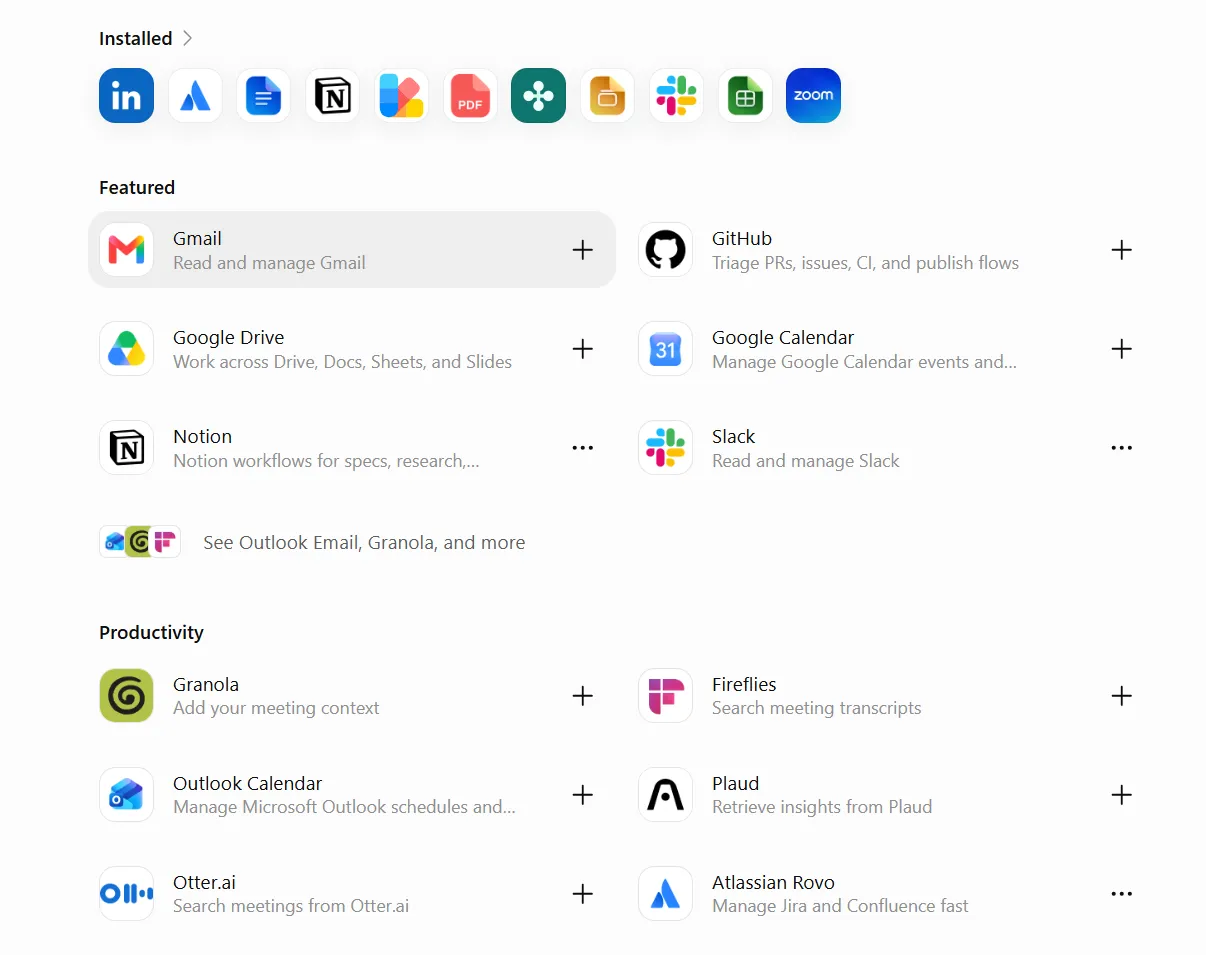
Search for the application you want to use.
For example:
- GitHub
- Slack
- Google Drive
- Atlassian/Jira
- Notion, where available
- other supported project tools
Open the relevant integration.
Step 3: Select Connect
Click the available Connect or authorization option.
You will normally be redirected to the external service.
For example, when connecting GitHub, ChatGPT directs you through GitHub authorization and lets you control which repositories ChatGPT can access. (OpenAI Help Center)
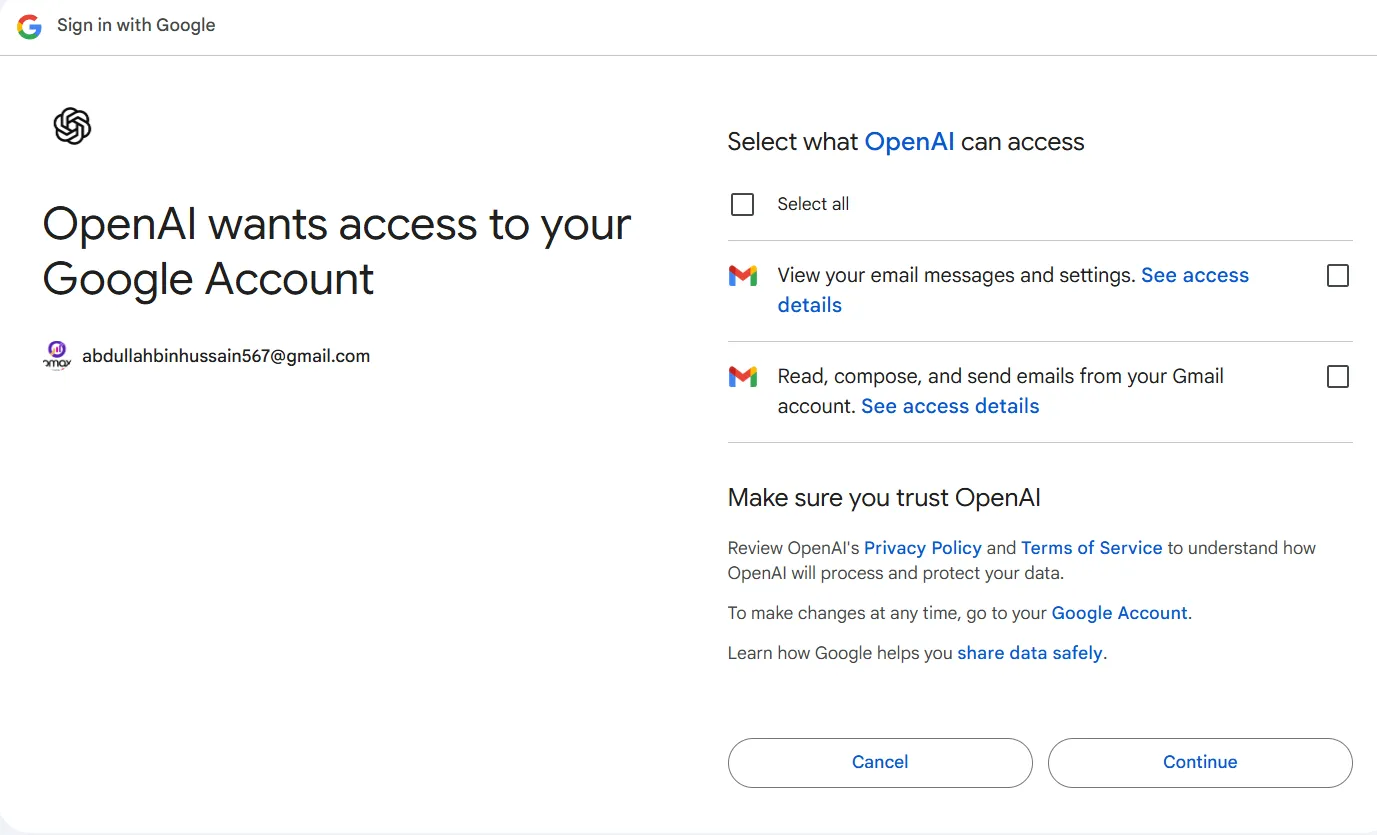
Step 4: Authorize Access
Review the requested permissions carefully.
This step is important.
Do not simply provide AI access to everything.
Use the principle of least privilege.
If your QA work only requires access to one repository, one workspace or selected projects, provide only the access that is needed.
Your organization's security policies should always take priority.
Step 5: Confirm the Connection
After authorization, return to ChatGPT and confirm that the application shows as connected.
For GitHub, for example, repository access can later be adjusted from ChatGPT's app settings or GitHub's repository configuration. (OpenAI Help Center)
Step 6: Test the Integration with a Simple Prompt
Do not immediately give AI a complicated task.
First verify that the integration works.
For Jira:
"Find the Jira issue ABC-123 and summarize the requirement."
For GitHub:
"Find the repository for Project X and explain its main modules."
For Slack:
"Find recent messages related to the login issue."
For documentation:
"Find our documentation related to the customer registration process."
If AI returns the correct information, your basic integration is working.
What Can a QA Engineer Do After Connecting These Tools?
Connecting tools is not the goal.
The real value comes from what you do after the connection.
Here are some practical workflows.
Requirement Analysis
Try:
"Review this Jira story and identify unclear, missing or conflicting requirements before testing begins."
This can help QA participate earlier in the development lifecycle.
Test Scenario Creation
Try:
"Review the requirement, previous related bugs and product documentation. Create positive, negative, boundary and permission-based test scenarios."
You can then review the generated scenarios and decide which ones belong in the final test coverage.
Regression Impact Analysis
Combine Jira and GitHub context:
"Review the changes made for this Jira ticket and tell me which existing modules could be affected and should be included in regression testing."
This can help QA create a more focused regression plan.
It should not be treated as the only regression decision, but it can help identify areas that deserve attention.
Bug History Analysis
Try:
"Search Jira for similar bugs reported during the last six months and summarize any patterns."
This can expose recurring problem areas.
Daily QA Updates
If your communication and project-management tools are connected, AI can help turn project activity into a concise update.
For example:
"Review today's relevant Jira and Slack activity and prepare my QA stand-up update."
Instead of spending ten minutes remembering everything you worked on, you get a first draft that you can quickly verify and adjust.
Release Readiness
Before a release, a QA lead could ask:
"Review the release tickets, unresolved bugs and recent QA discussions. Highlight anything that could block the release."
This does not mean AI gets the authority to approve production.
The final release decision still belongs to the responsible people.
But AI can help make sure important information is not scattered across several systems.
Strong software testing and quality assurance still depends on good processes, risk assessment and human judgment. AI integrations simply give QA teams faster access to the information needed to make those decisions.
A Powerful Example: Jira + GitHub + Slack + AI
The real value becomes clearer when multiple integrations work together.
Imagine you are assigned a Jira ticket for a new booking feature.
Instead of manually researching everything, you ask AI:
"Review Jira ticket ABC-342, check relevant Slack discussions and examine the related GitHub changes. Based on this information, summarize the final requirement, identify risk areas and suggest test scenarios."
The AI can help bring together three different types of information:
- Jira tells you: what should be built.
- Slack tells you: what the team discussed.
- GitHub tells you: what was actually changed.
And then QA validates whether the application behaves correctly.
This is where AI integrations start changing the QA workflow in a meaningful way.
But Can We Trust AI with QA Decisions?
Not blindly.
This is one of the most important points.
AI can misunderstand context.
- It can miss information.
- It can make incorrect assumptions.
- It can even give a confident answer that is wrong.
That is why AI integrations should support QA engineers, not remove them from the process.
A good workflow is:
"AI gathers -> AI analyzes -> Human verifies -> QA decides"
For example, if AI generates 25 test scenarios, the QA engineer should review them.
- Are they relevant?
- Did AI understand the requirement?
- Are important business rules missing?
- Did it invent something that is not part of the system?
This human validation is essential.
The goal of AI is not to eliminate QA thinking.
The goal is to remove unnecessary manual effort so QA has more time for critical thinking, exploratory testing, risk analysis and complex scenarios.
Security and Privacy Should Come First
Before connecting any company system to an AI platform, check your organization's policies.
Pay particular attention to:
- repository permissions
- customer information
- production data
- credentials
- API keys
- confidential documents
- private conversations
- personally identifiable information
Give the integration only the permissions required for the task.
For company environments, admins may also control which integrations users can access. Current ChatGPT workspace integrations include administrative controls and permissions for supported business environments. (OpenAI Help Center)
AI productivity should never come at the cost of security.
AI Integrations Are More Than Automation
Traditional test automation mainly focuses on execution.
For example:
"Open page -> enter data -> click button -> verify result."
AI integrations solve a different problem.
They connect knowledge.
AI can understand information across your QA ecosystem and help you make better decisions before, during and after testing.
That is why this is bigger than simply automating another test case.
It can improve the complete QA workflow:
"Requirement -> Analysis -> Testing -> Bug Reporting -> Retesting -> Regression -> Release"
For teams looking to modernize their quality assurance testing services, combining skilled QA professionals with carefully controlled AI integrations can create a faster and more informed testing process.
Start Small
You do not need to connect ten tools on the first day.
Start with one.
For most QA engineers, Jira is a good starting point.
- Connect it.
- Learn what AI can and cannot do with your project data.
- Create useful prompts.
- Verify the results.
- Then connect another source such as Slack, GitHub or your documentation platform.
Over time, you can build an AI-assisted QA environment around the tools your team already uses.
Final Thoughts
AI integrations for QA engineers are not about adding another fancy tool to the testing process.
They solve a very practical problem:
QA knowledge is scattered everywhere.
- Requirements are in Jira.
- Technical changes are in GitHub.
- Decisions are in Slack.
- Documentation is in Notion or Confluence.
- Reports are in Drive.
AI integrations can bring this information closer together and help QA engineers use it more effectively.
The biggest advantage is not that AI performs every task for us.
The advantage is that QA engineers can spend less time searching, copying, summarizing and switching between tools and more time understanding risks and improving product quality.
The future of QA is therefore not simply:
"AI vs. QA Engineer"
It is:
"QA Engineer + AI + Connected Project Context"
And that combination can make software testing faster, smarter and much more effective.
10 AI Prompts Every Manual Tester Should Have in Their QA Toolkit
Discover 10 practical AI prompts manual testers can use to improve test coverage, find edge cases, analyze bugs, strengthen regression testing, and become more effective QA engineers.
Read More
The Website Accessibility Revolution: Why You Can't Afford to Ignore WCAG 2.2
Website accessibility starts with WCAG 2.2. Learn how accessible design, development, QA, and testing can help create websites that work for everyone.
Read More
Race Conditions in Web Applications: Why Correct Code Produces Wrong Results
Race conditions silently corrupt data when concurrent requests touch shared state at the wrong time. Learn how atomic updates, transactions, idempotency, and locking keep your application correct under real concurrency.
Read More
AI Writes the Code • Stop Blindly Shipping It Without Reviewing the Engineering
A practical perspective on AI-generated code, scalability, maintainability, and engineering judgment and why engineering review still owns the final decision.
Read More
Migrating Databases with AWS DMS With Nearly Zero Downtime
Learn how to migrate databases using AWS DMS with nearly zero downtime using Full Load, CDC, validation, monitoring, and controlled cutover.
Read More
How to Add LiveKit Video Calling to a Next.js App
Add embedded video & audio calling to Next.js with LiveKit Cloud. Compared vs Twilio, Daily, Agora, Zoom — plus token auth, guests & recording.
Read More
We chose ECS over EKS: what we gained and what we gave up
An honest comparison of ECS vs EKS the costs, tradeoffs, and real-world reasoning behind choosing ECS for a production platform on AWS.
Read More
Upgrading Legacy Systems: From Outdated Technology to Competitive Advantage
Learn how to upgrade legacy systems through application modernization, API integration, cloud migration, security improvements, and incremental system upgrades without disrupting business operations.
Read More
Building Distributed Tracing and Observability with AWS X-Ray
A practical guide to correlating requests across a multi-tier application using correlation IDs, AWS X-Ray segments, and structured logging for faster incident debugging.
Read More