
Kafka vs RabbitMQ vs AWS EventBridge: Choosing the Right Architecture Based on Business Requirements

Got a project?
Let's discuss your project
Introduction
Modern applications rarely operate as a single system.
E-commerce platforms, financial applications, SaaS products, logistics systems, and enterprise applications often consist of multiple services that need to communicate with each other.
For example, when a customer places an order, one service may need to process the payment, another may update inventory, another may send an email, and another may update analytics.
Instead of making every service directly dependent on every other service, businesses often introduce event-driven architecture or message-based communication.
These approaches are especially valuable when building custom software development solutions and scalable SaaS platforms where multiple services and integrations need to work together reliably.
This is where technologies such as Apache Kafka, RabbitMQ, and Amazon EventBridge become important.
Although all three can be used to move events or messages between systems, they are designed around different architectural needs.
Choosing one simply because it is popular can result in unnecessary infrastructure complexity, higher operational costs, or an architecture that does not scale well with business requirements.
A practical example is COMP360, a SaaS sales compensation platform built by Omax Tech. The platform brings together compensation, commissions, quotas, territories, and revenue forecasting in a centralized, scalable system, using a microservice-based architecture.
The better question is:
"Which messaging or event-driven technology best matches the business requirement?"
This article compares Kafka, RabbitMQ, and AWS EventBridge based on architecture, scalability, routing, message processing, replay requirements, operational complexity, and real-world use cases.
What Is Event-Driven Architecture?
In a traditional tightly coupled application, one service directly calls another service.
For example:
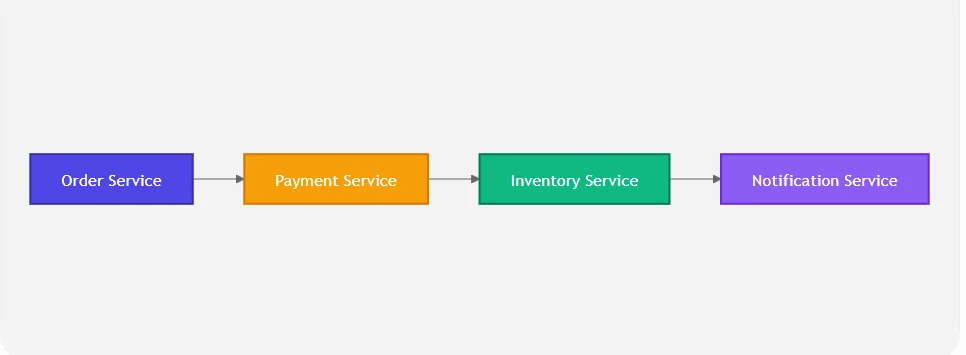
If one service becomes unavailable, the failure can potentially affect the entire workflow.
An event-driven architecture introduces an intermediary layer through which services communicate using events or messages.
A simplified architecture looks like this:
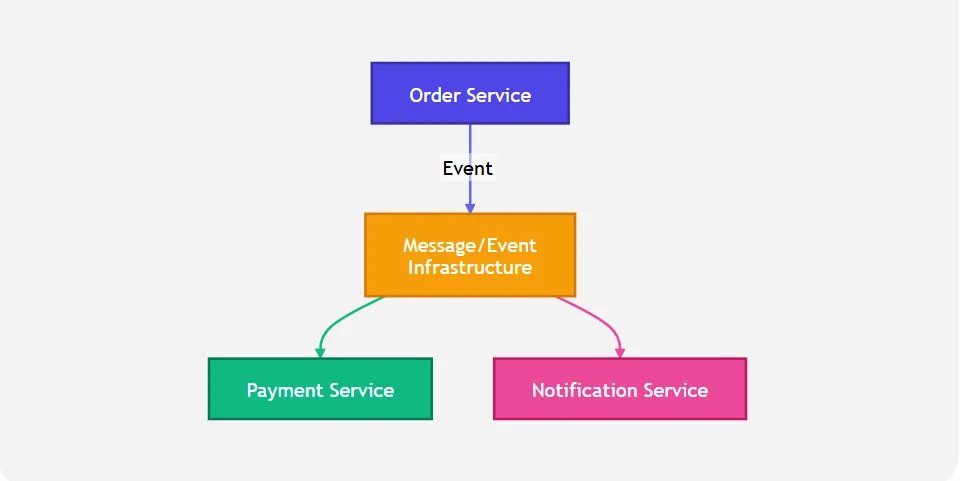
This approach can reduce direct dependencies between services and make systems more flexible.
However, the underlying technology matters because different platforms solve different problems.
Kafka vs RabbitMQ vs AWS EventBridge at a Glance
| Requirement | Apache Kafka | RabbitMQ | AWS EventBridge |
|---|---|---|---|
| Primary model | Event streaming | Message broker | Serverless event bus |
| Best for | High-volume event streams | Application messaging and workflows | AWS/SaaS event routing |
| Scaling | Excellent for large event streams | Good, depending on topology/workload | Managed AWS scaling |
| Message replay | Strong capability through retained events | Not its primary model | Supported through archives/replays |
| Routing | Topic/partition based | Powerful exchange/routing model | Event pattern-based routing |
| Consumer model | Consumer groups | Queues/consumers | Rules and targets |
| Infrastructure management | Higher | Medium | Very low |
| AWS integration | Good, but may require integration work | Requires setup/integration | Excellent |
| Operational complexity | High | Medium | Low |
| Best fit | Streaming/data-intensive systems | Reliable application messaging | AWS-centric event-driven systems |
The important point is that there is no universal winner. Each technology is optimized for a different set of requirements.
1. Apache Kafka
Apache Kafka is a distributed event streaming platform designed for publishing, storing, and processing events at scale.
Kafka organizes events into topics, which are divided into partitions. Consumers can read these events using consumer groups, allowing applications to process large event streams in parallel.
Kafka’s partition-based design provides ordering within a partition and enables load balancing across consumers in a consumer group.
How Kafka Works
A simplified Kafka architecture looks like:
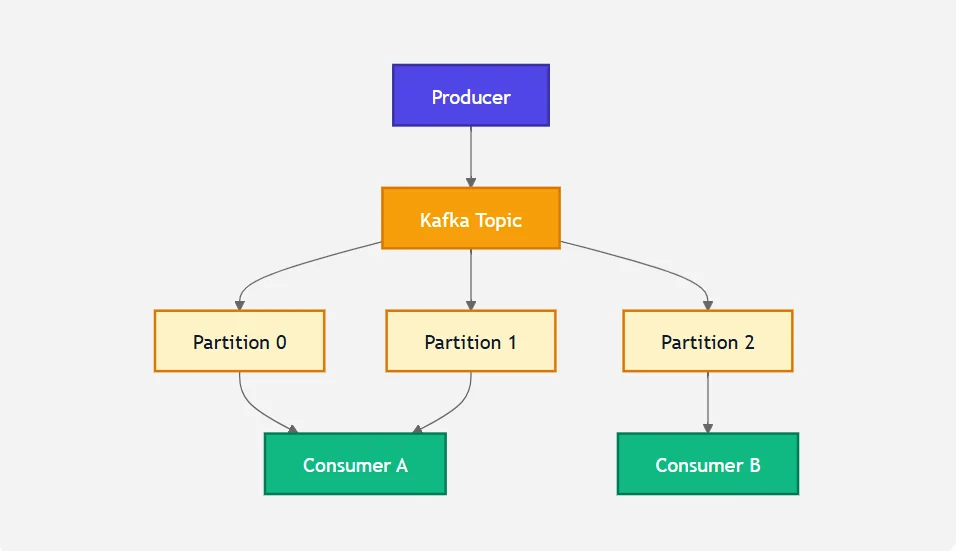
Producers publish events to Kafka topics.
Consumers then read those events. Multiple consumers can work together as a consumer group, with partitions distributed among them.
Why Businesses Choose Kafka
Kafka is particularly attractive when the business needs:
- Very high event throughput
- Large-scale data streaming
- Multiple independent consumers
- Event retention
- Event replay
- Real-time analytics
- Data pipelines
- Stream processing
- Scalable distributed processing
For example, consider an e-commerce company processing millions of customer activities.
The company could publish events such as:
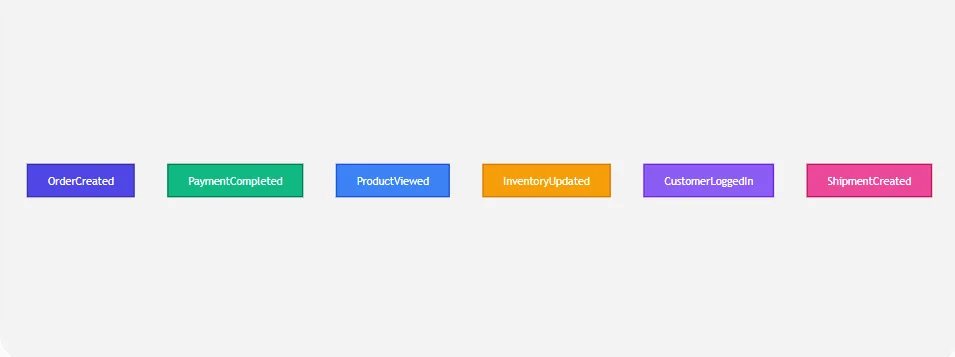
Different applications can consume these events independently.
The analytics system may consume customer activity events while the recommendation system consumes product-view events.
Kafka’s Major Strength: Event Retention
One of Kafka’s biggest architectural advantages is that events are stored in the log rather than simply disappearing after a consumer processes them.
This makes Kafka suitable when historical events need to be consumed again or processed by new consumers.
For example:
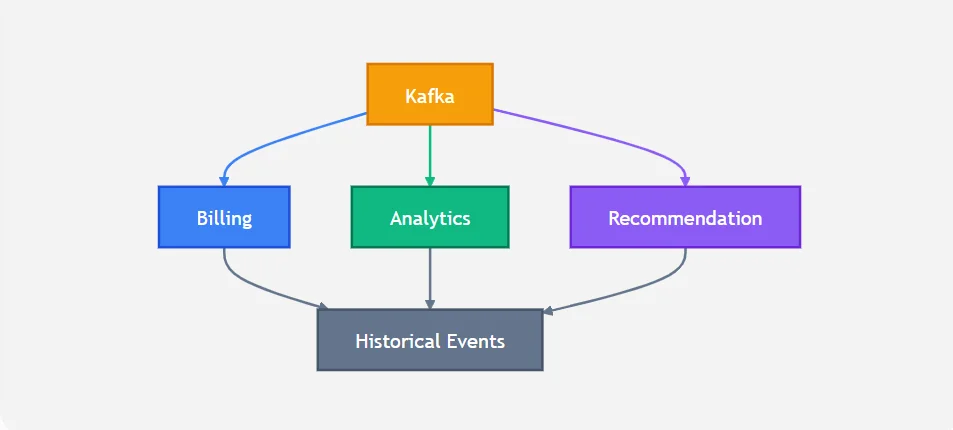
This makes Kafka especially useful for event streaming and data-platform architectures.
When Kafka May Be Overkill
Kafka can introduce significant operational and architectural complexity if the application only needs simple application messaging.
If the requirement is simply:
"Send a task to a worker and process it reliably."
Then Kafka may be more infrastructure than the business actually needs.
For those scenarios, RabbitMQ or a managed AWS service may be a better fit.
2. RabbitMQ
RabbitMQ is a message broker that is widely used for application-to-application communication.
Instead of focusing primarily on a distributed event log, RabbitMQ focuses heavily on message routing, queues, acknowledgements, and reliable delivery.
RabbitMQ uses exchanges to receive messages from publishers and route them to queues, streams, or other exchanges according to routing rules.
How RabbitMQ Works
A simplified RabbitMQ architecture looks like:
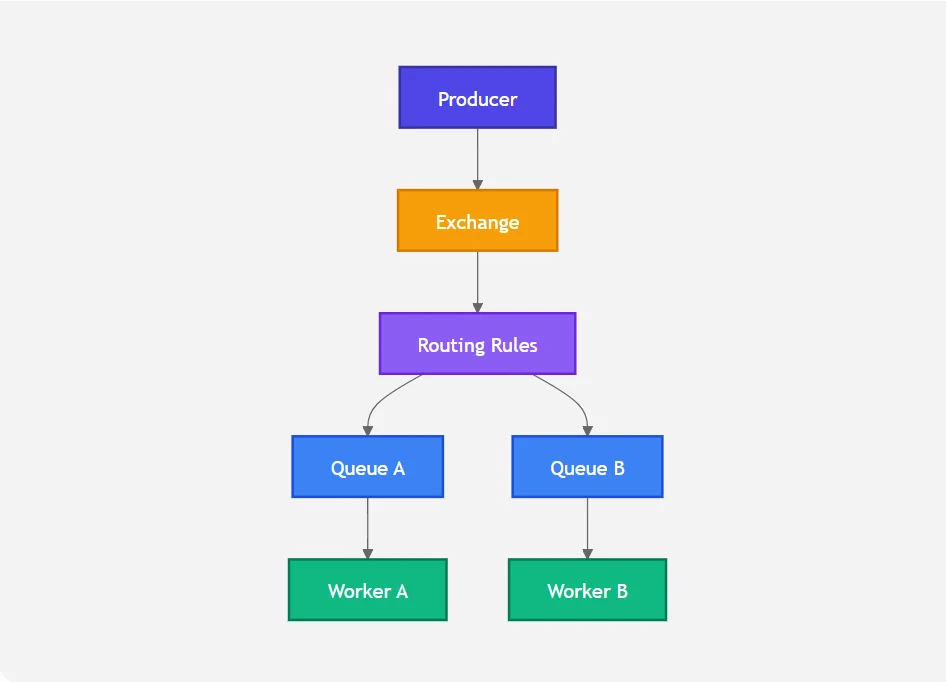
The exchange decides where the message should go.
RabbitMQ supports different exchange types, including:
- Direct
- Topic
- Fanout
- Headers
For example, a topic exchange can route messages using pattern-based routing keys.
Why Businesses Choose RabbitMQ
RabbitMQ is a strong choice when an application requires:
- Reliable task processing
- Application-to-application messaging
- Flexible routing
- Work queues
- Consumer acknowledgements
- Retry/requeue behavior
- Dead-lettering
- Controlled message consumption
RabbitMQ supports acknowledgements so consumers can explicitly confirm that a message has been processed. It also supports negative acknowledgements and requeueing when processing fails.
Example: Order Processing
Imagine an online store where an order requires multiple background operations.
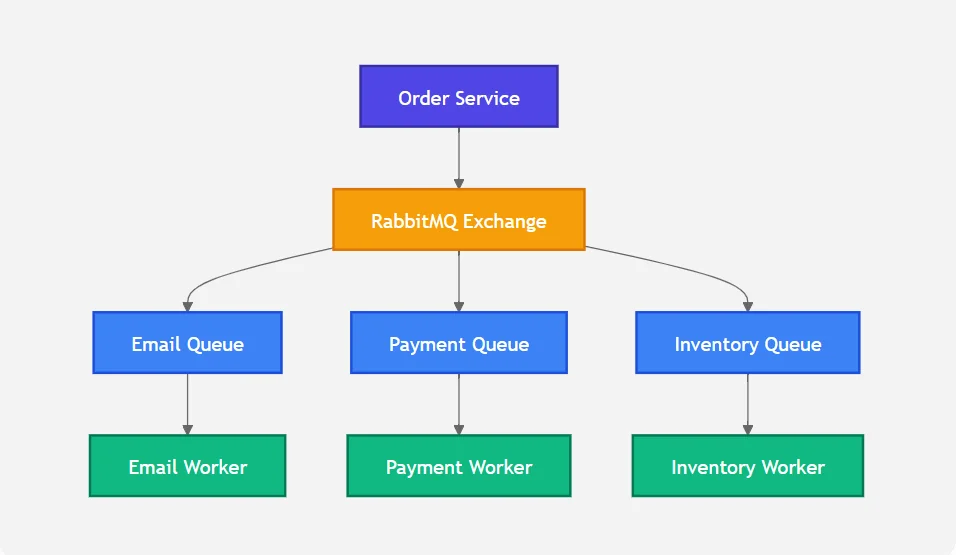
Each worker can process its own queue independently.
This makes RabbitMQ particularly useful for asynchronous application workflows.
RabbitMQ’s Major Strength: Routing
Suppose an organization has different event types:
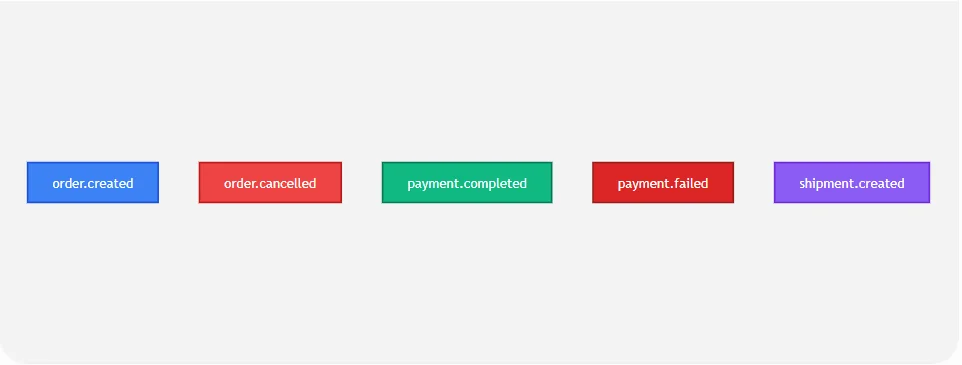
RabbitMQ topic exchanges can route messages based on routing patterns.
For example:
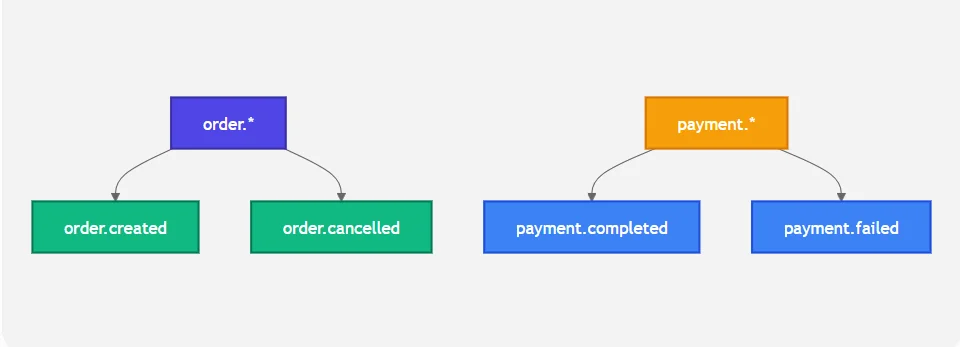
This level of routing control can be valuable for application workflows.
3. AWS EventBridge
Amazon EventBridge is a fully managed serverless event bus designed to connect applications, AWS services, and SaaS applications.
An EventBridge event bus receives events and evaluates them against rules. Matching events are then sent to configured targets.
A simplified architecture looks like:
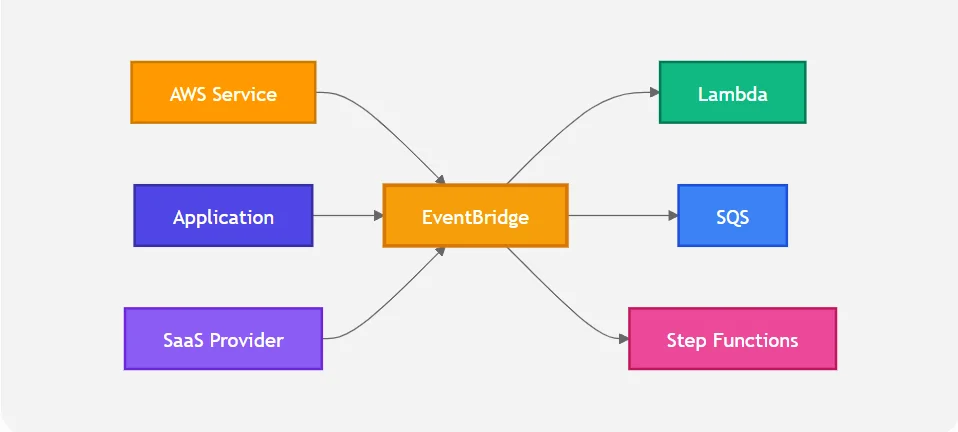
How EventBridge Routing Works
EventBridge uses event patterns to determine which events should be delivered to which targets.
For example:
{"source": ["my.application"],"detail-type": ["OrderCreated"]}
A rule can match this event and send it to a Lambda function, SQS queue, Step Functions workflow, API destination, or another supported target.
Why Businesses Choose EventBridge
EventBridge is particularly useful when:
- The application already runs heavily on AWS
- Teams want minimal infrastructure management
- Multiple AWS services need to react to events
- Events need to be routed based on patterns
- SaaS integrations are required
- Teams want a managed serverless solution
- Development teams want to avoid managing brokers
EventBridge also supports event archives and replay, allowing organizations to store selected events and replay them later.
EventBridge and AWS Integration
One of EventBridge’s biggest advantages is its integration with the AWS ecosystem.
For example:
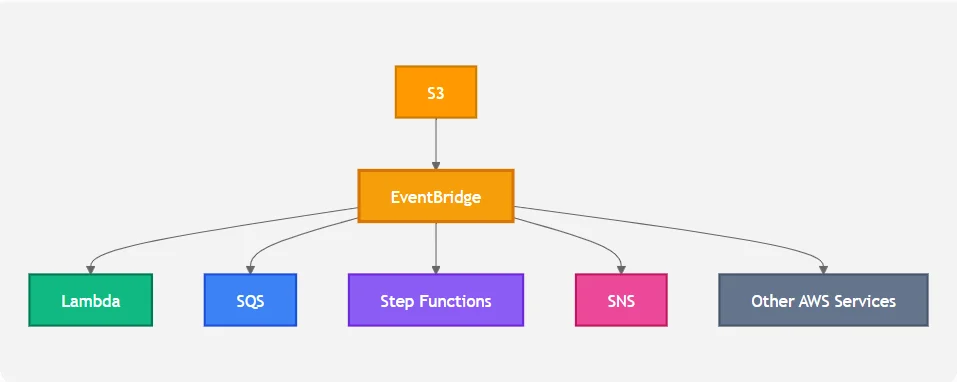
This can significantly reduce the amount of custom infrastructure required.
Let's Build Something Great Together
Ready to transform your idea into a powerful software solution? Talk to our experts and get a free consultation.
Contact Us
EventBridge can also integrate with SaaS and custom applications, making it useful beyond AWS-native events.
Kafka vs RabbitMQ vs EventBridge: The Architectural Difference
The easiest way to understand these technologies is to look at the problem each one is primarily solving.
Kafka
Think:
"I have a large stream of events that many consumers need to process."
Kafka is well suited to high-volume event streaming, distributed processing, analytics, and applications where retaining and processing historical events is important.
RabbitMQ
Think:
"I need reliable application messaging and flexible routing between producers and consumers."
RabbitMQ is well suited to asynchronous jobs, workflows, task queues, and complex message-routing scenarios.
EventBridge
Think:
"I want different systems and AWS services to react to business events without managing messaging infrastructure."
EventBridge is well suited to managed event routing, AWS-native architectures, SaaS integration, and serverless applications.
Choosing Based on Business Requirements
Instead of asking which technology is “better”, organizations should first identify the actual business requirement.
Requirement 1: Very High Event Volume
If the application generates a very large number of events and needs scalable event streaming, Kafka is often the strongest candidate.
Example:
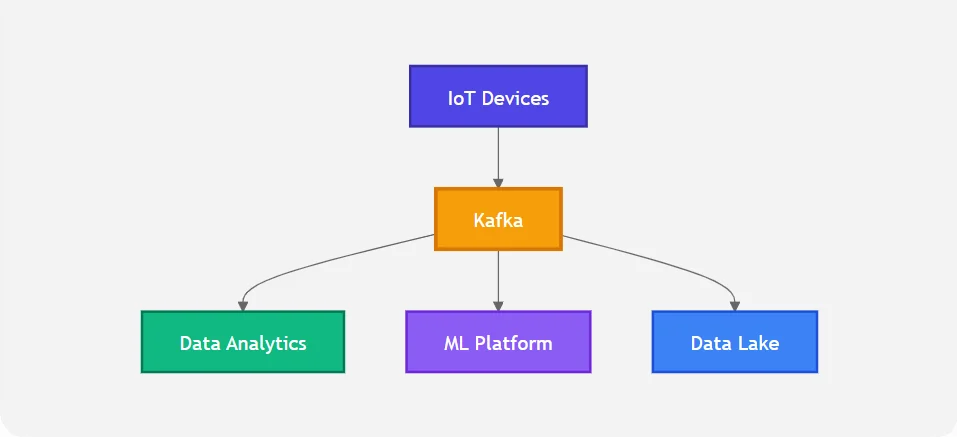
Kafka’s partitioning model allows workloads to be distributed across consumers and provides ordering within partitions.
Recommended: Kafka
Requirement 2: Background Jobs and Task Processing
Suppose an application needs to process:
- Email jobs
- PDF generation
- Image processing
- Payment processing
- Notification tasks
RabbitMQ can be a strong fit because its queue and acknowledgement model maps naturally to worker-based processing.
Recommended: RabbitMQ
Requirement 3: AWS-Native Event-Driven Application
If most of the infrastructure already runs on AWS, EventBridge can simplify the architecture.
For example:
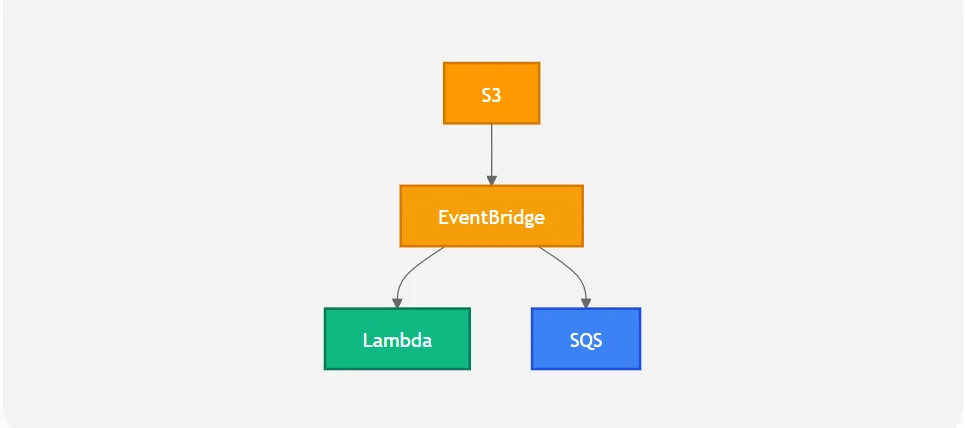
There is no need for the development team to manage a traditional message broker.
Recommended: AWS EventBridge
Requirement 4: Complex Message Routing
If the system needs sophisticated routing rules based on routing keys, RabbitMQ can be a strong option.
For example:
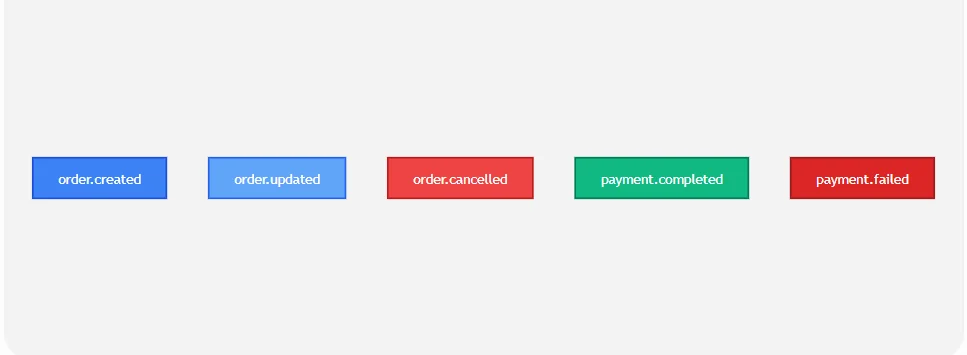
RabbitMQ exchanges can route messages using direct, topic, fanout, and other exchange models.
Recommended: RabbitMQ
Requirement 5: Event Replay and Historical Processing
If the organization needs to retain a large event stream and allow multiple consumers to process historical data, Kafka is often a natural fit.
EventBridge also provides archives and replay capabilities, which can be useful when the requirement is focused on managed AWS event processing rather than a large-scale streaming platform.
Recommended: Kafka for streaming-centric architectures; EventBridge for managed AWS event routing with replay requirements.
Requirement 6: Minimum Infrastructure Management
If the engineering team does not want to manage brokers, clusters, scaling, or messaging infrastructure, EventBridge provides a strong managed option.
This can allow developers to focus more on business logic rather than messaging infrastructure.
Recommended: AWS EventBridge
A Practical Decision Framework
A useful way to select between the three technologies is to ask the following questions.
Question 1: Do we need a high-volume event streaming platform?
"If yes: Consider Kafka."
Question 2: Do we primarily need reliable application messaging and worker queues?
"If yes: Consider RabbitMQ."
Question 3: Is our architecture heavily based on AWS?
"If yes: Consider EventBridge."
Question 4: Do we need complex routing between queues and consumers?
"If yes: Consider RabbitMQ."
Question 5: Do we need large-scale event retention and stream processing?
"If yes: Consider Kafka."
Question 6: Do we want a serverless, managed event bus?
"If yes: Consider EventBridge."
Can They Be Used Together?
Yes.
Choosing one technology does not always mean eliminating the others.
Large organizations may use different technologies for different parts of the architecture.
For example:
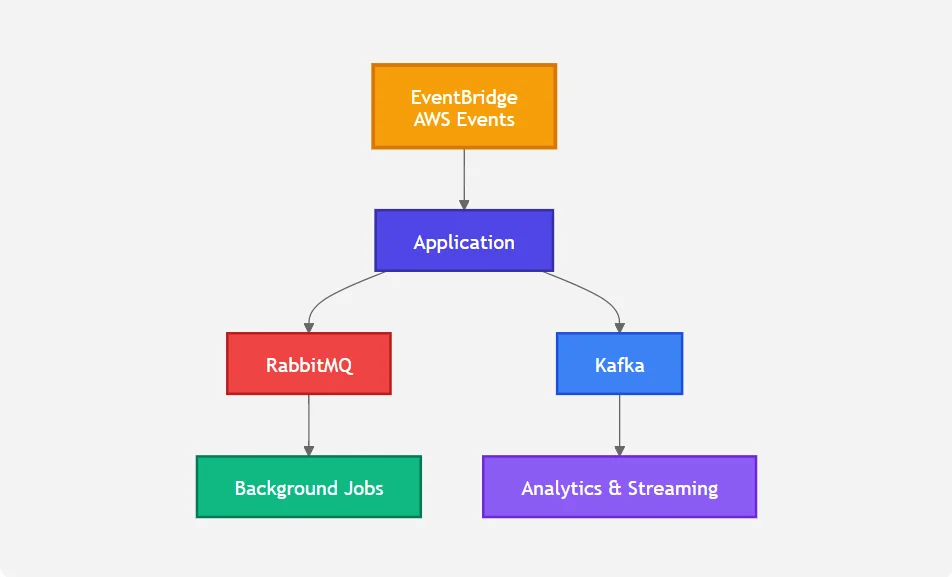
This approach can be useful when each technology has a clearly defined responsibility.
However, introducing multiple messaging platforms also increases operational and architectural complexity.
Therefore, businesses should avoid using all three simply because they are available.
Cost and Operational Considerations
Technology selection should not be based only on performance.
The total cost of ownership includes:
- Infrastructure
- Cloud services
- Engineering effort
- Monitoring
- Maintenance
- Upgrades
- Disaster recovery
- Developer expertise
- Operational complexity
Kafka can provide excellent scalability, but operating a Kafka-based platform requires appropriate expertise in topics, partitions, replication, consumer groups, monitoring, and capacity planning.
RabbitMQ is generally easier to reason about for traditional application messaging, but its topology and operational design still need careful management.
EventBridge removes much of the infrastructure management burden because AWS manages the underlying service.
Therefore:
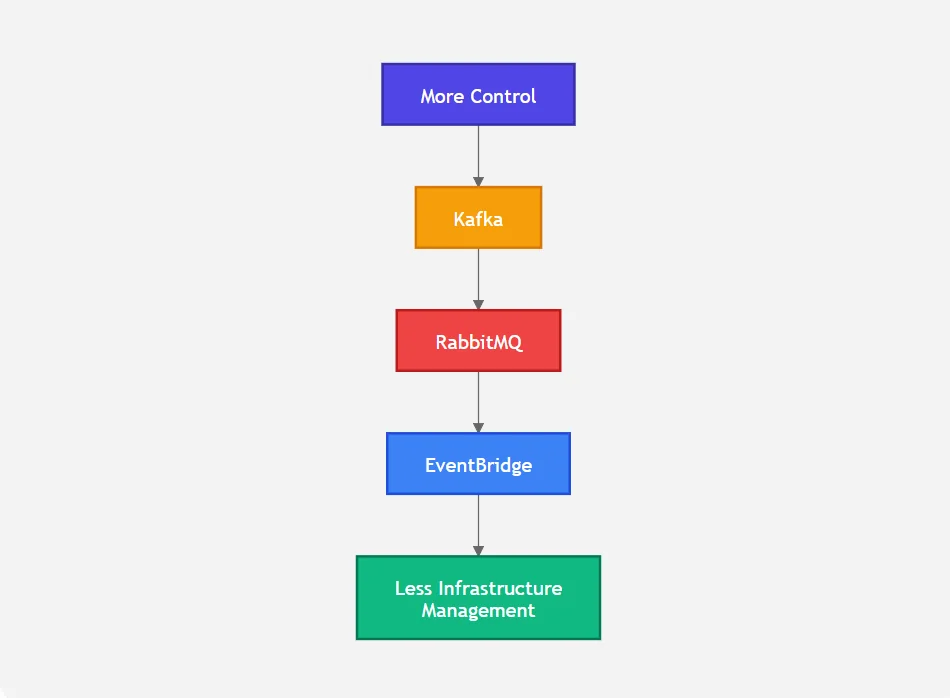
This is a simplified comparison rather than a ranking. The right choice depends on the application’s requirements.
Common Mistakes When Choosing a Messaging Technology
1. Choosing Kafka Because It Is Popular
Kafka is powerful, but not every application requires an event streaming platform.
For a small application that only needs background jobs, Kafka may add unnecessary complexity.
2. Choosing RabbitMQ for Massive Event Streaming
RabbitMQ can handle substantial workloads, but if the core requirement is a large-scale event streaming platform with long-lived event data and many independent consumers, Kafka may be a more natural architectural fit.
3. Choosing EventBridge Without Considering AWS Dependency
EventBridge is an excellent choice for AWS-centric architectures, but teams should consider how deeply they want their architecture tied to AWS-specific services and patterns.
4. Ignoring Operational Complexity
A technology that looks inexpensive at the infrastructure level can become expensive if it requires significant engineering effort to operate and maintain.
5. Comparing Only Throughput
Throughput is only one architectural requirement.
Businesses should also consider:
- Ordering
- Delivery guarantees
- Routing
- Replay
- Retention
- Latency
- Scalability
- Integration requirements
- Operational effort
- Cost
- Team expertise
Final Recommendation
There is no single winner in the Kafka vs RabbitMQ vs AWS EventBridge comparison.
The right technology depends on the problem the business is trying to solve.
Choose Kafka when:
- You need high-volume event streaming.
- You need scalable distributed consumers.
- You need long-lived event retention.
- Multiple systems need to process the same event stream.
- Real-time analytics or data pipelines are important.
- Event replay and historical processing are core requirements.
Choose RabbitMQ when:
- You need reliable application messaging.
- You are building background workers.
- You need flexible message routing.
- Queue-based processing is central to the application.
- Consumer acknowledgements and retry/requeue behavior are important.
- You want a mature message-broker model.
Choose AWS EventBridge when:
- Your architecture is primarily AWS-based.
- You want a managed, serverless event bus.
- You need to route events between AWS services, applications, and SaaS systems.
- You want to minimize infrastructure management.
- Event pattern-based routing is important.
- You want managed event archiving and replay capabilities.
The most important architectural lesson is simple:
"Do not choose a messaging technology based on popularity. Choose it based on business requirements, operational capabilities, scalability needs, and the way your applications need to communicate."
Kafka, RabbitMQ, and AWS EventBridge can all be excellent choices but for different problems.
10 AI Prompts Every Manual Tester Should Have in Their QA Toolkit
Discover 10 practical AI prompts manual testers can use to improve test coverage, find edge cases, analyze bugs, strengthen regression testing, and become more effective QA engineers.
Read More
The Website Accessibility Revolution: Why You Can't Afford to Ignore WCAG 2.2
Website accessibility starts with WCAG 2.2. Learn how accessible design, development, QA, and testing can help create websites that work for everyone.
Read More
Race Conditions in Web Applications: Why Correct Code Produces Wrong Results
Race conditions silently corrupt data when concurrent requests touch shared state at the wrong time. Learn how atomic updates, transactions, idempotency, and locking keep your application correct under real concurrency.
Read More
AI Writes the Code • Stop Blindly Shipping It Without Reviewing the Engineering
A practical perspective on AI-generated code, scalability, maintainability, and engineering judgment and why engineering review still owns the final decision.
Read More
Migrating Databases with AWS DMS With Nearly Zero Downtime
Learn how to migrate databases using AWS DMS with nearly zero downtime using Full Load, CDC, validation, monitoring, and controlled cutover.
Read More
How to Add LiveKit Video Calling to a Next.js App
Add embedded video & audio calling to Next.js with LiveKit Cloud. Compared vs Twilio, Daily, Agora, Zoom — plus token auth, guests & recording.
Read More
We chose ECS over EKS: what we gained and what we gave up
An honest comparison of ECS vs EKS the costs, tradeoffs, and real-world reasoning behind choosing ECS for a production platform on AWS.
Read More
Upgrading Legacy Systems: From Outdated Technology to Competitive Advantage
Learn how to upgrade legacy systems through application modernization, API integration, cloud migration, security improvements, and incremental system upgrades without disrupting business operations.
Read More
Building Distributed Tracing and Observability with AWS X-Ray
A practical guide to correlating requests across a multi-tier application using correlation IDs, AWS X-Ray segments, and structured logging for faster incident debugging.
Read More