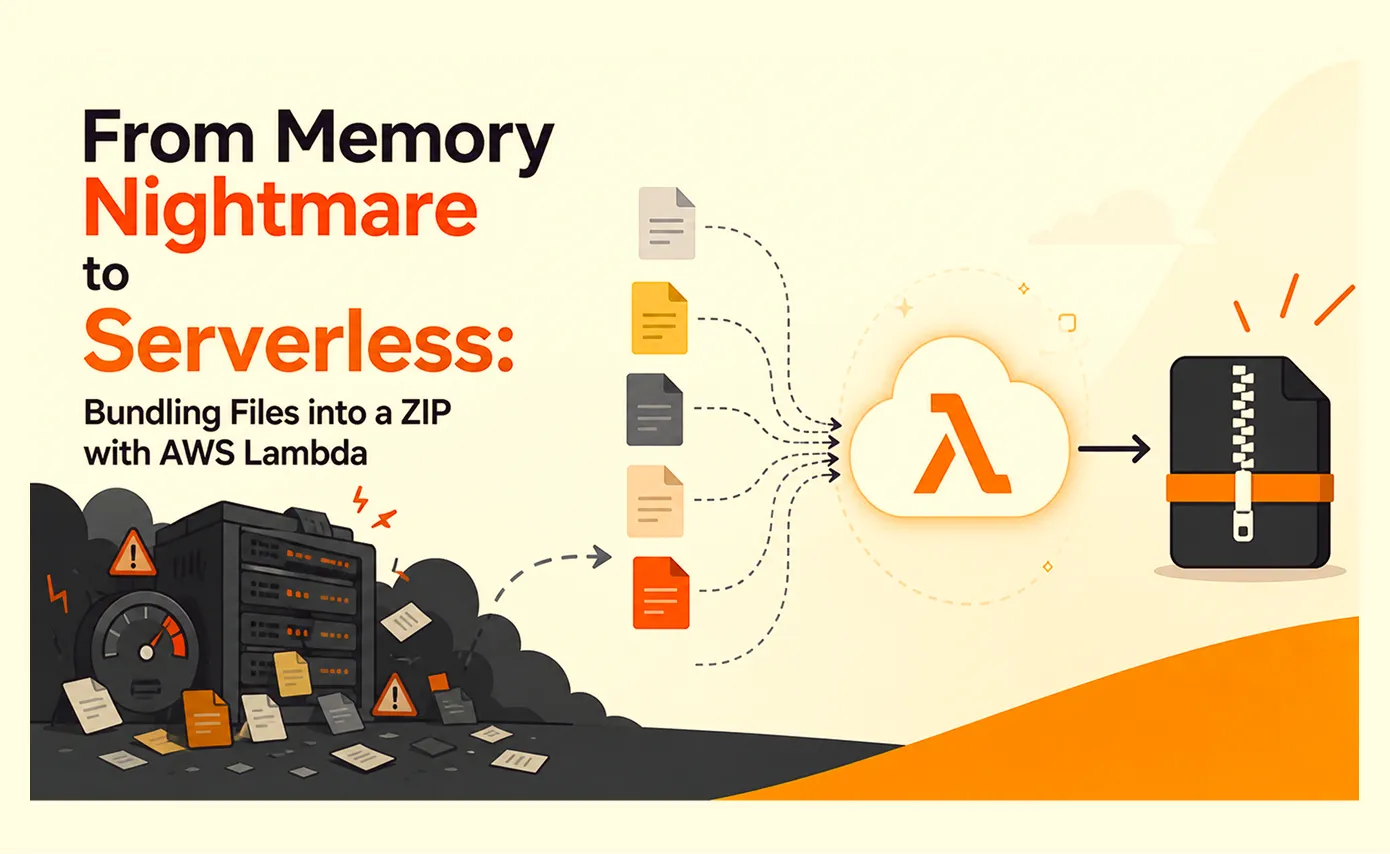
From Memory Nightmare to Serverless: Bundling Files into a ZIP with AWS Lambda

Got a project?
Let's discuss your project
Introduction
A straightforward "download all these files as one ZIP" request that worked perfectly on my laptop and fell over the first day it met real production load. Here's the debugging story, the scaling options I ruled out, and why AWS Lambda was the right answer.
Field Notes: Scaling Data Exports - Part II
It started as one of those tickets that looks like an afternoon of work: "Let users select a bunch of files and download them all as a single ZIP." Simple. I wrote the endpoint it looped over the selected files, pulled each one from storage, added it to an archive, and streamed the archive back to the browser. It worked on the first try. I tested it with the handful of files sitting in my local folder, everything zipped up neatly, I deployed it, and I closed the ticket.
Then it reached production, and the nightmare started. Within a day the alerts were firing: memory on the application servers climbing to the ceiling and staying there, response times crawling, health checks flapping in and out and the part that turned a feature bug into a full incident, requests that had nothing to do with exporting timing out and failing, purely because they'd been unlucky enough to land on a box that a ZIP build had already consumed. The feature worked exactly as written. It was just taking everything else down with it.
Production vs. local: where it fell apart
So I sat down and actually analyzed what was different. My local machine had maybe five small files in the test folder. In production, a user could select several hundred records, each with an attached document. And the endpoint did exactly what I'd told it to: it pulled every one of those files out of object storage down onto the application server, held them, built one big archive in memory, and held that too.
Put some numbers on it hypothetically, but not unrealistically. Say a user selects 300 documents that average 15 MB each. The naive endpoint pulls all of them onto the application server first roughly 4.5 GB of source data staged in memory or on local disk and then assembles the ZIP alongside them, so at its peak that single request is holding the inputs and a multi-gigabyte output at the same time. Now suppose three users do this within the same minute on the same box: that's comfortably over 10 GB of transient footprint on a server that might have 2–4 GB of headroom to spare. There is no graceful degradation at that point. The box hits its memory ceiling and starts failing everything, exported or not.
That's the shape of the problem: a single request whose resource cost is unbounded and proportional to user input, running on machines that also have to serve everyone else. It doesn't just fail the download it dragged down every unrelated request unlucky enough to share the machine.
The problems we ran into
Broken down, the single "simple" endpoint had five distinct failure modes stacked on top of each other:
- 1Every source file came back to the app server first. To add a file to a ZIP, the naive approach downloads it from object storage onto the application server. Bundling 500 files means pulling all 500 down first the app server becomes a temporary staging ground for gigabytes of data it has no reason to hold.
- 2The finished archive lived there too. On top of the source files, the ZIP itself was assembled in memory before being sent back. Now you're holding the inputs and the output at once.
- 3Footprint scaled with archive size. A small export was fine; a large one consumed hundreds of megabytes to gigabytes on a single request an unpredictable, unbounded cost.
- 4Concurrency compounded it. A couple of simultaneous large exports could exhaust RAM on the box, and that didn't just fail the exports it took down unrelated traffic on the same machine.
- 5Timeouts and dead spinners. Streaming hundreds of files past a load balancer's request-duration limit cut the download off mid-stream, leaving a corrupt ZIP and the user staring at an opaque spinner with no progress and no way to cancel.
The underlying issue: the application server is the wrong place to do this work at all. Bundling bulk files is I/O-heavy, bursty, and its resource cost is proportional to something the app server can't predict. Forcing it through the machines that serve interactive traffic means they're always one large download away from contending for the same finite memory.
The options I weighed and ruled out
Before reaching for anything fancy, I went through the obvious fixes and crossed them off one by one.
"Q. Do we need bigger or more servers vertical or horizontal scaling?"
No. The load isn't sustained; it's spiky and occasional. Provisioning bigger boxes (vertical scaling) or more boxes (horizontal scaling) to survive a burst that happens a few times a day means paying around the clock for capacity that sits idle almost all the time and it still doesn't fix the real problem. A large enough bundle still runs on the same machines as normal traffic, so the blast radius stays exactly where it was. Scaling the whole fleet to protect one occasional feature is expensive and misses the point.
"Q. Do we need a third-party bundling or export service?"
No. The files are user documents some sensitive. Shipping them out to an external vendor to be zipped means user data leaves our trust boundary, which is a privacy, data-governance, and compliance problem before it's ever a technical one. Add vendor lock-in and per-use fees on top. The files already live in our own object storage; sending them on a round trip through someone else's infrastructure is the wrong direction.
"Q. Do we push it to the client and zip in the browser?"
No. Zipping in the browser sounds appealing offload it entirely but it just relocates the same memory problem onto a device we don't control. The browser would have to download every file over the user's bandwidth, hold them all in memory, and compress them locally; that collapses for large sets, can't resume on failure, and forces us to hand the client direct access to files we'd rather keep mediated. It's a server concern shoved onto an unreliable client.
A. What we actually needed: serverless, on AWS Lambda
What the problem really called for was a way to run this one feature in isolation something that scales up exactly when someone triggers it and costs nothing when nobody does. That's the definition of serverless, and specifically I chose AWS Lambda. Here's the reasoning:
- It scales on demand, per invocation. Ten people click "Download All" and you get ten independent Lambda executions not ten bundles fighting over one server's RAM. Nobody clicks, nothing runs, nothing costs. This is elastic scalability scoped to a single feature rather than the whole application.
- Isolated blast radius means real fault tolerance. Each export runs in its own execution environment. One failing or memory-heavy bundle can't touch the others or the main app. A crash is contained, and retries are isolated.
- It stays inside our trust boundary. Lambda runs in our own AWS account, can be locked to our VPC, and talks directly to our existing object storage (Amazon S3). The files never leave our governance perimeter which answers the third-party privacy concern for free.
- The cost model fits the usage. The AWS Lambda free tier covers a large number of invocations, and beyond it, pay-per-use billing means we're charged for compute by the millisecond only while a bundle is actually building. No idle fleet to pay for.
The architecture we moved to
Instead of building archives in-process, we offloaded the mechanical work to a dedicated Lambda function whose only job is: take a list of objects, stream them into a ZIP, and stream the ZIP straight back to object storage. Three ideas make it work.
1. Stream, never buffer.
This is the core of the fix, so it's worth being precise about the mechanism rather than waving at it. The function never downloads a whole file, and it never holds the finished archive. Instead it wires up one continuous pipeline and lets bytes flow through it:
Let's Build Something Great Together
Ready to transform your idea into a powerful software solution? Talk to our experts and get a free consultation.
Contact Us
- It opens a read stream from S3 for a single source object bytes, not a buffered blob.
- That stream is piped directly into a ZIP archiver that compresses on the fly.
- The archiver's output is piped straight into a multipart upload streaming back to S3.
So a chunk of a file arrives from the source, passes through compression, and leaves for the destination in one motion only a small, fixed-size buffer is ever in memory at any given instant, and stream backpressure keeps a fast source from outrunning a slower upload (the pipeline slows the read when the write can't keep up, instead of piling bytes into RAM). The function walks the file list one object at a time through that same pipeline, which is the whole point: whether the finished archive is 10 megabytes or 10 gigabytes, the memory footprint stays essentially constant.
"Files flow through the function like water through a pipe memory stays flat whether the archive is 10 megabytes or 10 gigabytes."
Contrast that with the in-process version, whose footprint was the sum of every source file plus the entire output ZIP the exact 10-GB-on-a-2-GB-box math from earlier. The streaming design replaces that sum with a trickle: at no point is the whole thing resident anywhere, and that single property is what turns the memory blow-up from an incident waiting to happen into a non-issue.
2. The application only orchestrates.
The main app decides which files to include and what to name them inside the archive, then invokes the Lambda and hands off. It never touches the file bytes. When the function finishes, the app records the resulting archive as a normal downloadable file so existing permission checks, audit trails, and time-limited download links all keep working, and the ZIP isn't some special case living outside the system.
3. A shared store carries progress across the boundary.
The function and the application are now two separate processes, potentially in different languages. To bridge them, the Lambda writes progress (files processed, total, final status, output location) into a shared, Redis-compatible in-memory store the app already uses. The app polls that store to drive a progress bar and detect completion. Polling is the authoritative signal; a lightweight publish/subscribe notification can ride alongside it as a latency optimization, but the design never depends on a message being delivered a missed notification can never strand an export, because the poll always catches up. That's a deliberate fault-tolerance choice.
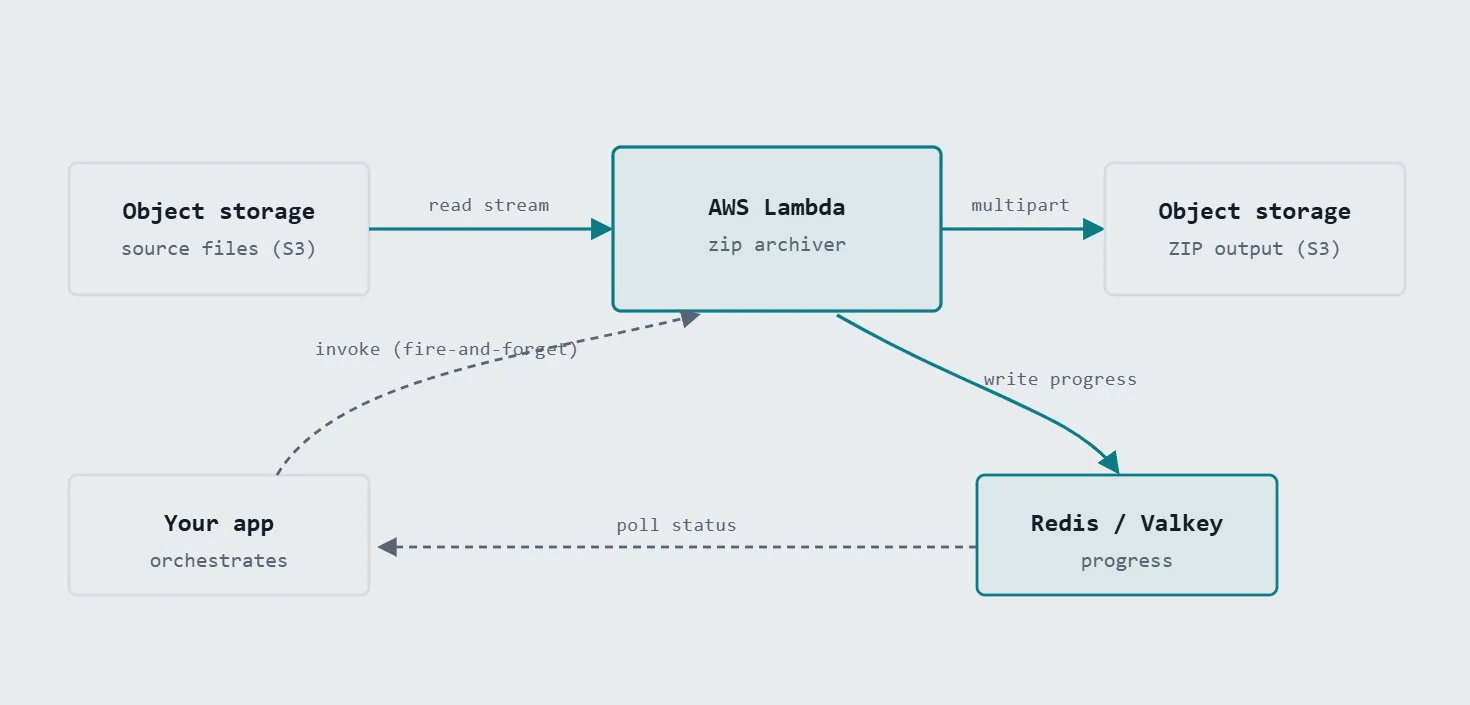
The app invokes and polls; Lambda does the streaming work in isolation:
S3 source → (read stream) → Lambda zip archiver → (multipart) → S3 output
writing progress to a Redis/Valkey store the app polls.
The invocation itself is fire-and-forget: the app triggers the Lambda asynchronously and returns immediately, then tracks progress through the shared store. The user's request is never left waiting on the archive build.
What we gained
- Flat memory, regardless of archive size. Because nothing is buffered whole, a 5-gigabyte export uses roughly the same memory as a 50-megabyte one. The cost that used to scale with the archive simply doesn't anymore.
- Complete isolation from the app servers. The heavy I/O happens in a separate execution environment. A massive export can no longer starve, slow, or crash the machines serving interactive traffic they share nothing.
- On-demand scalability with zero idle cost. Lambda scales out per-invocation by default. Ten simultaneous exports become ten independent instances, not ten jobs fighting over one box. Nothing to pre-provision, nothing to pay for while idle.
- Fault tolerance by construction. Failures are contained to a single invocation and retried in isolation; polling guarantees no export is ever silently lost.
- A real, cancellable, progress-tracked experience. Users watch progress advance and can abort mid build; the function checks for an abort signal between files and stops early instead of finishing work no one wants.
Taming cold starts later, if you need to
The one genuine tax on serverless is the cold start: a Lambda that hasn't run recently pays a short startup penalty on its first invocation while the runtime spins up. It's worth being honest that this exists but for a background bundle that already takes several seconds to build, an extra fraction of a second is noise, so we measured it and deliberately did nothing.
If cold starts ever do matter for your workload, there's a well-worn toolbox, roughly in order of how much complexity they add:
- Keep the package and handler lean. A smaller deployment artifact and a light initialization path shrink the cold start directly the cheapest win, and just good hygiene.
- Warm it on a schedule. A periodic "ping" invocation keeps an instance alive during business hours, so real users rarely hit a cold one.
- Provisioned concurrency. AWS Lambda can keep a set number of instances initialized and ready at all times it removes cold starts entirely for that capacity, at the cost of paying to keep them warm. Reserve this for latency-critical paths, not background jobs.
The point is that cold starts are a known, bounded problem with off-the-shelf mitigations not a reason to avoid serverless, and easy to defer until you can prove you need it.
The other honest trade-offs
- Network configuration is a real prerequisite. If the function needs private resources (like the shared progress store), it has to be attached to the right VPC and once it is, its route back out to object storage has to be arranged deliberately too. A one-time setup, but the part most likely to trip you up on first deployment; it deserves a checklist, not improvisation.
- Cross-process coordination has sharp edges. Because the Lambda and the app both read and write the same shared store, they must agree exactly on key naming and configuration. A subtle mismatch a differing key prefix, say lets each side read and write different keys, so progress silently never appears even though the archive builds perfectly. Easy to get right, but invisible until you look.
- Slight polling latency. Progress and completion are observed on a polling interval rather than instantly. A few seconds of lag on a job that runs for tens of seconds is a fine trade, but it isn't real-time.
Where this goes next: parallel, fan-out archiving
The current design uses one Lambda invocation per export. Streaming already keeps memory flat, so a single invocation handles very large archives comfortably but the time to build one still scales with the number of files, since they're processed one after another.
The natural next step is fan-out parallelism: split the file list across several concurrent invocations, have each build a partial archive of its slice, and combine the parts. Bundling then becomes limited by your slowest slice rather than the total file count the same map-reduce shape distributed processing uses, applied to archive construction. From there:
- Larger and larger archives become routine, since multipart streaming imposes no practical ceiling and parallelism keeps wall-clock time in check.
- The worker generalizes. Because the Lambda carries no knowledge of what it's zipping it just takes a list of objects and names the same function can back any bulk-file export in the system. New export types become configuration, not new infrastructure.
- Lower-latency completion signals can be layered on via event-driven pub/sub, tightening the feedback loop while polling remains the safety net.
Takeaway
A "bundle all the files" feature ties a workload with unbounded, size-proportional memory cost to the machines that serve your users and it will look perfectly healthy on your laptop right up until production load finds it. Move it off: stream object storage straight through an archive and back to object storage in an isolated AWS Lambda, orchestrate from the app, and track progress through a shared store. You trade a manageable cold start for flat memory, on-demand scalability, fault tolerance, and no request timeouts with a clean path to parallel, fan-out archiving the day a single invocation stops being fast enough.
Facing similar scaling challenges with your application? Our DevOps services can help you architect serverless solutions that grow with your business.
Field Notes on Scaling Data Exports Part I The Export That Kept Timing Out: scaling computation-heavy exports with async background jobs.

10 AI Prompts Every Manual Tester Should Have in Their QA Toolkit
Discover 10 practical AI prompts manual testers can use to improve test coverage, find edge cases, analyze bugs, strengthen regression testing, and become more effective QA engineers.
Read More
The Website Accessibility Revolution: Why You Can't Afford to Ignore WCAG 2.2
Website accessibility starts with WCAG 2.2. Learn how accessible design, development, QA, and testing can help create websites that work for everyone.
Read More
Race Conditions in Web Applications: Why Correct Code Produces Wrong Results
Race conditions silently corrupt data when concurrent requests touch shared state at the wrong time. Learn how atomic updates, transactions, idempotency, and locking keep your application correct under real concurrency.
Read More
AI Writes the Code • Stop Blindly Shipping It Without Reviewing the Engineering
A practical perspective on AI-generated code, scalability, maintainability, and engineering judgment and why engineering review still owns the final decision.
Read More
Migrating Databases with AWS DMS With Nearly Zero Downtime
Learn how to migrate databases using AWS DMS with nearly zero downtime using Full Load, CDC, validation, monitoring, and controlled cutover.
Read More
How to Add LiveKit Video Calling to a Next.js App
Add embedded video & audio calling to Next.js with LiveKit Cloud. Compared vs Twilio, Daily, Agora, Zoom — plus token auth, guests & recording.
Read More
We chose ECS over EKS: what we gained and what we gave up
An honest comparison of ECS vs EKS the costs, tradeoffs, and real-world reasoning behind choosing ECS for a production platform on AWS.
Read More
Upgrading Legacy Systems: From Outdated Technology to Competitive Advantage
Learn how to upgrade legacy systems through application modernization, API integration, cloud migration, security improvements, and incremental system upgrades without disrupting business operations.
Read More
Building Distributed Tracing and Observability with AWS X-Ray
A practical guide to correlating requests across a multi-tier application using correlation IDs, AWS X-Ray segments, and structured logging for faster incident debugging.
Read More