The Right Way to Migrate from MySQL to AWS Aurora DSQL

Got a project?
Let's discuss your project
Introduction
Migrating a production database is one of the highest-risk changes you can make to an application. Moving from MySQL to AWS Aurora DSQL raises the stakes further you are not swapping one relational engine for another. You are changing how your data is stored, how IDs are generated, how relationships are enforced, and how your application authenticates to the database.
Aurora DSQL is a serverless, distributed, PostgreSQL-compatible database. It scales automatically, uses IAM-based authentication instead of static passwords, and is built for cloud-native workloads. But it also comes with real constraints: no foreign key enforcement, different identity column behavior, async index creation, and a connection model that behaves differently from a traditional MySQL instance.
Teams that treat this as a connection-string change often discover the problem in production broken auth after an hour, missing rows after cutover, tenant data leaking across customers, or IDs that no longer behave the way the application expects.
This guide covers what actually changes, why it changes, what you need to do at each stage, and the problems that catch teams off guard in the order you would plan and execute the migration.
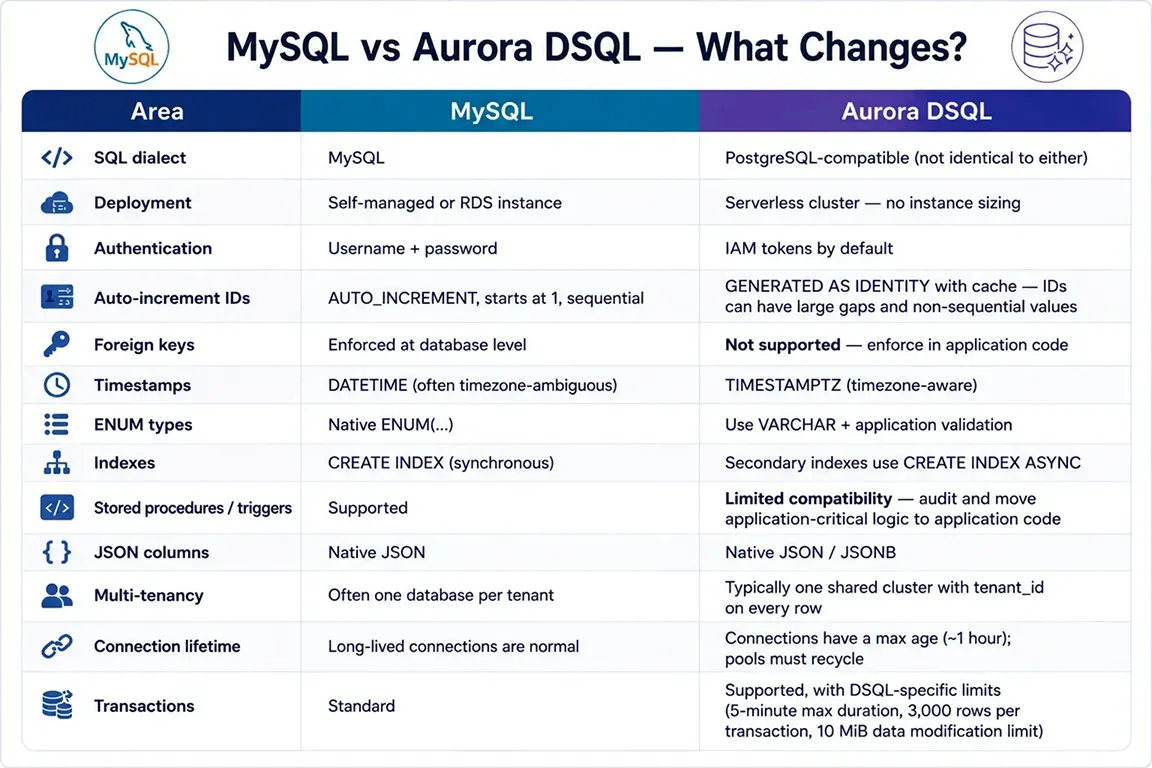
1. MySQL vs DSQL: What Changes?
The key mindset: DSQL speaks SQL, but it is not a drop-in MySQL replacement.
2. Plan Before You Migrate
Spend time here it saves days later.
- Audit the schema. Document tables, indexes, foreign keys, procedures, and triggers. Anything MySQL enforced for you must be replaced in application code.
- Choose a multi-tenancy model. If you used one MySQL database per tenant, the usual DSQL pattern is one shared cluster with tenant_id on every row and every query.
- Decide ID strategy. Aurora DSQL identity columns require an explicit cache setting. CACHE = 1 provides allocation behavior closer to sequential generation, while CACHE >= 65536 is designed for highly concurrent workloads and can produce gaps and non-sequential values. This means IDs may start high and skip values, so they are not suitable for client-facing order numbers. Prefer opaque IDs (like UUIDs) for clients. For high-scale inserts, UUIDs are also a strong option.
- Replace unsupported features early. Foreign keys → app-level checks. Cascades → explicit delete/update logic in your application. Stored procedures → application code or Lambda functions. Full-text search → an external search service like OpenSearch.
3. Migrate the Schema
Write new DSQL migrations from scratch. Remember, DSQL uses PostgreSQL syntax, and it is case-sensitive for quoted identifiers (e.g., "UserId" is different from userid). Standardize on lowercase for simplicity.
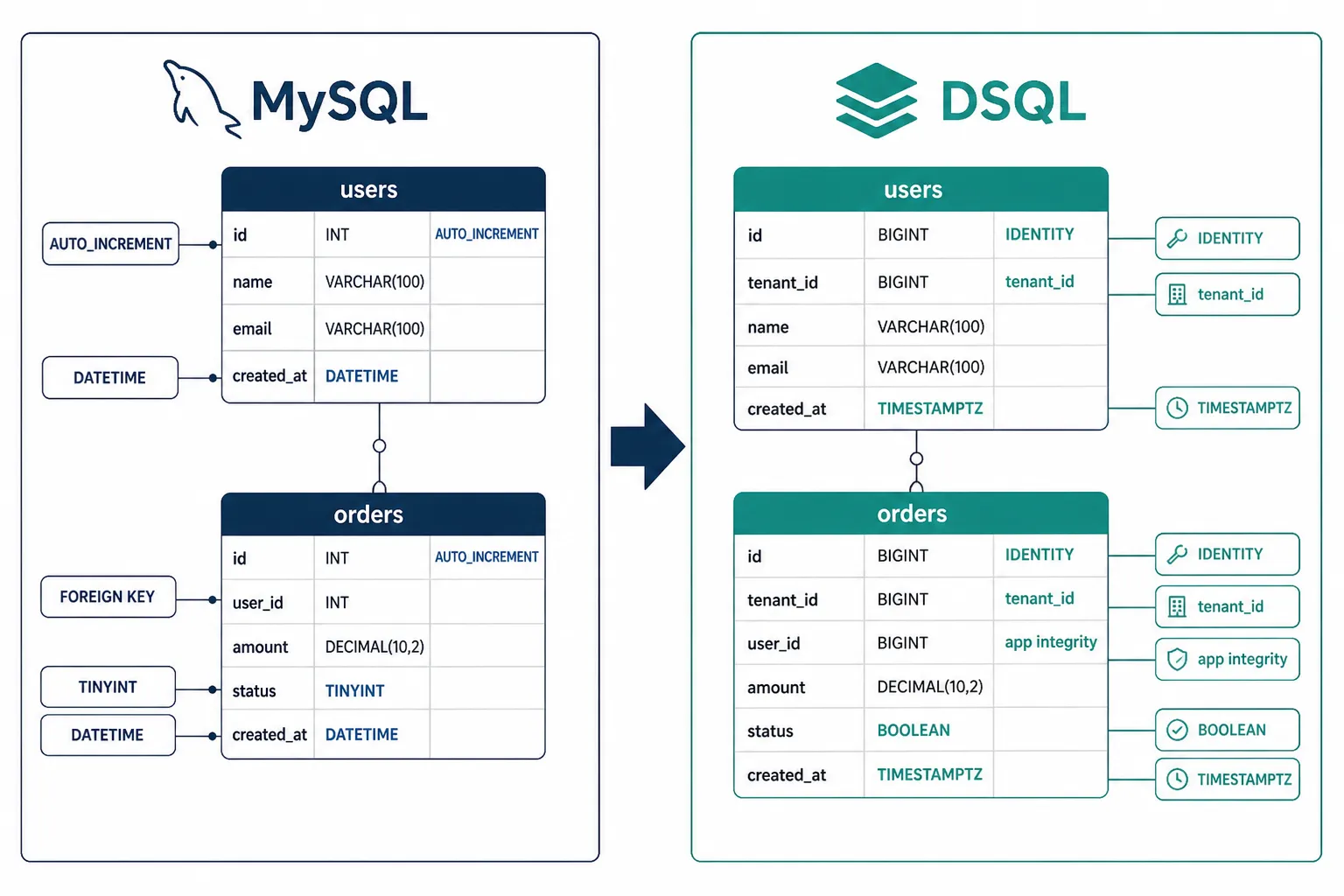
MySQL:
CREATE TABLE users (id BIGINT AUTO_INCREMENT PRIMARY KEY,name VARCHAR(255) NOT NULL,email VARCHAR(255) NOT NULL UNIQUE,is_active TINYINT(1) DEFAULT 1,created_at DATETIME DEFAULT CURRENT_TIMESTAMP);
DSQL:
CREATE TABLE users (id BIGINT GENERATED BY DEFAULT AS IDENTITY (CACHE 65536) PRIMARY KEY,tenant_id BIGINT NOT NULL,name VARCHAR(255) NOT NULL,email VARCHAR(255) NOT NULL,is_active BOOLEAN NOT NULL DEFAULT TRUE,created_at TIMESTAMPTZ NOT NULL DEFAULT NOW());CREATE INDEX ASYNC IF NOT EXISTS idx_users_tenant_emailON users (tenant_id, email);
If a MySQL table had foreign keys, drop them on DSQL and enforce parent/child integrity in the application. Run schema migrations once per cluster, then wait for async indexes to finish before depending on them.
4. Migrate the Data
This is the heart of the migration. Build a resumable pipeline not a one-shot dump.
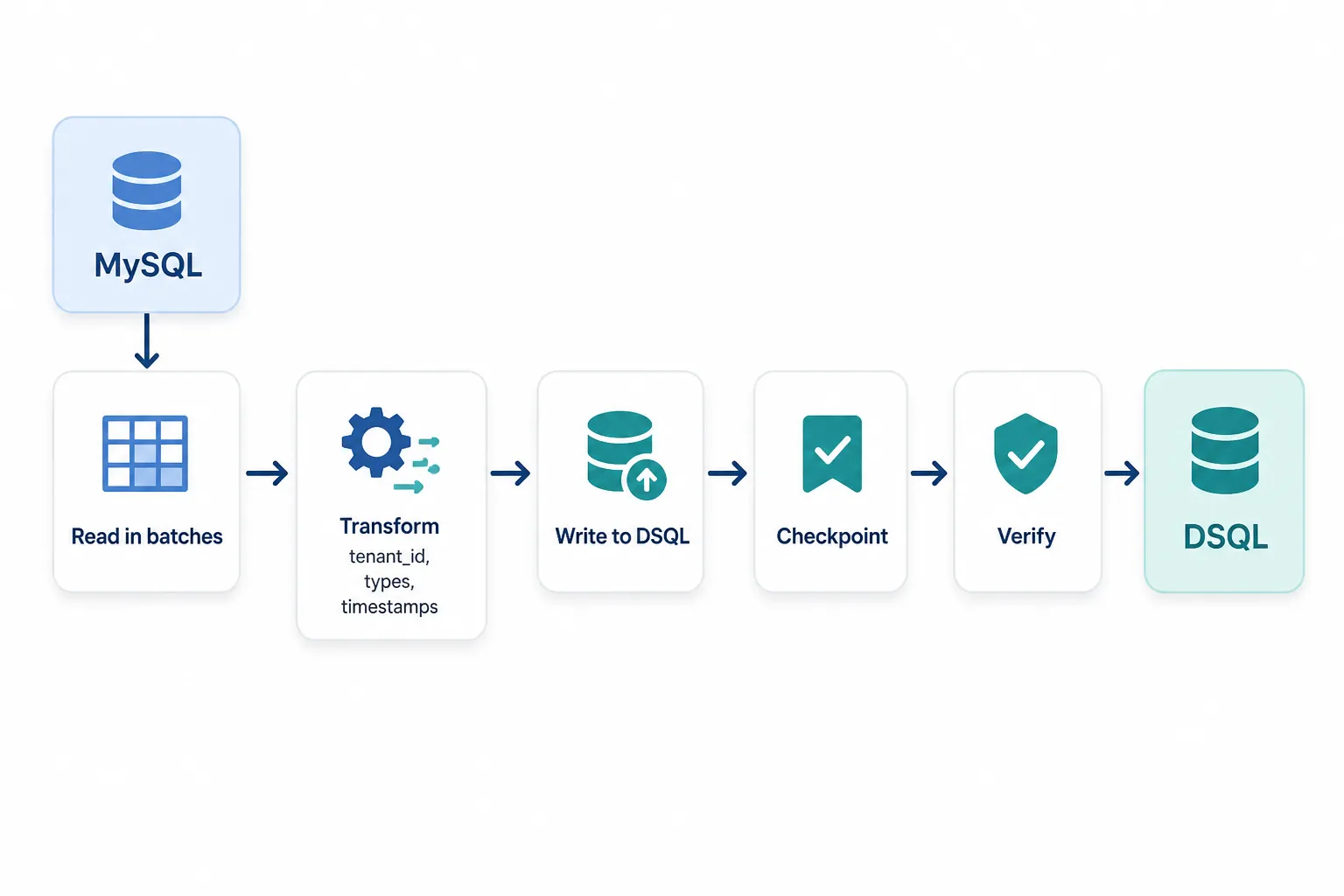
What the pipeline must do:
- Batch reads and writes copy 500-2000 rows at a time. Never load a full table into memory.
- Transform each row add tenant_id, convert types (DATETIME to TIMESTAMPTZ, TINYINT to boolean), and copy encrypted fields as-is if encryption is app-layer.
- Map tenants if MySQL used separate databases, map each source DB to a tenant_id. A wrong mapping is silent corruption.
- Checkpoint progress store the last successful primary key per table so a failure can resume safely.
- Stay idempotent INSERT ... ON CONFLICT DO NOTHING or INSERT ... ON CONFLICT DO UPDATE so re-running a batch does not create duplicates.
- Support dry-run read and transform without writing, so mapping bugs show up before production data is touched.
After each run, verify more than row counts: compare checksums on key columns, sample records field-by-field, and confirm primary key sets match.
5. Update the Application
Schema and data prepare the database. Application changes make the product work.
What changes for developers:
- Replace mysql2 with pg plus the Aurora DSQL connector
- Switch ORM dialect from mysql to postgres
- Use one shared connection pool instead of per-tenant MySQL connections
- Generate IAM tokens at connection time never store a one-time token in env vars Add tenant_id to every query and insert
- Move foreign-key and cascade logic into application code
- Handle PostgreSQL error codes (23505 unique conflict, 40001 serialization failure retry)
Query example:
// Before (MySQL, per-tenant database)User.findAll({ where: { email } });// After (DSQL, shared cluster)User.findAll({ where: { tenant_id: tenantId, email } });
Connection pooling matters. DSQL closes connections after about an hour. Set pool max lifetime near 55 minutes and use the official DSQL connector so new connections get fresh IAM tokens automatically. On Lambda, create the pool outside the handler and keep it small (1-3 connections).
Let's Build Something Great Together
Ready to transform your idea into a powerful software solution? Talk to our experts and get a free consultation.
Contact Us
Create separate DSQL clusters for development and production, attach least-privilege IAM for runtime and admin permission only for migrations, and keep those policies in infrastructure-as-code. For exact AWS setup steps, use the Aurora DSQL docs.
Then remove MySQL completely drivers, per-tenant connection managers, and old config files. Do not leave commented-out MySQL code behind.
6. Handle Production Cutover
The critical question: what happens to writes that land in MySQL while you are copying data? For most teams, the best balance is initial copy + delta sync:
- 1Copy full data to DSQL while MySQL stays live
- 2Keep the app on MySQL
- 3On cutover day, make MySQL read-only
- 4Run a final delta sync for inserts, updates, and deletes since the last checkpoint
- 5Verify counts, samples, and critical flows
- 6Switch traffic to DSQL
Other options exist when needed: a short maintenance window (simplest), dual-write (more complex), or CDC/binlog sync for near-zero downtime at large scale.
Keep MySQL available in read-only mode for at least a week after cutover so you can roll back if needed. Decide the rollback rule before cutover day not during an incident.
7. Test What Actually Matters
Schema + Async Indexes Complete
- Check: Verify all tables, columns, and indexes exist on DSQL. Confirm async indexes are fully built.
- Why: Missing tables or indexes break queries or cause severe performance problems. Auto-converted DDL often misses subtle differences.
Row Counts + Checksums + Sample Records
- Check: Compare row counts, compute checksums on critical columns, and sample key tables field-by-field.
- Why: Row counts alone can match while data is silently corrupted wrong tenant mappings, truncated strings, or incorrect type conversions.
Login and Core CRUD
- Check: Run your full test suite against DSQL. Verify authentication and basic CRUD operations work.
- Why: SQL syntax differences, case-sensitivity issues, or missing tenant_id filters will break your application in ways schema validation can't catch.
Tenant Isolation Tests
- Check: Write automated tests that attempt cross-tenant data access. Verify every query includes tenant_id.
- Why: A missing WHERE tenant_id = ? is a security vulnerability, not a bug. Manual testing will miss edge paths. Must be automated.
Load Under Concurrency
- Check: Simulate production traffic with concurrent users. Monitor connection pools, active sessions, and error rates.
- Why: Surfaces connection pool exhaustion and serialization failures (40001). Validates IAM token refresh and retry logic under real load.
Tenant isolation should be automated. Manual testing will miss edge paths.
8. Rollback, Cleanup, Checklist
During the first 1-2 weeks: monitor errors daily, verify critical business flows, and keep MySQL intact for rollback.
After stable production: remove one-time migration scripts, remove MySQL libraries and config, rotate old MySQL secrets, take a final backup, then decommission MySQL. Do cleanup in a separate PR.
Checklist:
- Schema audited; unsupported features have replacements
- Multi-tenancy and ID strategy decided
- DSQL migrations written and applied (dev + prod)
- Data pipeline supports batching, checkpoints, dry-run, verification
- App uses DSQL connector, shared pool, IAM auth, and tenant_id
- Cutover plan includes delta sync and rollback
- Tenant isolation and core flows tested
- MySQL kept for rollback, then removed after stability
Final Words
A MySQL to Aurora DSQL migration is an architecture change, not a DBA task. The teams that succeed plan identity, tenancy, auth, and cutover before they move data. The teams that struggle treat it as a weekend connection-string update.
Plan carefully. Migrate in batches. Sync the delta before you switch. Test tenant isolation. Keep rollback available longer than feels necessary then retire MySQL with confidence.
10 AI Prompts Every Manual Tester Should Have in Their QA Toolkit
Discover 10 practical AI prompts manual testers can use to improve test coverage, find edge cases, analyze bugs, strengthen regression testing, and become more effective QA engineers.
Read More
The Website Accessibility Revolution: Why You Can't Afford to Ignore WCAG 2.2
Website accessibility starts with WCAG 2.2. Learn how accessible design, development, QA, and testing can help create websites that work for everyone.
Read More
Race Conditions in Web Applications: Why Correct Code Produces Wrong Results
Race conditions silently corrupt data when concurrent requests touch shared state at the wrong time. Learn how atomic updates, transactions, idempotency, and locking keep your application correct under real concurrency.
Read More
AI Writes the Code • Stop Blindly Shipping It Without Reviewing the Engineering
A practical perspective on AI-generated code, scalability, maintainability, and engineering judgment and why engineering review still owns the final decision.
Read More
Migrating Databases with AWS DMS With Nearly Zero Downtime
Learn how to migrate databases using AWS DMS with nearly zero downtime using Full Load, CDC, validation, monitoring, and controlled cutover.
Read More
How to Add LiveKit Video Calling to a Next.js App
Add embedded video & audio calling to Next.js with LiveKit Cloud. Compared vs Twilio, Daily, Agora, Zoom — plus token auth, guests & recording.
Read More
We chose ECS over EKS: what we gained and what we gave up
An honest comparison of ECS vs EKS the costs, tradeoffs, and real-world reasoning behind choosing ECS for a production platform on AWS.
Read More
Upgrading Legacy Systems: From Outdated Technology to Competitive Advantage
Learn how to upgrade legacy systems through application modernization, API integration, cloud migration, security improvements, and incremental system upgrades without disrupting business operations.
Read More
Building Distributed Tracing and Observability with AWS X-Ray
A practical guide to correlating requests across a multi-tier application using correlation IDs, AWS X-Ray segments, and structured logging for faster incident debugging.
Read More