Angular Update Guide

Prerequisites
Before you started make sure you have completed all the required installations such as:
- npm (Node Package Manager) and NodeJS compatible version which is required by the angular i.e:
- NodeJS v14.x.x or Later from https://nodejs.org/en/download and choose your compatible version.
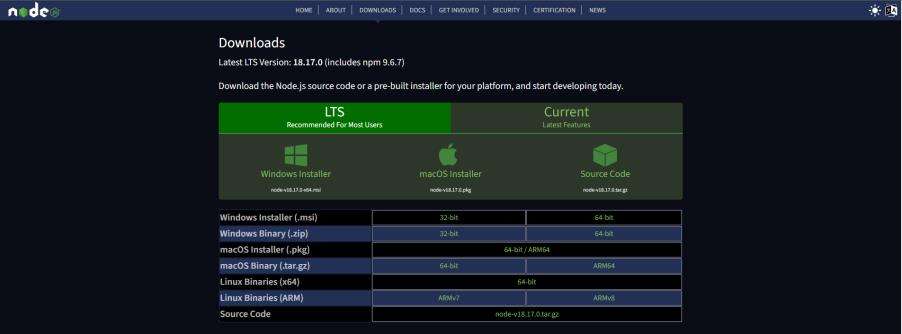
- npm v7.x.x or Later.
By installing NodeJS npm will be also installed by itself so no need to worry about that follow the official document for further help.
Link: https://docs.npmjs.com/downloading-and-installing-node-js-and-npmAngular CLI Update
After performing the above installation your system is ready for the Angular Update. Assuming Angular’s older version 10.x.x or 11.x.x is already installed in your system. Now you need to update to version 14.2.11.
We use npm to Install Angular CLI by running this command on the shell.
- “npm install -g @angular/cli@14.2.11”

This command will install Angular CLI v14.2.11 globally.
Update Your App
You can find many online contents to update the Angular App but no guarantee that it will easily work for you. Here’s the best and tested approach to updating the app with fewer hurdles on an initial basis.
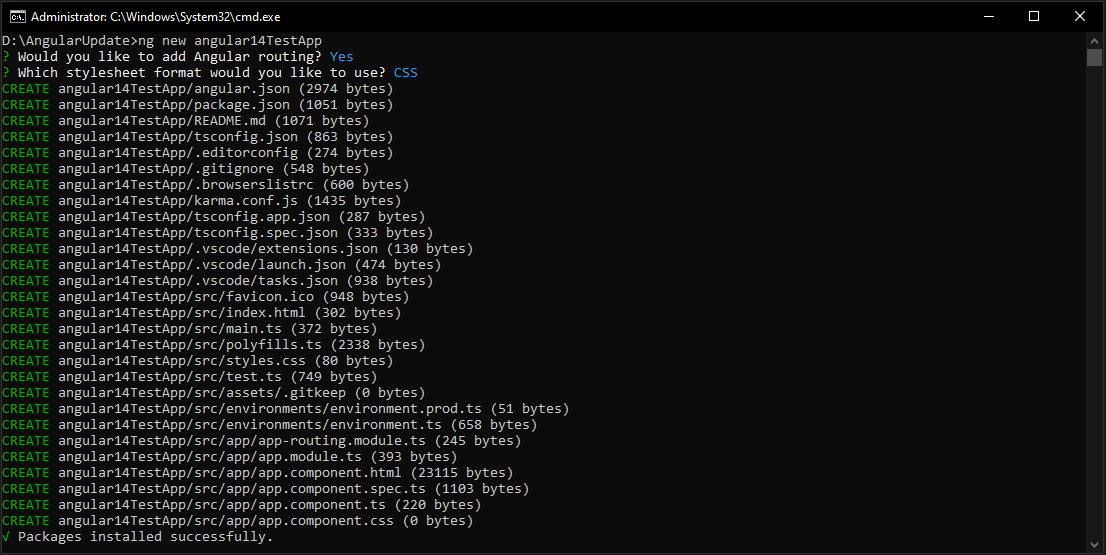
- Create a new angular 14 test app in your local directory by using this command.
- “ng new angular14TestApp”

This command will create Angular App v14.2.11
Once Packages installed successfully now replace the version of dependencies and devDependencies in package.json of the old app with the new app as shown below.
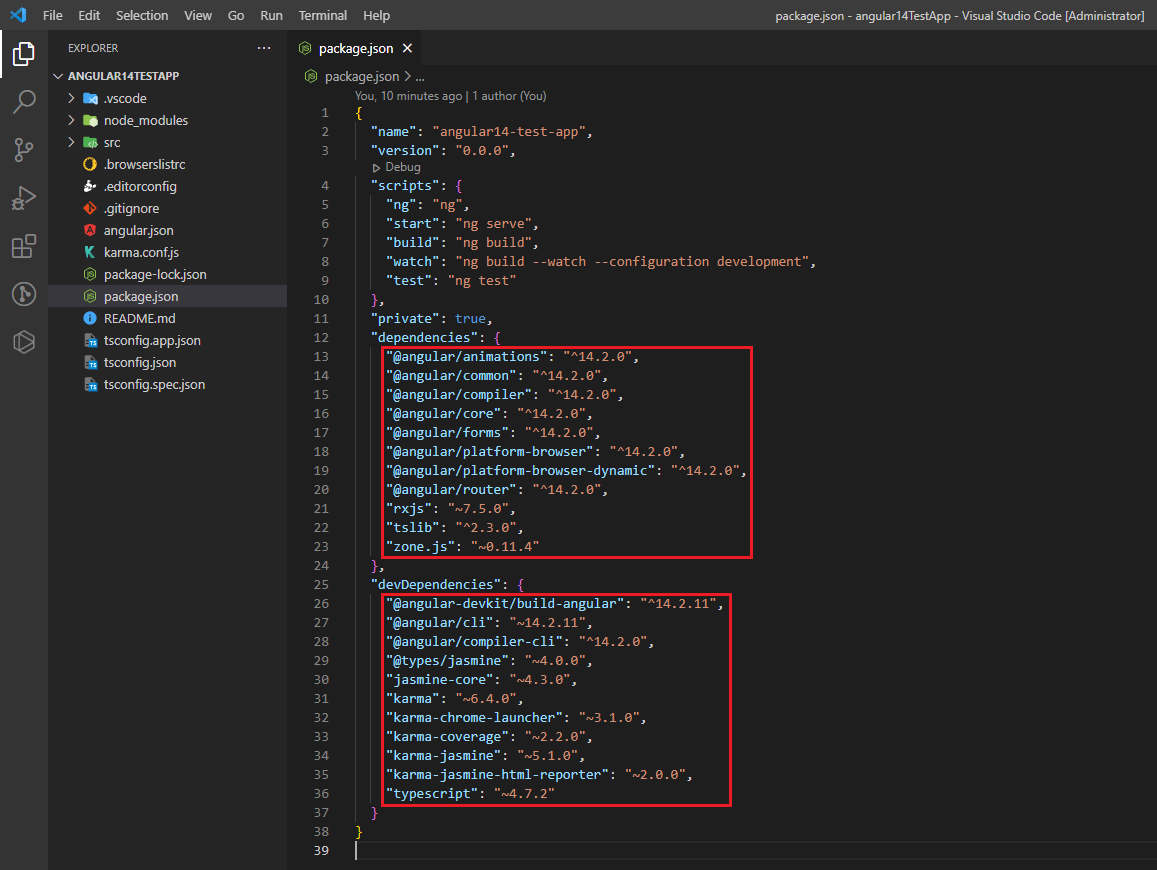
Angular 14 Test App
- After replacing versions delete node_modules of the old angular app and run “npm install” to reinstall the compatible versions in the old app.
Update Third-Party Packages
In order to be compatible with Angular 14 it might be necessary to update a lot of Third-Party libraries and packages. Make sure you have documentation and release notes on the libraries used in your project. To update them to the most recently supported version, please do so.
Review Deprecated APIs and resolve them
Some deprecated APIs that you used in Angular 11.2.14 may be introduced in Angular 14. To update your code, you need to check the Angular Update Guide and Documentation for deprecated APIs.
Check your Codebase
Review your codebase to find out if there are breaking changes or discontinued APIs that you may need to change, after updating Angular CLI, Core Packages, and Third-Party Dependencies. Attention shall be given to the following:
- The syntax for the Angular template.
- Angular lifecycle hooks.
- Changes in Angular Material component (if used)
Run and Test
After performing the above checks run your new Angular 14 app and test each of the components and functionalities to ensure that all features function as expected and that there are no regressions or problems. You may also face issues related to the styling and functionalities if any feature encountered an issue fixed them for example ng-select. You need to check the version and its newly added feature and apply them to your codebase. Depending on the specific features and dependencies that your application is using, it can have a different update process.

Clean Code vs. Overengineering: Where Should Developers Draw the Line?
Clean code reduces unnecessary complexity; overengineering invents it. A practical guide to using context, evidence, and the cost of change to know when to stop adding abstractions...
Read More
Kafka vs RabbitMQ vs AWS EventBridge: Choosing the Right Architecture Based on Business Requirements
Compare Kafka, RabbitMQ, and AWS EventBridge based on scalability, routing, event streaming, replay, infrastructure, and business requirements to choose the right architecture...
Read More
AI Integrations for QA Engineers
Learn how QA engineers can connect AI with Jira, GitHub, Slack, Notion and other tools to improve testing, bug tracking, reporting and QA productivity...
Read More
The Ultimate Guide to Amazon SES Setup with GoDaddy DNS
Learn how to set up Amazon SES with GoDaddy DNS. Complete step-by-step guide covering Easy DKIM, SPF, DMARC, custom MAIL FROM, and exiting the SES Sandbox...
Read More
AWS DevOps Agent Setup Guide with EC2
Learn how to set up AWS DevOps Agent with EC2, CloudWatch, IAM, and Agent Spaces for AI-assisted monitoring, incident investigation, and root-cause analysis...
Read More
Multi-Tenancy Patterns in DynamoDB: Silo, Pool, and Bridge Models
If you've already made the jump from a relational database to DynamoDB see our guide on moving relational data from SQL to DynamoDB...
Read More
We stopped leaving the IDE to design. Here’s our Cursor → Figma flow
Cursor drafts fast, catches gaps early, and still clips fields and breaks layouts. Here's the real pros-and-cons breakdown of our workflow...
Read More
AWS DevOps Agent: How AI is Automating On-Call Incident Response
If you've ever been on call during a production outage, you know how stressful it can be. Alerts start firing, dashboards light up, and suddenly you're jumping between monitoring tools...
Read More
Catch Missing Images Before Deploy: A Simple Pre-Build Script for Next.js
How Omax Tech added a lightweight image validation gate to Next.js 15 builds on Vercel...
Read MoreReady to Work With Us?
Most engagements start with a 20-minute conversation. No pitch, no pressure - just an honest discussion about what you're building and whether we're the right fit.