AWS DevOps Agent: How AI is Automating On-Call Incident Response

Introduction
If you've ever been on call during a production outage, you know how stressful it can be. Alerts start firing, dashboards light up, and suddenly you're jumping between monitoring tools, log files, deployment histories, and Slack/chats/teams messages trying to figure out what went wrong.
Finding the root cause isn't always the hardest part finding it quickly is.
That's exactly the problem AWS is trying to solve with AWS DevOps Agent, an AI-powered assistant built for DevOps engineers and Site Reliability Engineers (SREs). Instead of simply notifying you that something has broken, the agent helps investigate incidents, explains what likely happened, recommends possible fixes, and even identifies ways to prevent similar issues in the future.
In other words, it acts like an experienced DevOps engineer that's available whenever you need it.
What Is AWS DevOps Agent?
AWS DevOps Agent is an intelligent operational assistant designed to help teams manage applications more efficiently. It connects with your existing tools including observability platforms, source code repositories, CI/CD pipelines, runbooks, and deployment history to understand how your applications work.
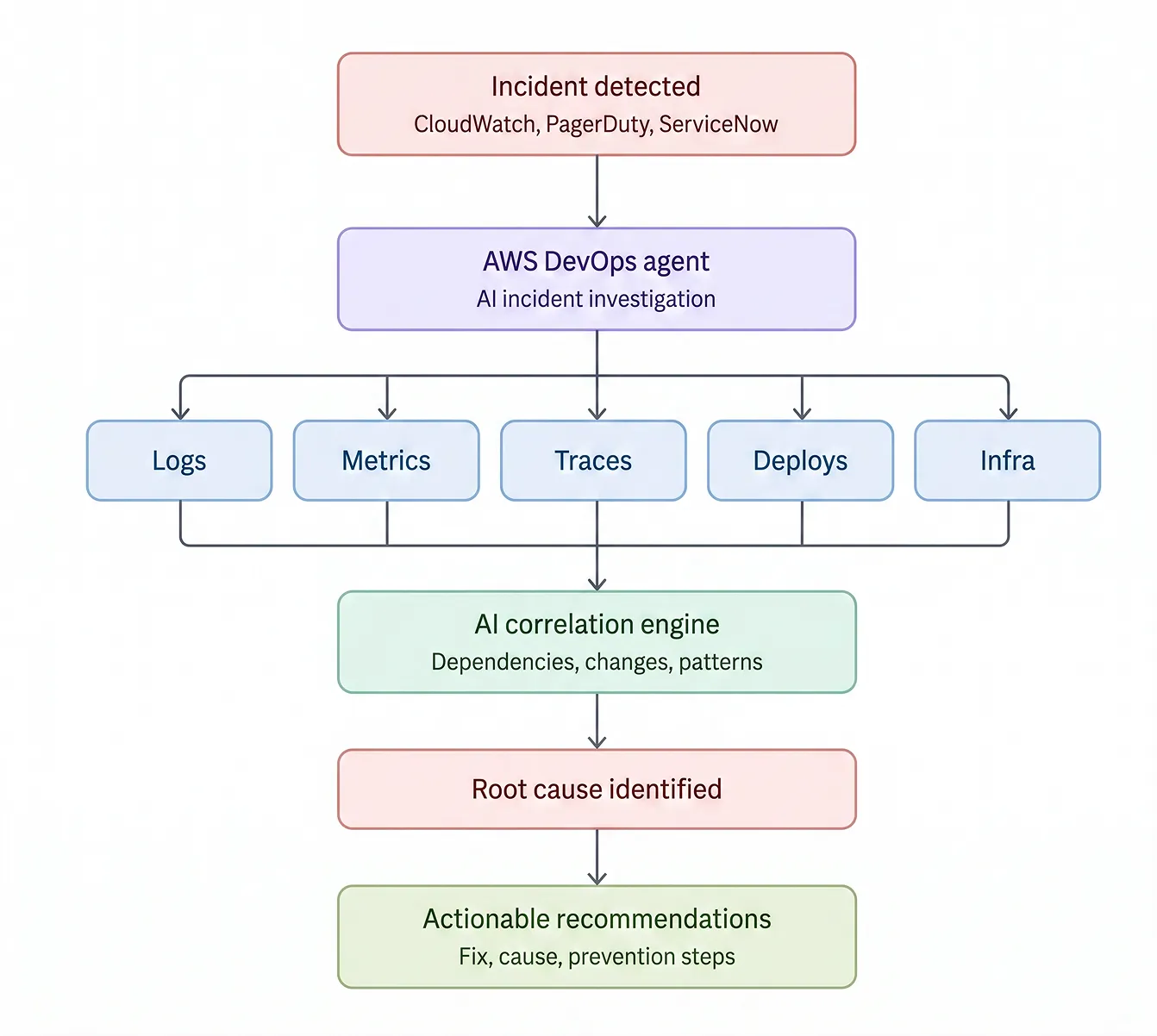
When an issue occurs, it doesn't just collect data. It correlates logs, metrics, traces, infrastructure changes, deployment events, and application telemetry to build a complete picture of what's happening.
Instead of spending hours manually investigating an outage, engineers receive contextual insights within minutes.
How Does It Work?
Imagine receiving an alert because your application suddenly starts responding slowly.
Normally, you'd need to:
- Check your monitoring dashboards
- Search application logs
- Review recent deployments
- Compare infrastructure changes
- Investigate resource utilization
- Coordinate with multiple team members
AWS DevOps Agent automates much of this process.
It gathers information from across your operational environment, analyzes relationships between services, maps resource dependencies, and highlights the most likely cause of the issue. Rather than presenting raw data, it provides meaningful explanations and practical recommendations.
This helps teams move from asking "What happened?" to "How do we fix it?" much faster.
Features That Stand Out
Automated Incident Investigation
One of the biggest time sinks during an outage is collecting information from different systems.
AWS DevOps Agent automatically investigates alerts by bringing together relevant logs, metrics, traces, deployment history, and infrastructure events into a single analysis.
That means less time switching between dashboards and more time resolving problems.
AI-Powered Root Cause Analysis
Every experienced DevOps engineer knows that symptoms rarely reveal the actual problem.
High CPU usage, increased latency, or failed requests are often just the result of something deeper.
AWS DevOps Agent analyzes operational data across multiple systems to identify likely root causes and explain why they matter, helping engineers make informed decisions faster.
Proactive Reliability Improvements
The best incident is the one that never happens.
Instead of waiting for problems to occur, AWS DevOps Agent continuously looks for recurring issues, operational risks, and reliability improvements. The moment an incident is triggered by monitoring systems like PagerDuty, ServiceNow, or Amazon CloudWatch, the agent autonomously kicks into action. It can recommend configuration changes, performance optimizations, or process improvements before those small issues become major outages. Underneath it all, reliable monitoring and alerting make this possible - see how we handle AWS cloud monitoring across AWS environments.
Natural Language Queries
One of the most impressive features is how naturally you can interact with it.
Instead of searching through dashboards, you can simply ask questions like:
- Why did my application fail?
- Which deployment introduced this issue?
- Show me CPU usage for the last 24 hours.
- What changed before latency increased?
- Which service is affecting customer requests?
The agent responds with contextual answers, charts, and reports that can be shared with your team.
Enterprise Security via Agent Spaces & IAM Guardrails
AI in production is scary if left unchecked which is why security is built into how the agent operates, not bolted on afterward.
Environment isolation AWS DevOps Agent uses Agent Spaces to define strict perimeter boundaries between environments, keeping Prod and Non-Prod cleanly separated. Read-only by design.
The agent operates under read-only IAM policies with enforced session guardrails. It can read logs, metrics, and application topology but it never has permission to modify or tear down live infrastructure. The same least-privilege and defense-in-depth principles guide our AWS cloud security and compliance services.
Works Beyond AWS
Although it's built by AWS, the DevOps Agent isn't limited to AWS workloads. It supports:
- AWS environments
- Multicloud deployments
- Hybrid infrastructure
- On-premises systems
It also integrates with many of the tools DevOps teams already use, including:
- Amazon CloudWatch for monitoring and alarms
- PagerDuty and ServiceNow for incident management
- GitHub and GitLab for source code and deployment history
- Grafana, Datadog, Splunk, and New Relic for observability, logs, metrics, and traces
This flexibility makes AWS DevOps Agent valuable for organizations operating across diverse technology stacks rather than relying solely on AWS-native services.
Built on Open Standards: Model Context Protocol (MCP)
AWS DevOps Agent uses the Model Context Protocol (MCP) to securely connect with AWS services and supported third-party tools. This open standard enables the agent to retrieve telemetry, deployment history, and operational context across hybrid and multicloud environments without locking organizations into a single ecosystem.
Why This Matters for DevOps Teams
Modern software systems are more complex than ever.
Microservices, containers, Kubernetes clusters, serverless applications, and distributed architectures generate enormous amounts of operational data every second.
While observability tools provide visibility, they don't always provide answers.
AWS DevOps Agent bridges that gap by interpreting data instead of simply displaying it.
Rather than replacing DevOps engineers, it helps them spend less time searching for problems and more time solving them.
Benefits of Using AWS DevOps Agent
Organizations adopting AI-assisted operations can expect several advantages:
- Faster incident investigation
- Reduced Mean Time to Resolution (MTTR)
- Better application reliability
- Improved operational visibility
- Smarter root cause analysis
- Increased engineering productivity
- Fewer repetitive manual investigations
- Better collaboration through shareable reports and insights
For teams responsible for maintaining production systems, these improvements can have a significant impact on uptime, customer experience, and operational efficiency.
AWS DevOps Agent and the Rise of Agentic Ops
This isn't just "AI for DevOps" it's part of the broader shift toward Agentic Operations (Agentic Ops), where AI systems actively investigate incidents, analyze operational data, and recommend solutions within secure, read-only boundaries.
Rather than replacing engineers, AWS DevOps Agent reduces manual investigation by providing contextual insights and likely root causes. As cloud environments become more complex, AI-powered operational assistants like this are poised to become a standard part of modern DevOps and SRE workflows. For teams looking to build this kind of automation into their own delivery pipelines, our DevOps services cover the full cycle, from CI/CD to incident response.
Final Thoughts
As cloud environments continue to grow in complexity, the challenge is no longer collecting operational data it's interpreting it quickly enough to keep services running. AWS DevOps Agent aims to bridge that gap by turning telemetry into actionable insights, helping engineers spend less time investigating incidents and more time resolving them. For DevOps and SRE teams, it represents an important step toward AI-assisted operations helping engineers spend less time searching for answers and more time delivering reliable, resilient systems.

Clean Code vs. Overengineering: Where Should Developers Draw the Line?
Clean code reduces unnecessary complexity; overengineering invents it. A practical guide to using context, evidence, and the cost of change to know when to stop adding abstractions...
Read More
Kafka vs RabbitMQ vs AWS EventBridge: Choosing the Right Architecture Based on Business Requirements
Compare Kafka, RabbitMQ, and AWS EventBridge based on scalability, routing, event streaming, replay, infrastructure, and business requirements to choose the right architecture...
Read More
AI Integrations for QA Engineers
Learn how QA engineers can connect AI with Jira, GitHub, Slack, Notion and other tools to improve testing, bug tracking, reporting and QA productivity...
Read More
The Ultimate Guide to Amazon SES Setup with GoDaddy DNS
Learn how to set up Amazon SES with GoDaddy DNS. Complete step-by-step guide covering Easy DKIM, SPF, DMARC, custom MAIL FROM, and exiting the SES Sandbox...
Read More
AWS DevOps Agent Setup Guide with EC2
Learn how to set up AWS DevOps Agent with EC2, CloudWatch, IAM, and Agent Spaces for AI-assisted monitoring, incident investigation, and root-cause analysis...
Read More
Multi-Tenancy Patterns in DynamoDB: Silo, Pool, and Bridge Models
If you've already made the jump from a relational database to DynamoDB see our guide on moving relational data from SQL to DynamoDB...
Read More
We stopped leaving the IDE to design. Here’s our Cursor → Figma flow
Cursor drafts fast, catches gaps early, and still clips fields and breaks layouts. Here's the real pros-and-cons breakdown of our workflow...
Read More
Catch Missing Images Before Deploy: A Simple Pre-Build Script for Next.js
How Omax Tech added a lightweight image validation gate to Next.js 15 builds on Vercel...
Read More
Teach your LLM your design system: Storybook MCP + Amazon Bedrock + Strands
How to stop models inventing buttons and make them build UI from your real component catalog. Most "AI UI" demos look great until you paste the markup into a real product. The fix is not a smarter prompt...
Read MoreReady to Work With Us?
Most engagements start with a 20-minute conversation. No pitch, no pressure - just an honest discussion about what you're building and whether we're the right fit.