
The Ultimate Guide to Amazon SES Setup with GoDaddy DNS

Introduction
A Complete Zero-to-100% Implementation & Technical Deliverability Manual
Setting up Amazon Simple Email Service (SES) with GoDaddy as your domain registrar is one of the most cost-effective ways to deliver transactional and marketing emails at scale. However, misconfiguring your email authentication protocols such as DKIM, SPF, or DMARC can send your critical messages straight to spam folders or cause recipient servers to reject them entirely. This is exactly the kind of issue our AWS cloud security and compliance team helps production environments avoid.
This comprehensive guide provides an end-to-end operational walkthrough to set up AWS SES from scratch, extract the precise DNS records, avoid GoDaddy-specific formatting pitfalls, configure strict authentication protocols, and request exit from the AWS SES Sandbox into full production. For teams that prefer professional DevOps services to handle this setup, this walkthrough also serves as a reference for what the implementation involves.
"Note for Users on Other DNS Providers (Cloudflare, Namecheap, Route 53, DigitalOcean, etc.): While this guide highlights GoDaddy specifically, DNS record requirements for AWS SES are universal across all DNS management platforms. Regardless of whether your DNS is hosted on Cloudflare, Namecheap, AWS Route 53, Google Cloud DNS, or elsewhere, you will still create the exact same CNAME, MX, and TXT records for DKIM, SPF, and DMARC. The core principles, syntax, and verification steps in this guide apply 100% to your DNS provider as well."
Key Architectural Protocols & Prerequisites
Before configuring DNS records, it is critical to understand the four underlying protocols that secure your email domain and guarantee deliverability:
| Record Type | Protocol | Technical Purpose |
|---|---|---|
| CNAME | Easy DKIM | Provides asymmetric cryptographic signatures to verify that emails originated from your domain and were not tampered with in transit. |
| TXT | SPF | Specifies which mail servers (IP addresses/hosts) are explicitly authorized to send email on behalf of your domain. |
| TXT | DMARC | Dictates policy enforcement (None, Quarantine, Reject) to receiving inbox providers if SPF or DKIM validation fails. |
| MX & TXT | Custom MAIL FROM | Enables full SPF alignment between the technical envelope sender domain and the visual From: header domain. |
Step-by-Step Implementation Guide
Step 1: Create and Configure Domain Identity in AWS SES
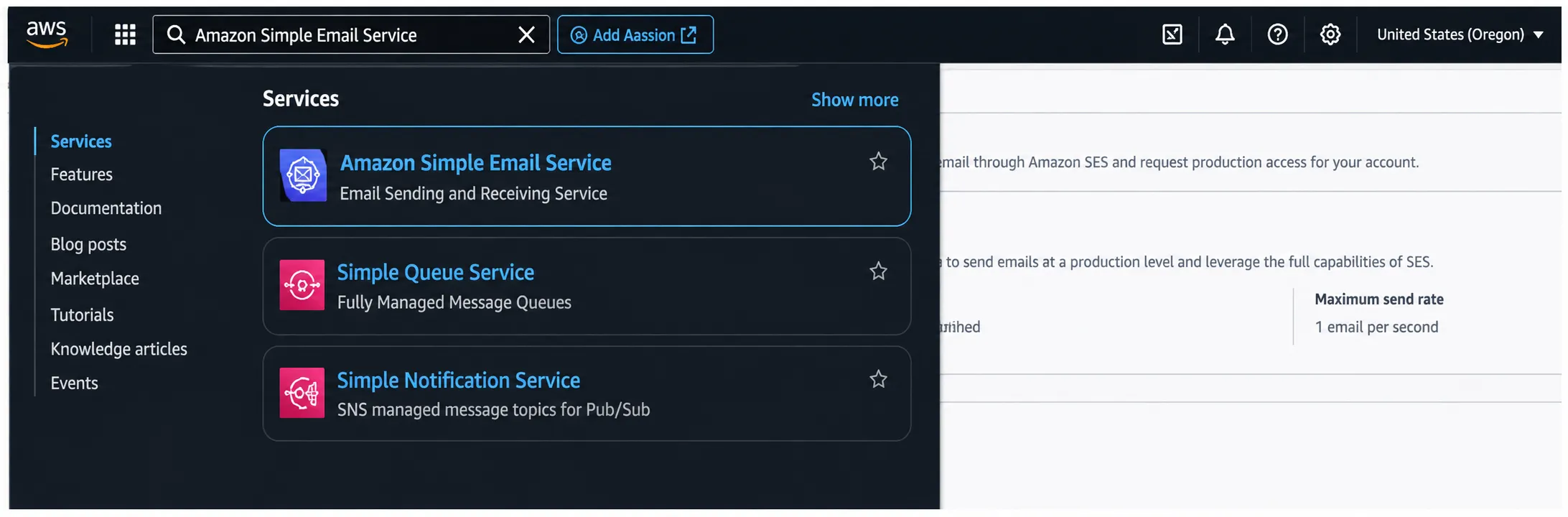
1. Log in to the AWS Management Console and search for Amazon Simple Email Service (SES).
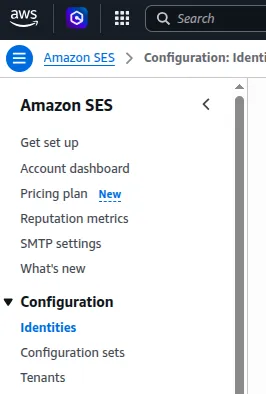
2. In the left navigation sidebar under Configuration, select Identities.
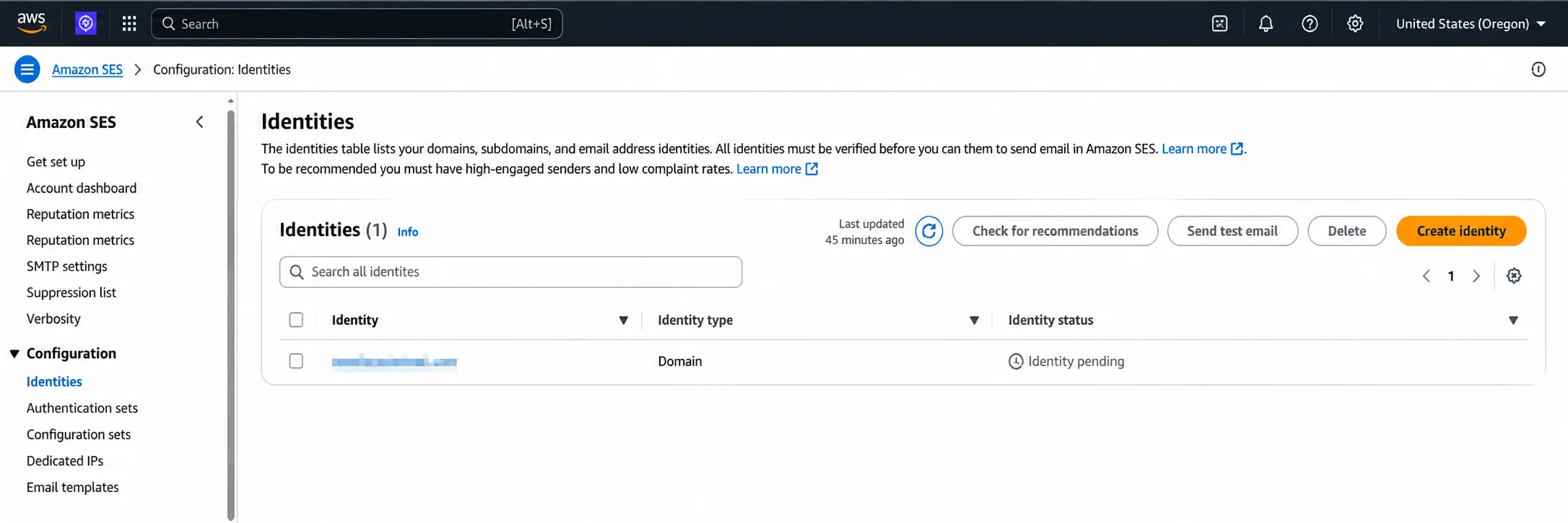
3. Click Create identity.
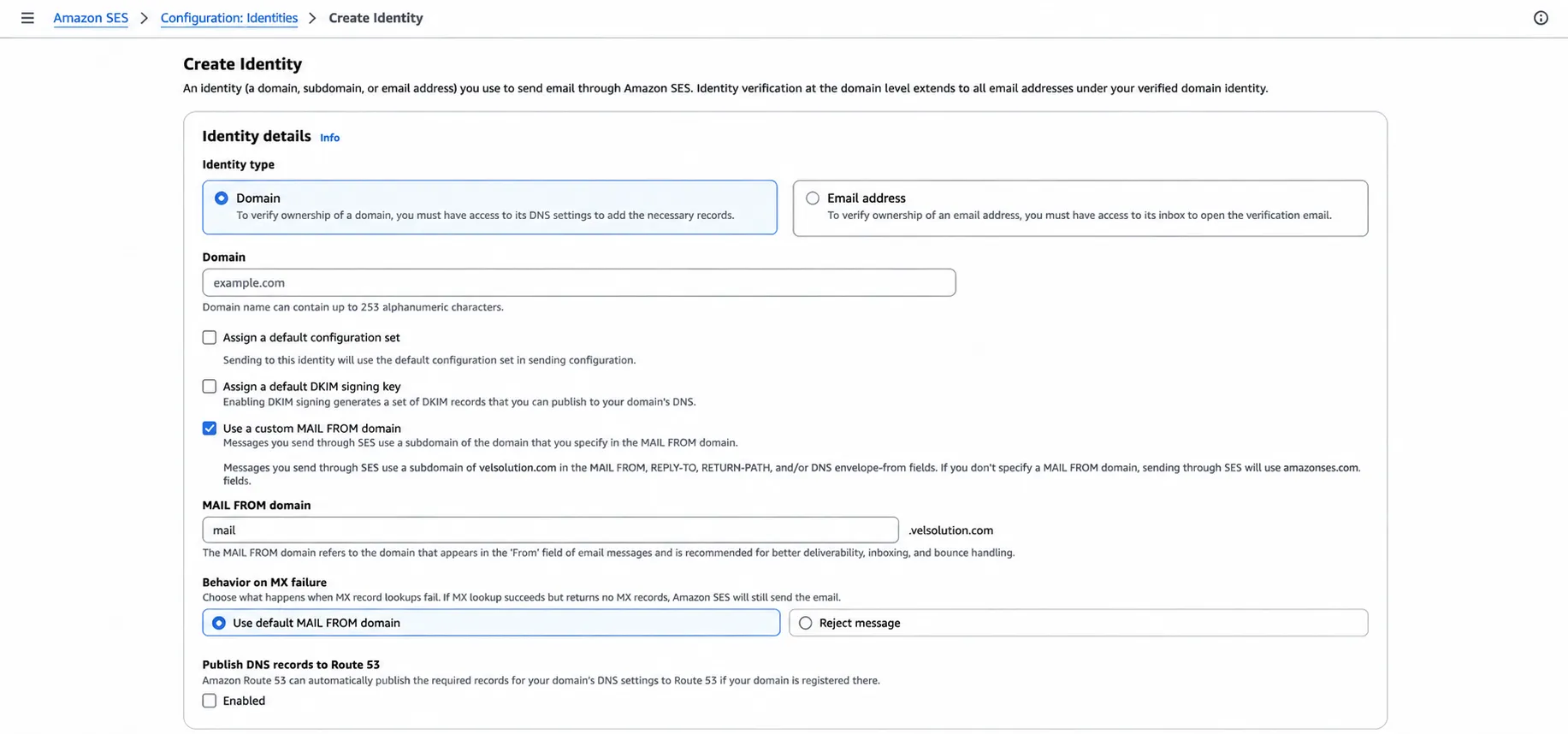
4. Select Domain as the Identity type.
5. Enter your root domain name (e.g., yourdomain.com).
6. Check Custom MAIL FROM domain (Highly Recommended):
- Check Use a custom MAIL FROM domain.
- Enter a dedicated subdomain prefix such as mail or bounce (e.g., mail.yourdomain.com).
- Under Behavior on MX failure, choose Reject message to enforce strict alignment.
- Uncheck publish DNS records to Route53
7. Expand Advanced DKIM settings:
- Select Easy DKIM.
- Choose RSA_2048_BIT for the DKIM signing key length (recommended for widespread mail client compatibility).
- Uncheck publish DNS records to Route53
- Keep DKIM signatures Enabled.
8. Click Create identity at the bottom of the page.
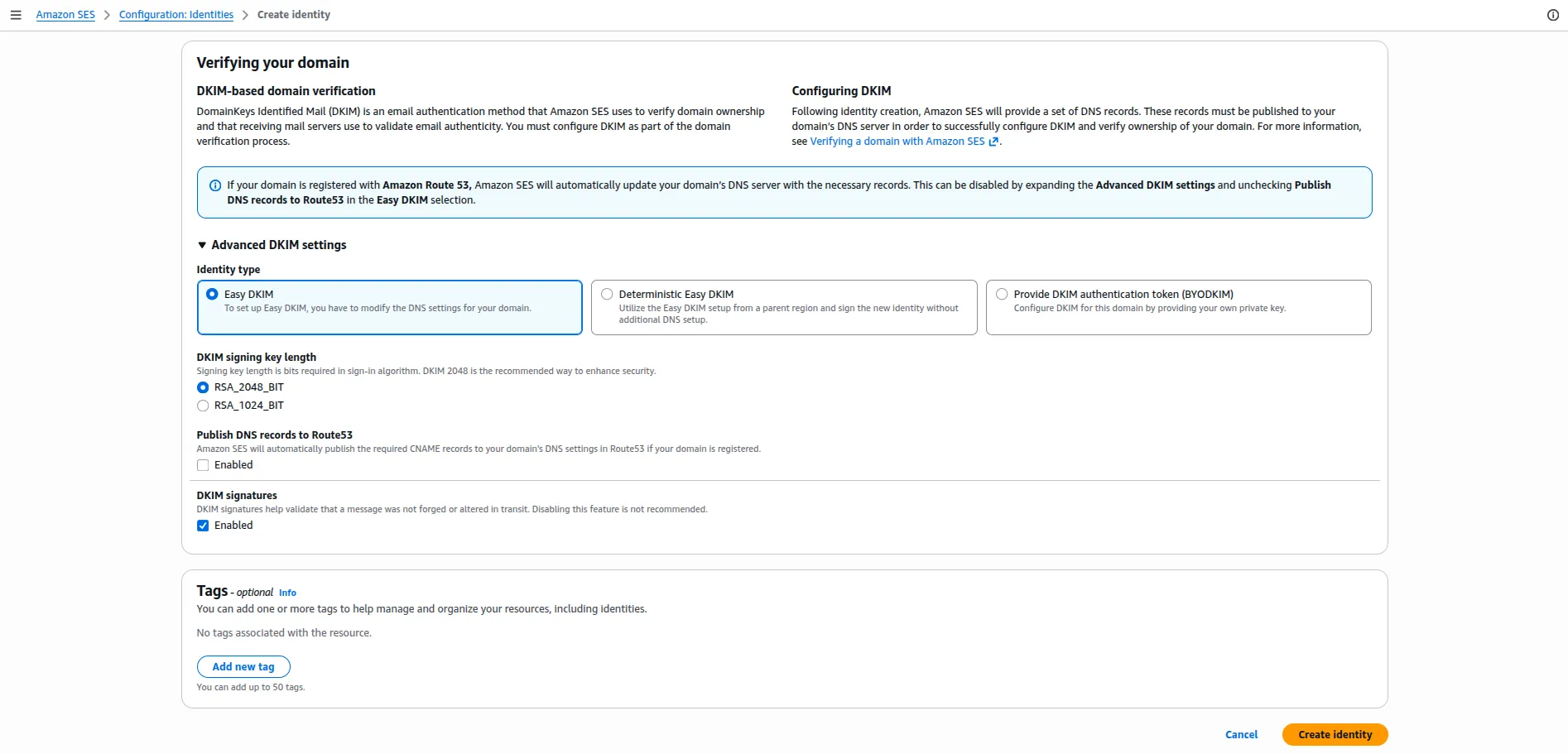
Step 2: Retrieve the Generated DNS Records from AWS
Once created, open the Get set up page from the left menu in AWS SES and click Get DNS Records button. You will be presented with the following required DNS records:
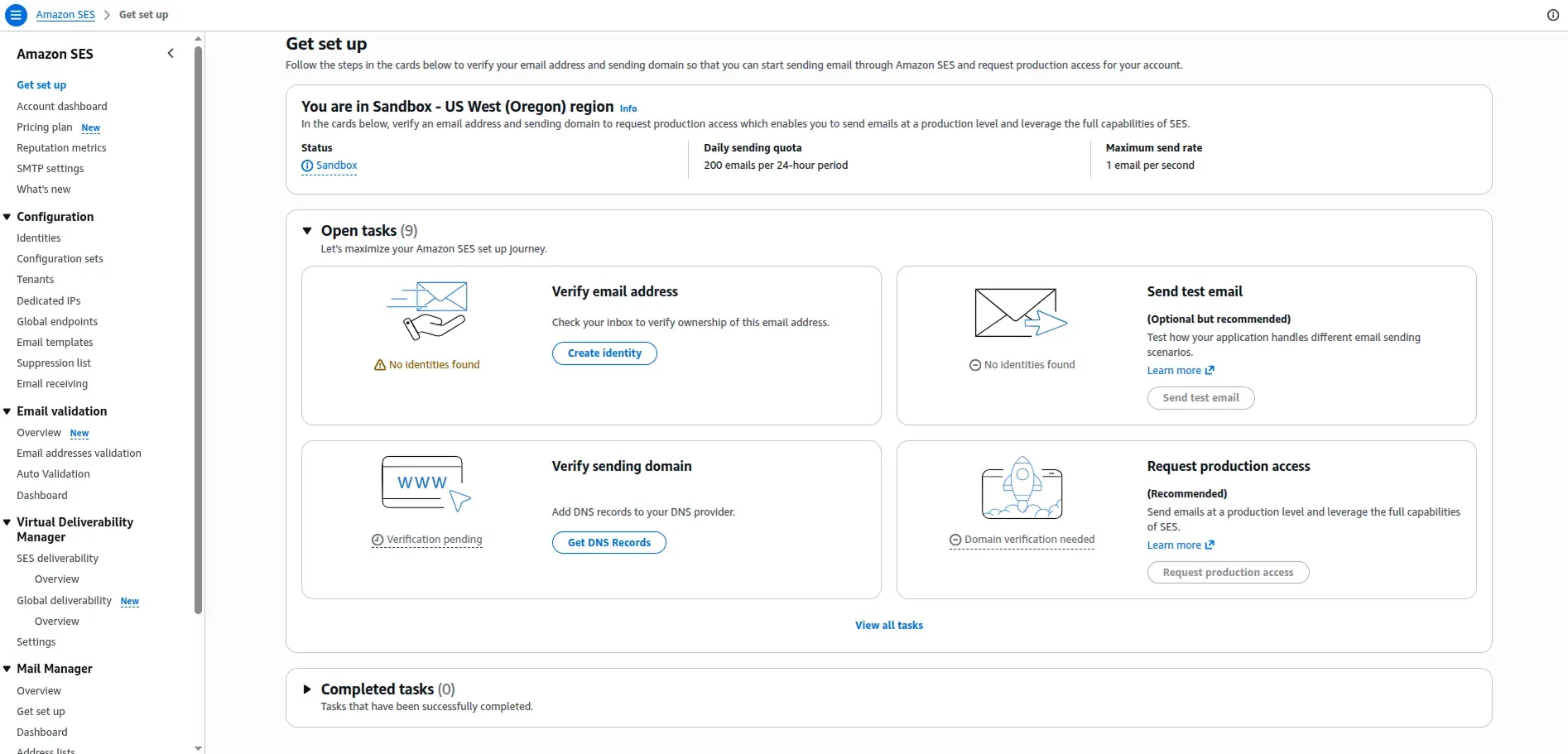
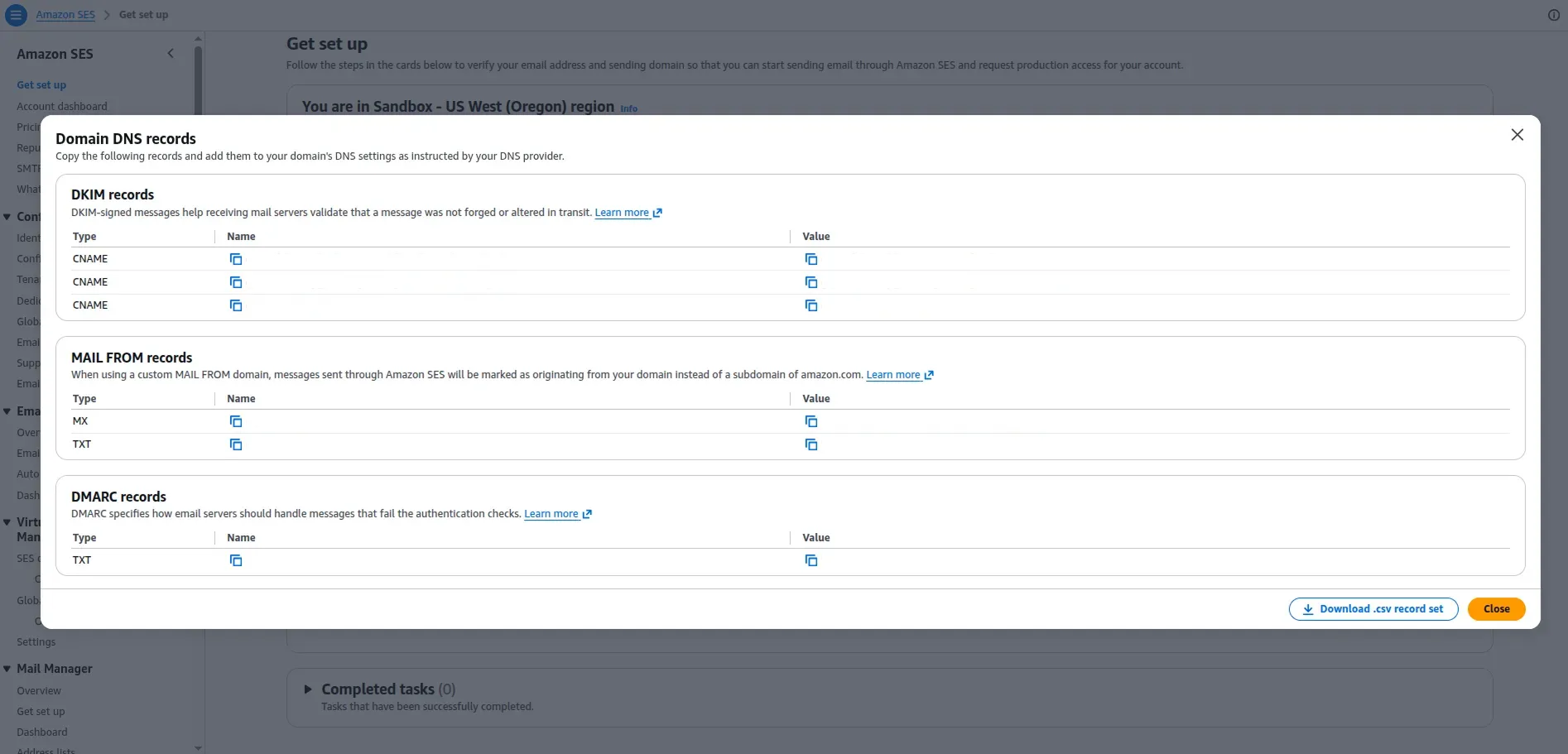
- 3 CNAME Records for Easy DKIM (e.g., [token1]._domainkey.yourdomain.com pointing to [token1].dkim.amazonses.com).
- 1 MX Record for Custom MAIL FROM (e.g., mail.yourdomain.com pointing to feedback-smtp.[region].amazonses.com with priority 10).
- 1 TXT Record for Custom MAIL FROM SPF (e.g., mail.yourdomain.com with value "v=spf1 include:amazonses.com ~all").
- 1 TXT Record DMARC (e.g., _dmarc.yourdomain.com with value "v=DMARC1; p=none;").
Step 3: Add DNS Records in GoDaddy DNS Management
"CRITICAL GODADDY PITFALL: AUTOMATIC DOMAIN APPENDING GoDaddy automatically appends your root domain (.yourdomain.com) to whatever string you type in the 'Name' or 'Host' field. If AWS gives you a host name like token1._domainkey.yourdomain.com, you must enter ONLY token1._domainkey into GoDaddy. Pasting the full domain results in token1._domainkey.yourdomain.com.yourdomain.com, causing verification to fail permanently."
Navigate to your GoDaddy Domain Portfolio, click your domain, select DNS, and add the following 6 records:
| Type | Name / Host (GoDaddy) | Value / Target | Priority | TTL |
|---|---|---|---|---|
| CNAME | [token1]._domainkey | [token1].dkim.amazonses.com | - | 1 Hour |
| CNAME | [token2]._domainkey | [token2].dkim.amazonses.com | - | 1 Hour |
| CNAME | [token3]._domainkey | [token3].dkim.amazonses.com | - | 1 Hour |
| MX | feedback-smtp.[region].amazonses.com | 10 | 1 Hour | |
| TXT | v=spf1 include:amazonses.com ~all | - | 1 Hour | |
| TXT | _dmarc | v=DMARC1; p=none; | - | 1 Hour |
Step 4: Verify Propagation and AWS Identity Status
DNS changes typically propagate within 15 minutes, though GoDaddy can occasionally take up to a few hours. Return to the AWS SES Console and confirm:
- Identity status: Verified (Green badge)
- DKIM status: Successful
- MAIL FROM status: Successful
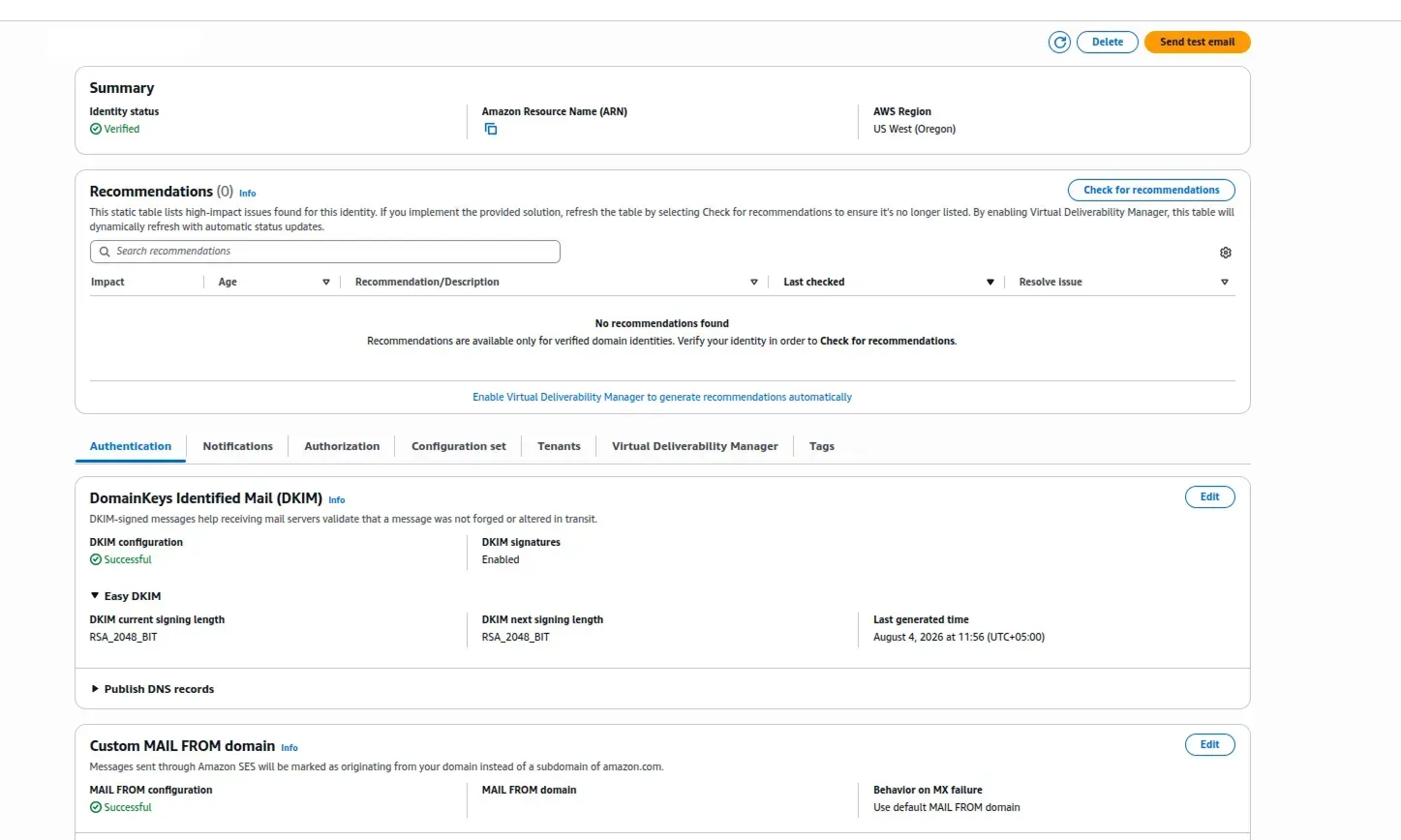
Step 5: Request Production Access (Exiting the SES Sandbox)
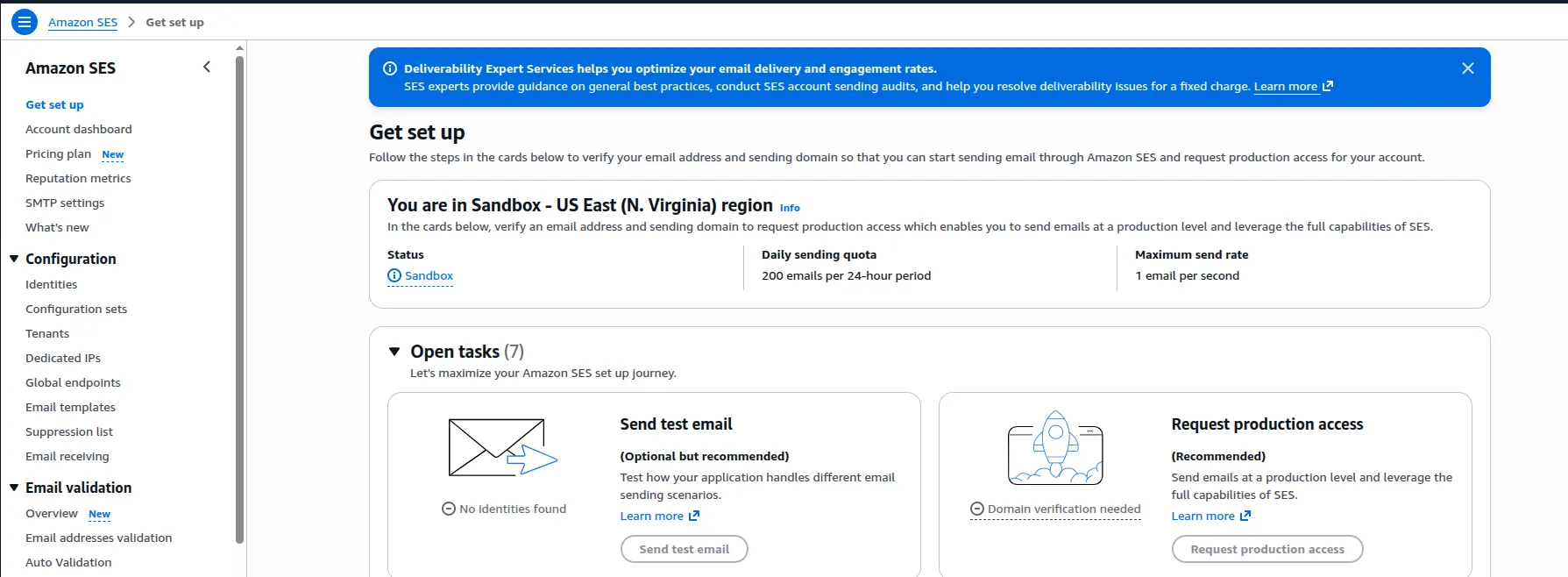
All new AWS SES accounts are placed in the SES Sandbox to prevent abuse. In Sandbox mode, you can only send emails to verified recipient addresses, and daily limits are restricted to 200 messages per 24 hours.
To move into Production:
- In AWS SES Console, navigate to Get Set up page.
- Click Request production access.
- Select your Mail Type (Transactional vs. Marketing).
- Enter your active website URL.
- Provide a detailed Use Case Description explaining how you collect opt-ins, handle bounce/complaint notifications, and process unsubscribes.
- Submit the request (AWS review typically takes 24–48 hours).
Deliverability & Anti-Spam Technical Checklist
| Technical Metric | Best Practice Requirement | Risk / Common Failure |
|---|---|---|
| DKIM Host Formatting | Strip root domain suffix in GoDaddy | Duplicated hostname renders DKIM records unresolvable. |
| SPF Record Limit | Maximum of 1 SPF TXT record per subdomain | Multiple SPF records on one domain fail SPF validation outright. |
| DMARC Enforcement | Start with p=none, progress to p=quarantine | Prematurely setting p=reject can drop legitimate messages during setup. |
| MAIL FROM Alignment | Use dedicated subdomain (mail.domain.com) | Prevents soft-fail warnings in Gmail/Outlook for sender mismatch. |
| Bounce Rate Threshold | Keep bounce rate strictly under 5% | Rates exceeding 5% cause immediate AWS SES sending suspension. |
DNS Verification via Command Line (Terminal / CMD)
You can verify that your DNS records have successfully propagated using the dig command line tool before checking AWS:
# 1. Verify DKIM CNAME Record propagationdig CNAME token1._domainkey.yourdomain.com +short# 2. Verify Custom MAIL FROM SPF Recorddig TXT mail.yourdomain.com +short# 3. Verify DMARC TXT Recorddig TXT _dmarc.yourdomain.com +short

Clean Code vs. Overengineering: Where Should Developers Draw the Line?
Clean code reduces unnecessary complexity; overengineering invents it. A practical guide to using context, evidence, and the cost of change to know when to stop adding abstractions...
Read More
Kafka vs RabbitMQ vs AWS EventBridge: Choosing the Right Architecture Based on Business Requirements
Compare Kafka, RabbitMQ, and AWS EventBridge based on scalability, routing, event streaming, replay, infrastructure, and business requirements to choose the right architecture...
Read More
AI Integrations for QA Engineers
Learn how QA engineers can connect AI with Jira, GitHub, Slack, Notion and other tools to improve testing, bug tracking, reporting and QA productivity...
Read More
AWS DevOps Agent Setup Guide with EC2
Learn how to set up AWS DevOps Agent with EC2, CloudWatch, IAM, and Agent Spaces for AI-assisted monitoring, incident investigation, and root-cause analysis...
Read More
Multi-Tenancy Patterns in DynamoDB: Silo, Pool, and Bridge Models
If you've already made the jump from a relational database to DynamoDB see our guide on moving relational data from SQL to DynamoDB...
Read More
We stopped leaving the IDE to design. Here’s our Cursor → Figma flow
Cursor drafts fast, catches gaps early, and still clips fields and breaks layouts. Here's the real pros-and-cons breakdown of our workflow...
Read More
AWS DevOps Agent: How AI is Automating On-Call Incident Response
If you've ever been on call during a production outage, you know how stressful it can be. Alerts start firing, dashboards light up, and suddenly you're jumping between monitoring tools...
Read More
Catch Missing Images Before Deploy: A Simple Pre-Build Script for Next.js
How Omax Tech added a lightweight image validation gate to Next.js 15 builds on Vercel...
Read More
Teach your LLM your design system: Storybook MCP + Amazon Bedrock + Strands
How to stop models inventing buttons and make them build UI from your real component catalog. Most "AI UI" demos look great until you paste the markup into a real product. The fix is not a smarter prompt...
Read MoreReady to Work With Us?
Most engagements start with a 20-minute conversation. No pitch, no pressure - just an honest discussion about what you're building and whether we're the right fit.