
Catch Missing Images Before Deploy: A Simple Pre-Build Script for Next.js

Introduction
"At a glance: a dependency-free Node script validates every local /images/... reference before next build, catching missing files, unsafe names, and case mismatches before deploy."
Image failures are deceptively expensive. A page can look perfect on a developer's machine, pass review, and then ship with blank logos, missing product screenshots, or broken hero images. At Omax Tech, we recently added a small pre-build validation step to stop that class of issue before deployment.
Our stack is Next.js 15 on Vercel. We currently use unoptimized: true in next.config.ts, so image assets are served through direct /images/... URLs rather than the Vercel Image Optimizer. That makes asset paths straightforward but it also means every referenced file and its exact casing must be correct.
The result is simple: before every build, a Node.js script validates our image library and references. If it finds an issue, the build stops. The same check runs locally and in Vercel CI, so a broken image cannot quietly reach production.
The problem: it worked locally, then broke in production
Most of the failures came down to differences between local Windows development and Vercel’s production environment.
Windows file systems are commonly case-insensitive. A component can request /images/technology/wordpress.webp while the actual asset is named WordPress.webp, and it may still appear locally. Vercel treats those as different files.
We also found other easy-to-miss issues:
- Paths referencing files that had been renamed or removed
- An old .jpg reference after the asset was converted to .webp
- Fallback image paths left behind in components
- Filenames containing spaces, ampersands, quotes, parentheses, commas, or an en dash
- Path casing that did not exactly match the file on disk
Each problem is small in isolation. Across a large site, they are difficult to spot through manual testing alone.
Why development misses it
Local development is a useful but imperfect production simulation. In this case, Windows can mask casing errors that may fail in Vercel’s production environment. A route may also be missed during a visual QA pass, especially when a problematic image is in a rarely used component, a fallback state, or a static page.
Relying on the browser to reveal missing assets is late feedback. We wanted a deterministic check that answers two questions before the build begins: does every local image reference resolve, and will it resolve with the exact same name on a case-sensitive file system?
The solution: validate images before next build
We added a dependency-free Node ESM script at scripts/validate-images.mjs. It scans public/images/, then searches image references under src/ across .tsx, .ts, and .json files.
The script reports grouped errors instead of making developers hunt through a long build log:
- BAD_FILENAME: /public/images/team/John & Jane.webp - the filename contains an ampersand (&), which is not allowed by the validation rule.
- MISSING FILE: /images/technology/angular.svg - referenced in code, but no matching file exists in public/images/technology/.
- CASE_MISMATCH: /images/technology/wordpress.webp - the file exists as /images/technology/WordPress.webp, but the casing does not match exactly.
- BAD_REF: /images/blog/my image.webp - the image path written in code contains a space, which is considered an unsafe character.
The full production script is available in our repository. The version below shows the core approach in a compact form; the complete implementation is included with this post’s deliverables.
1const files = await walk('public/images');2const assetPaths = new Set(files.map(toPublicPath));3const folded = new Map(files.map((file) => [toPublicPath(file).toLowerCase(), toPublicPath(file)]));45for (const sourceFile of await walk('src')) {6 if (!/\.(tsx?|json)$/.test(sourceFile)) continue;7 for (const imagePath of extractImagePaths(await readFile(sourceFile, 'utf8'))) {8 if (hasInvalidCharacters(imagePath)) report('BAD_REF', imagePath, sourceFile);9 else if (!assetPaths.has(imagePath)) {10 report(folded.has(imagePath.toLowerCase()) ? 'CASE_MISMATCH' : 'MISSING FILE', imagePath, sourceFile);11 }12 }13}1415if (errors.length) process.exit(1);
Quick setup
Add a manual command and a prebuild hook to package.json:
1{2 "scripts": {3 "validate:images": "node scripts/validate-images.mjs",4 "prebuild": "npm run validate:images",5 "build": "next build"6 }7}
Then keep the validator at scripts/validate-images.mjs and commit it with the project.
Use these commands during development:
npm run validate:images # Run the image check at any timenpm run build # Validate first, then run next build
Because npm automatically runs prebuild before build, no separate CI command is required. Vercel runs the normal build command, which means image validation runs there too.
Works with Vercel, Netlify, and other CI platforms
This validation script is not specific to Vercel. It runs wherever your Next.js project runs npm run build, including Netlify, Cloudflare Pages, GitHub Actions, GitLab CI, AWS Amplify, Docker-based pipelines, and self-hosted environments.
We use Vercel for this project, so it is referenced throughout this article. Because the validation runs through the npm prebuild hook, it automatically runs before every production build on Vercel and any other Node.js-based hosting platform. If an image path, filename, or casing issue is found, the build stops before deployment.
What developers see
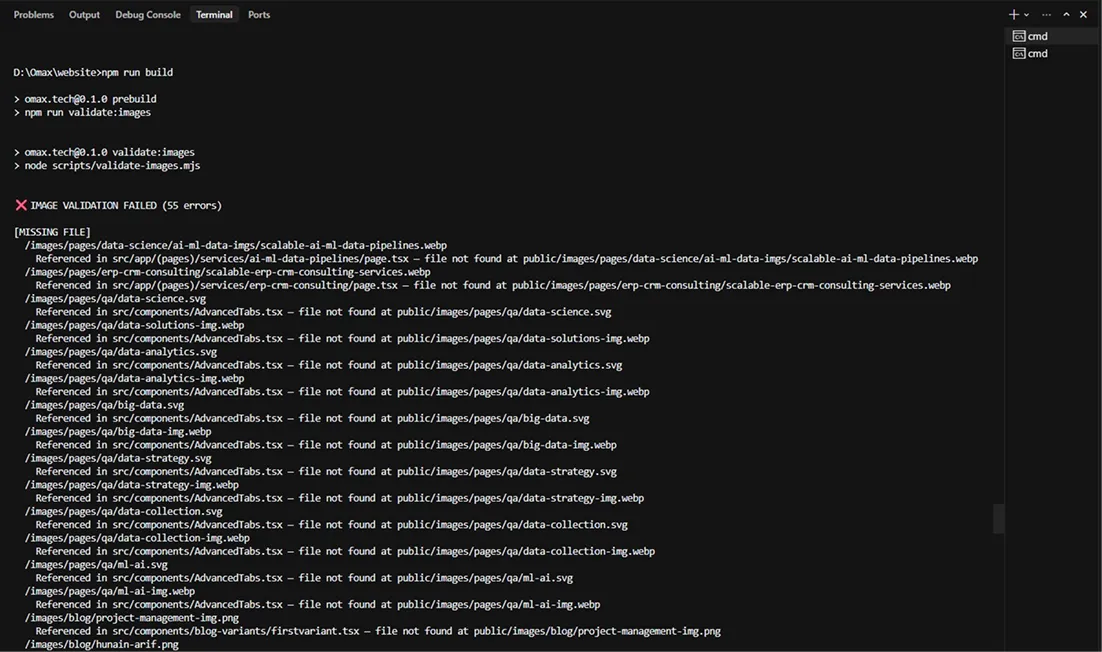
When an asset is missing, the failure is direct and actionable:
IMAGE VALIDATION FAILED (55 errors)[MISSING FILE]/images/technology/angular.svgReferenced in src/components/technology-stack.tsx — file not found
At this point the build stops, so the issue is fixed while the source file and intended asset are still clear.
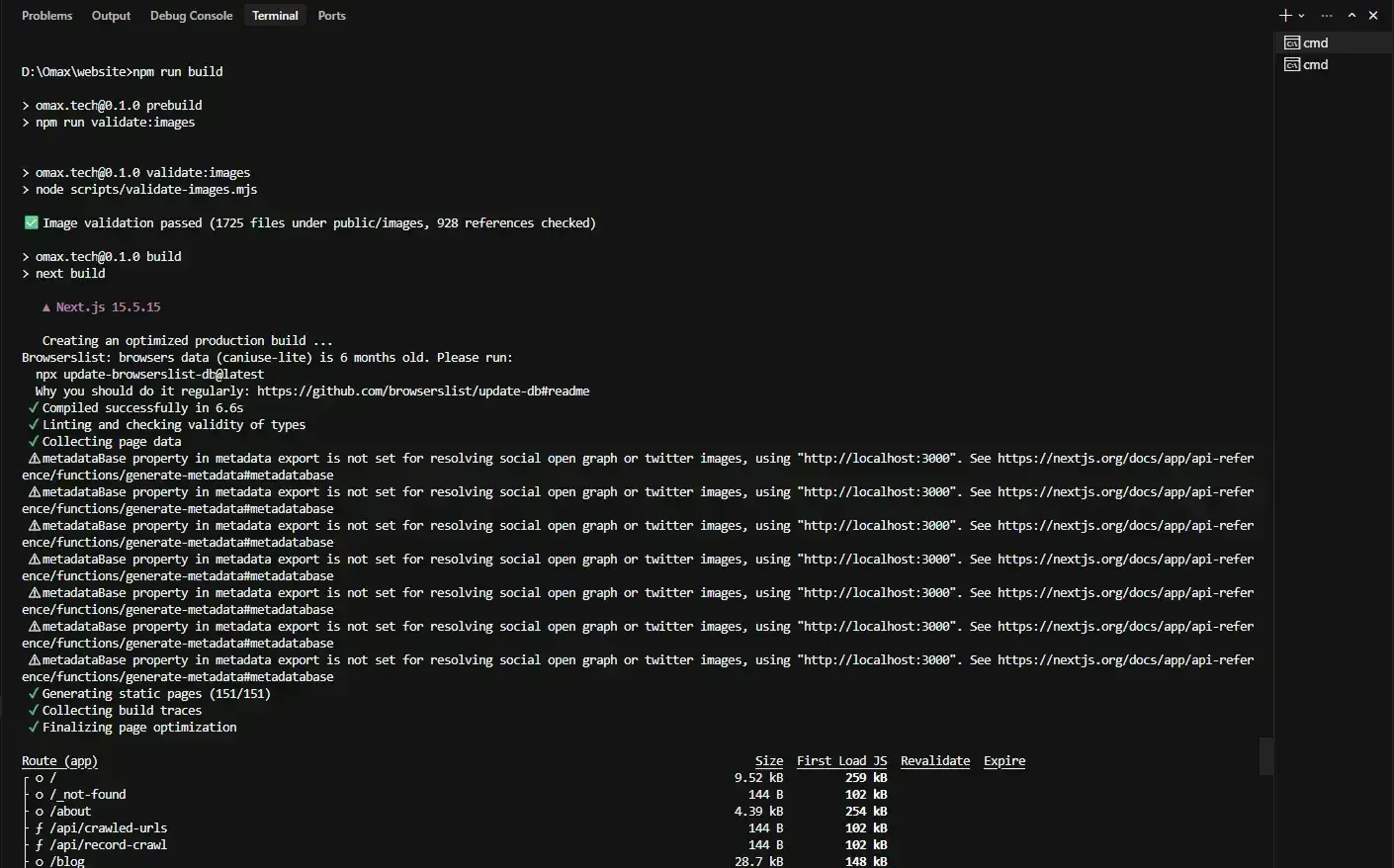
After correcting references, filenames, extensions, and casing, the success path is intentionally quiet:
Image validation passed (1725 files under public/images, 928 references checked)
Next.js then proceeds with the build normally. In our project, the build completed successfully without any issues.
Refinement: validate real image references, not plain text
We started with a simple rule: flag every /images/... path found in source files. It caught real problems, but it also had a blind spot in the other direction. A path mentioned in prose, such as a blog post describing what a missing-file error looks like, was treated the same as an asset the page actually loads. That produced occasional false 'missing file' reports for images that were never rendered.
We refined the scan so a path is validated only when it appears as an actual image reference in code, such as src="/images/...", icon: '...', or url('...'). If the code does not load the image, the image is not treated as a dependency, and a mention in plain text is ignored.
This article is a convenient test case. It references /images/technology/wordpress.webp and /images/technology/angular.svg in paragraphs and in the example output above. With the refined rule, npm run validate:images passes without complaint, because those are prose mentions, not references. Write the same path as a real src in a component while the file is missing, and the build stops as before.
The refinement changes the signal, not the safety net. Missing files, exact casing mismatches, and unsafe filenames are still caught wherever they are genuinely referenced. What changed is the noise: a build no longer fails over an image path that only appears in text.
Our results
The first run found 55 validation errors. They included missing files, incorrect .jpg versus .webp extensions, stale fallback paths in components, and three case mismatches. None required a complex fix-but finding all of them manually would have taken far longer.
Once corrected, the script validated 1,725 files under public/images against 928 references in source code. The build passed and generated 151 static pages. More importantly, the check now runs wherever the application builds, including Vercel.
Why this is worth keeping
This small guardrail gives both frontend developers and team leads clearer signals:
- It turns a production-only image failure into a local, source-linked error.
- It enforces a predictable asset naming convention as the library grows.
- It makes production filesystem compatibility part of the normal development workflow.
- It catches regressions in CI without adding a package or a separate service.
This production-first approach is part of how we deliver reliable, scalable digital products through our web application development services
FAQ
Does this replace manual testing?
No. The validator confirms that local image paths exist and match case; it does not assess visual quality, layout, responsive behavior, or whether the chosen image is the right one. It complements visual QA.
Does it work on Vercel CI?
Yes. Vercel invokes the project build command. Since npm run build triggers prebuild, validation runs before next build there as well, and any errors fail the deployment.
What about external URLs?
This validator targets local /images/... assets in public/images. External URLs need a different policy, such as domain allowlists, runtime fallbacks, or a network-aware check. We intentionally do not treat them as local files.
Conclusion
A pre-build image check is a small addition with a high return. It catches errors at the point where they are cheapest to fix, protects deployments from environment-specific behavior, and gives the team one reliable standard for static assets.
- Run deterministic asset validation before every production build.
- Treat filename casing and characters as part of your deployment contract.
- Keep visual testing, but let automation catch broken local paths first.

Clean Code vs. Overengineering: Where Should Developers Draw the Line?
Clean code reduces unnecessary complexity; overengineering invents it. A practical guide to using context, evidence, and the cost of change to know when to stop adding abstractions...
Read More
Kafka vs RabbitMQ vs AWS EventBridge: Choosing the Right Architecture Based on Business Requirements
Compare Kafka, RabbitMQ, and AWS EventBridge based on scalability, routing, event streaming, replay, infrastructure, and business requirements to choose the right architecture...
Read More
AI Integrations for QA Engineers
Learn how QA engineers can connect AI with Jira, GitHub, Slack, Notion and other tools to improve testing, bug tracking, reporting and QA productivity...
Read More
The Ultimate Guide to Amazon SES Setup with GoDaddy DNS
Learn how to set up Amazon SES with GoDaddy DNS. Complete step-by-step guide covering Easy DKIM, SPF, DMARC, custom MAIL FROM, and exiting the SES Sandbox...
Read More
AWS DevOps Agent Setup Guide with EC2
Learn how to set up AWS DevOps Agent with EC2, CloudWatch, IAM, and Agent Spaces for AI-assisted monitoring, incident investigation, and root-cause analysis...
Read More
Multi-Tenancy Patterns in DynamoDB: Silo, Pool, and Bridge Models
If you've already made the jump from a relational database to DynamoDB see our guide on moving relational data from SQL to DynamoDB...
Read More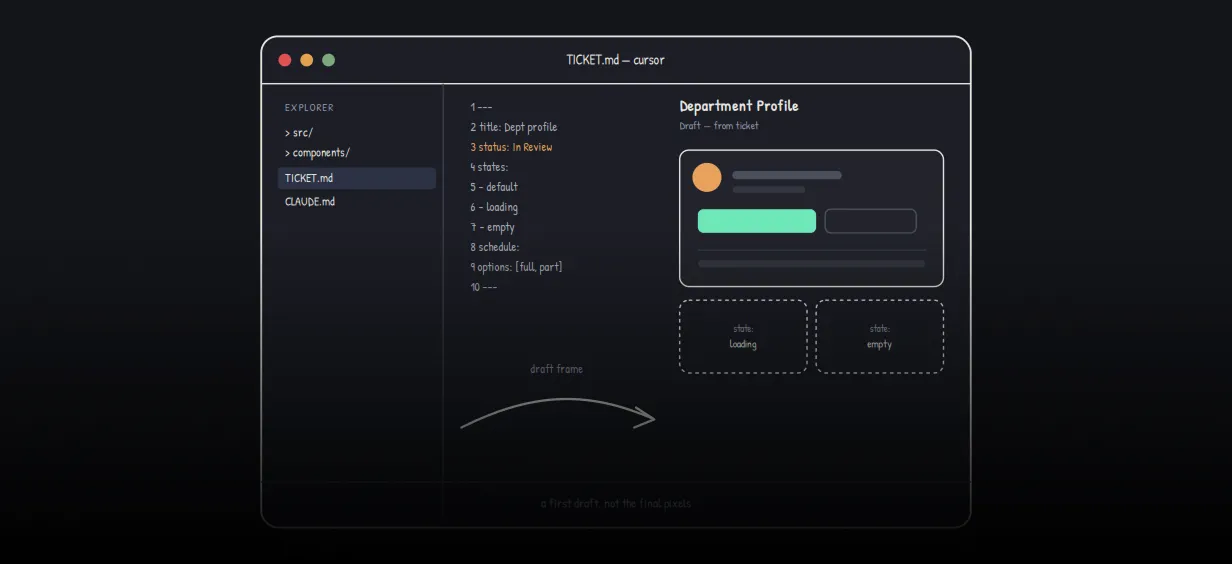
We stopped leaving the IDE to design. Here’s our Cursor → Figma flow
Cursor drafts fast, catches gaps early, and still clips fields and breaks layouts. Here's the real pros-and-cons breakdown of our workflow...
Read More
AWS DevOps Agent: How AI is Automating On-Call Incident Response
If you've ever been on call during a production outage, you know how stressful it can be. Alerts start firing, dashboards light up, and suddenly you're jumping between monitoring tools...
Read More
Teach your LLM your design system: Storybook MCP + Amazon Bedrock + Strands
How to stop models inventing buttons and make them build UI from your real component catalog. Most "AI UI" demos look great until you paste the markup into a real product. The fix is not a smarter prompt...
Read MoreReady to Work With Us?
Most engagements start with a 20-minute conversation. No pitch, no pressure - just an honest discussion about what you're building and whether we're the right fit.