
What Is llms.txt? How It Helps Google, AI Search, and Agentic Browsing Find Your Website

Introduction
The way people search is changing. They still use Google, but more and more they also ask AI chat tools like ChatGPT, Perplexity, and Google AI Overviews to find services, compare options, and get quick answers. These AI tools read websites differently than a person browsing a page, and they don't always look for the same signals that traditional SEO relies on.
Most websites already have a sitemap.xml file and follow good SEO practices to help Google. But there's a newer file built specifically for AI systems: llms.txt. In this post, you'll learn what llms.txt is, how it's different from sitemap.xml and robots.txt, what it can (and can't) do for your search visibility, and how to create one for your own site.
What Is llms.txt?
llms.txt is a public text file placed at yoursite.com/llms.txt similar in spirit to robots.txt, but built for AI and large language model (LLM) systems instead of search crawlers.
The file gives a clean, structured summary of who you are, what you offer, and links to your most important pages things like your services, products, case studies, and contact information. Instead of making an AI system guess at your site's structure by crawling every page, llms.txt hands it a short, organized overview it can read quickly.
It's worth being clear about what llms.txt is and isn't. It's an emerging practice adopted by a growing number of companies and tools not an official web standard, and not a magic button that boosts your ranking. What it does offer is discoverability and clarity: it makes it easier for AI systems (and humans) to understand your site correctly.
How llms.txt Is Different From sitemap.xml and robots.txt
These three files sound similar but serve very different purposes:
| File | Purpose | Audience |
|---|---|---|
| robots.txt | Tells crawlers which pages they can or cannot crawl | Search engine crawlers |
| sitemap.xml | Lists all your URLs so search engines can find and index them | Search engine indexers (Google, Bing) |
| llms.txt | Gives a clear, human-readable summary of who you are, what you offer, and links to key pages | AI systems, LLM crawlers, AI agents, and humans |
In short: robots.txt sets rules, sitemap.xml lists pages, and llms.txt explains your site in plain language for AI.
How llms.txt Fits Into Your Website's Discoverability
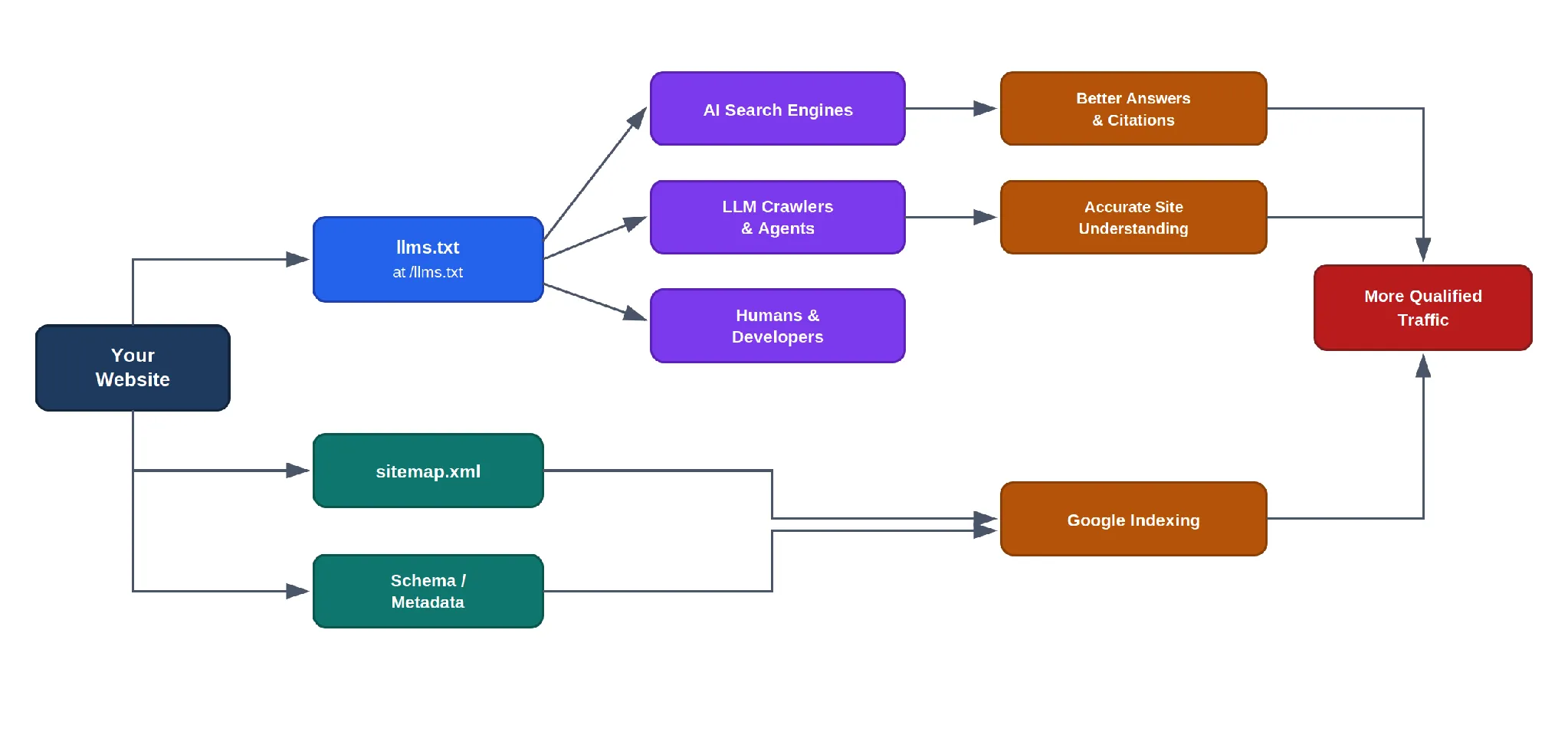
The diagram below shows how llms.txt works alongside sitemap.xml and structured data to help both AI systems and traditional search engines find and understand your site.
What Improvements Can llms.txt Bring?
Here's an honest look at where llms.txt can help without overclaiming.
AI Search, GEO, AEO, and LLMO
Generative engine optimization (GEO), answer engine optimization (AEO), and LLM optimization (LLMO) are all about helping AI systems understand and represent your business accurately. A well-written llms.txt gives these systems a clear, structured source to reference, which can help them cite your site more accurately when answering questions.
Agentic Browsing
AI agents tools that browse the web on a user's behalf to complete a task benefit from llms.txt because it points them directly to the right service or product page, instead of forcing them to crawl and interpret your entire site structure.
Google and Traditional Crawlers
llms.txt supports your overall discoverability when it's combined with a sitemap, structured data (schema), and solid SEO fundamentals. On its own, llms.txt does not guarantee better Google rankings or a #1 spot it's a complementary piece, not a replacement.
A Site Quality Signal
Publishing a clear, well-maintained llms.txt shows that your organization keeps structured, machine-readable information about itself. That's a small but real signal of trust and clarity for any system reading your site.
Performance
The file itself is tiny plain text, so it loads fast and has no negative impact on your site's performance.
Internal Clarity
Writing an llms.txt forces your team to keep service descriptions, links, and messaging consistent which is a useful exercise even beyond AI search.
Real Example: Omax Tech
Omax Tech, a custom software development, AI, data engineering, and QA company, publishes its own llms.txt at https://omax.tech/llms.txt. It includes a company overview, links to core services (custom software development, AI, data engineering, AWS, Dynamics 365, and QA), case studies, blog content, contact information, and usage guidelines for AI systems reading the file.
The file also notes that Omax Tech operates from global offices in the USA, UAE, and Pakistan, and holds AWS Partner status giving AI systems (and human readers) a fast, accurate summary instead of having to piece it together from multiple pages.
How to Create a Good llms.txt (Practical Checklist)
If you want to publish your own llms.txt, keep it simple and useful:
- 1Start with a short company summary. 2 to 3 sentences that explain who you are and what you do.
- 2Group your links by category, such as Services, Products, Case Studies, and Blog.
- 3Use clear markdown links in the format: [Label](https://full-url) so they're easy for both humans and AI to parse.
- 4Add contact information, and optionally, usage guidelines for AI systems reading the file.
- 5Link to your sitemap.xml so crawlers and AI systems can find your full page list.
- 6Keep it updated whenever you add new services, products, or major pages.
Common Mistakes to Avoid
- Leaving outdated or broken links in the file
- Keyword stuffing instead of writing clear, natural descriptions
- Hiding llms.txt or accidentally blocking it in robots.txt
- Expecting llms.txt to replace SEO, schema markup, or QA testing
- Letting the file contain information that conflicts with your main website pages
How This Connects to QA and Search Quality
llms.txt is one layer of a much bigger picture. Even with a well-written llms.txt, your site still needs crawlable pages, accurate metadata, proper schema markup, good performance, and ongoing quality assurance and testing to make sure everything actually works the way it's described. This is the core idea behind search quality engineering: treating discoverability for both humans and AI as something you test and maintain, not something you set up once and forget.
This also ties closely into AI and AI agent development, since the same systems that power AI search and agentic browsing are built on the kind of structured, well-tested foundations that QA teams help maintain.
For deeper reading on AEO, GEO, and LLMO, see: From SEO to AEO and GEO: Why QA Teams Will Own Search Visibility in the AI Era.
Conclusion
llms.txt is a small file with a big clarity payoff for the AI search era. It won't replace SEO, schema, or QA but combined with those fundamentals, it helps both machines and humans find the right pages faster and understand your business more accurately.
Want help setting up llms.txt, improving your AI search visibility, or strengthening your QA process? Explore Omax Tech's services or book a free consultation.

Build an Automated Image Compression Script with Sharp and SVGO
Compress images from the terminal with a Node.js script powered by Sharp and SVGO a safe, two-step workflow that keeps your site fast without bloating your repo.
Read More
The Right Way to Migrate from MySQL to AWS Aurora DSQL
Migrating a production database is one of the highest-risk changes you can make to an application. Moving from MySQL to AWS Aurora DSQL raises the stakes further...
Read More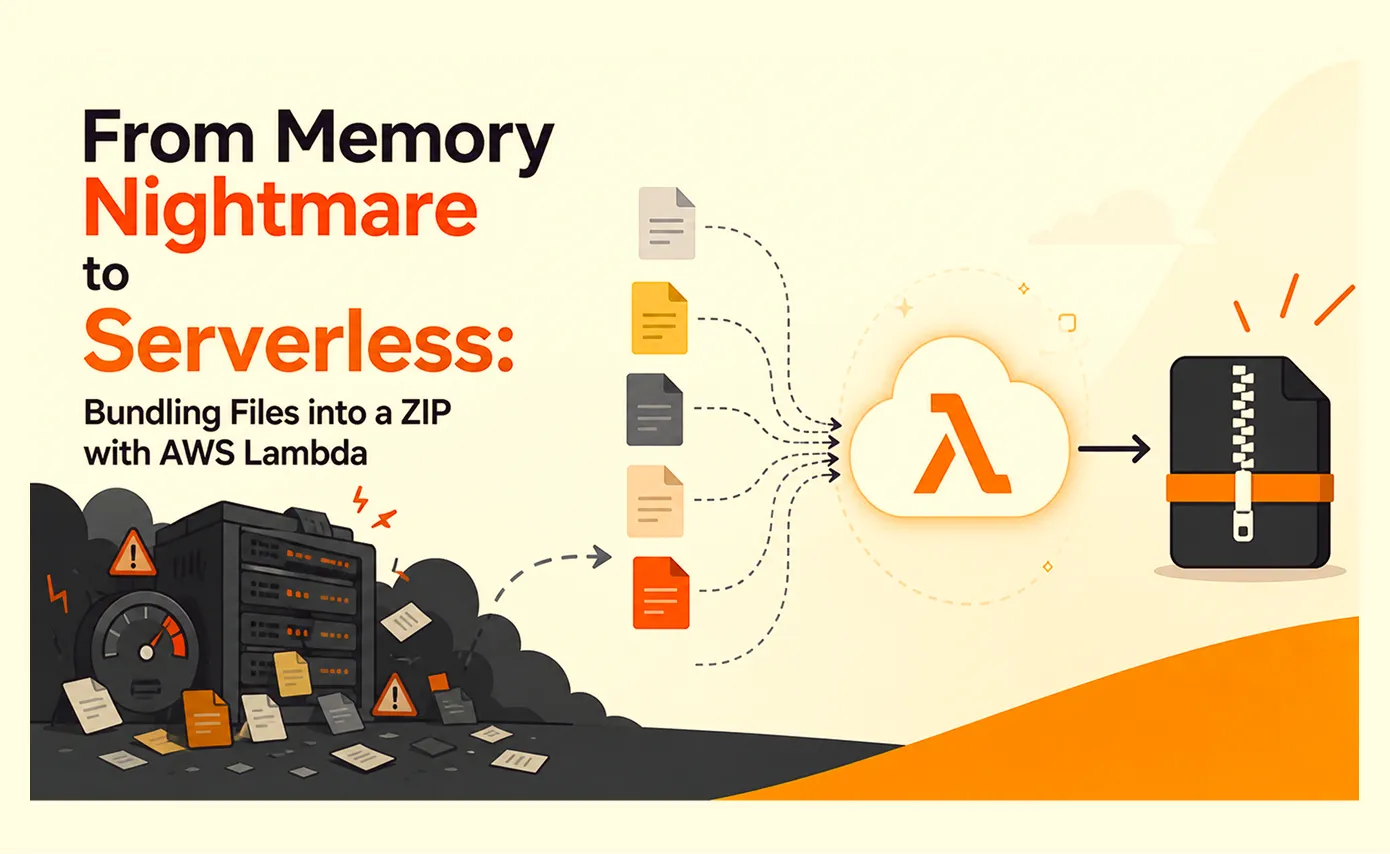
From Memory Nightmare to Serverless: Bundling Files into a ZIP with AWS Lambda
A straightforward 'download all these files as one ZIP' request that worked perfectly on my laptop and... fell over the first day it met real production load. Here's the debugging story, the scaling options I ruled out, and why AWS Lambda was the right answer.
Read More
Clean Code vs. Overengineering: Where Should Developers Draw the Line?
Clean code reduces unnecessary complexity; overengineering invents it. A practical guide to using context, evidence, and the cost of change to know when to stop adding abstractions...
Read More
Kafka vs RabbitMQ vs AWS EventBridge: Choosing the Right Architecture Based on Business Requirements
Compare Kafka, RabbitMQ, and AWS EventBridge based on scalability, routing, event streaming, replay, infrastructure, and business requirements to choose the right architecture...
Read More
AI Integrations for QA Engineers
Learn how QA engineers can connect AI with Jira, GitHub, Slack, Notion and other tools to improve testing, bug tracking, reporting and QA productivity...
Read More
The Ultimate Guide to Amazon SES Setup with GoDaddy DNS
Learn how to set up Amazon SES with GoDaddy DNS. Complete step-by-step guide covering Easy DKIM, SPF, DMARC, custom MAIL FROM, and exiting the SES Sandbox...
Read More
AWS DevOps Agent Setup Guide with EC2
Learn how to set up AWS DevOps Agent with EC2, CloudWatch, IAM, and Agent Spaces for AI-assisted monitoring, incident investigation, and root-cause analysis...
Read More
Multi-Tenancy Patterns in DynamoDB: Silo, Pool, and Bridge Models
If you've already made the jump from a relational database to DynamoDB see our guide on moving relational data from SQL to DynamoDB...
Read MoreReady to Work With Us?
Most engagements start with a 20-minute conversation. No pitch, no pressure - just an honest discussion about what you're building and whether we're the right fit.